Home Page › Forums › General Chat › Using Shells with Golden Palace & Pubic Hair
Tagged: bug, golden palace
- This topic has 11 replies, 5 voices, and was last updated 1 year ago by
 eelgoo.
-
AuthorPosts
-
September 18, 2025 at 2:31 PM #2145709
I'm using Golden Palace for G9. When trying to add new stuff, that I believe use Shells, it just turns white. Any solution?
Also since we're talking about Golden Palace, I used to use LI Pubic Hair which is great but it's not compatible with Golden Palace. The best replacement I could find was Wild Bush 4 but it's so far behind. Any good alternatives
Edit: By the way, a good example of the shell problem is when I try to add RDGL Nipples. If I'm using Golden Palace and I try to copy the material, nothing happens
September 18, 2025 at 3:36 PM #2145714Select the Shell item and go to the surface tab. After 'general', 'display' etc, click on 'shell' and mark as OFF the GoldenPalace/Genitalia/Lickalicius/etc
Regarding pubic hair, my favourite option are the 'Tempesta3d' items
September 18, 2025 at 6:47 PM #2145734
I turned the visibility of the shells from Golden Place off and it worked but I don't think that was it (it also hides the textures and color of the minora and majora). Was that it or is it something on the image above? I tried to switch some things off but nothing worked (didn't try everything though)
September 18, 2025 at 7:00 PM #2145738is there any other shell item in the scene?
September 18, 2025 at 8:05 PM #2145744For the nipples in specific, no. Other things I might wanna add will create shells (like Vellus Horizon 2.0) but the nipples don't
September 18, 2025 at 9:06 PM #2145748sorry, no idea...
upload a pic of the image to see if anyone have an ideaSeptember 18, 2025 at 9:31 PM #2145749Sure

In this first pic you can see I have the shells from Golden Palace being showed as well as the Nipples. The nipples turn white.
On this second one the shells from GP aren't visible anymore but now the nipples are. If you look closely you can see the vulva doesn't have that dark skin at the bottom like the first one which was duo to the shells.
This third image has another shell, Vellus Horizon 2 which adds tiny bits of hair to the face but does so by creating a shell. Now that we have another shell, not just the ones from GP, both the Nipples but Golden Palace turn white (in this example the shell for GP is active, we can see the bottom of the vulva darkened).My questions are:
1. How can I have both the Nipples and the shells from Golden Palace visible without any bugs?
2. After this, how can I then add new shells without bugging the whole thing?In relation to the Parameters tab, I messed with it like I showed but there was nothing that worked except making the shells invisable like it can be seen on the 2nd image
Hope this is a better explanation
September 18, 2025 at 10:55 PM #2145753In the shell section you displayed on your second post. select minora, go to the bottom, and you will see a tab with the nipples. turn it off, do the same for the majora and every other shell beside the nipple ones. select the nipples shell, turn off all the golden palace shells, and you should be fine.
You can use the submenu surface under the shell tab so it should be easier.
Extra info: if using mesh grabber, everything will be enabled again and you will have to redo everything from the scratch. If using it, wait to be done with that tool before turning off the shellsSeptember 19, 2025 at 3:31 AM #2145765The root cause of the issue is that the nipple/GP geografts' surfaceS on the geoshells have no texture but just white colors. The issue happens in the case there're more than one geograft surfaces on geoshell(s) of a figure.
I recommend another way of fixing it once and for all, by hiding the geografts surfaces on the geoshells:
- First, you need to install this product: https://zonegfx.com/pbr-skin-plus-repost/ since you're using a character with PBR Skin Shader
- Select both GP geoshells, in Surfaces pane, Ctrl + select two surfaces of Rdgl_nipples_Body.
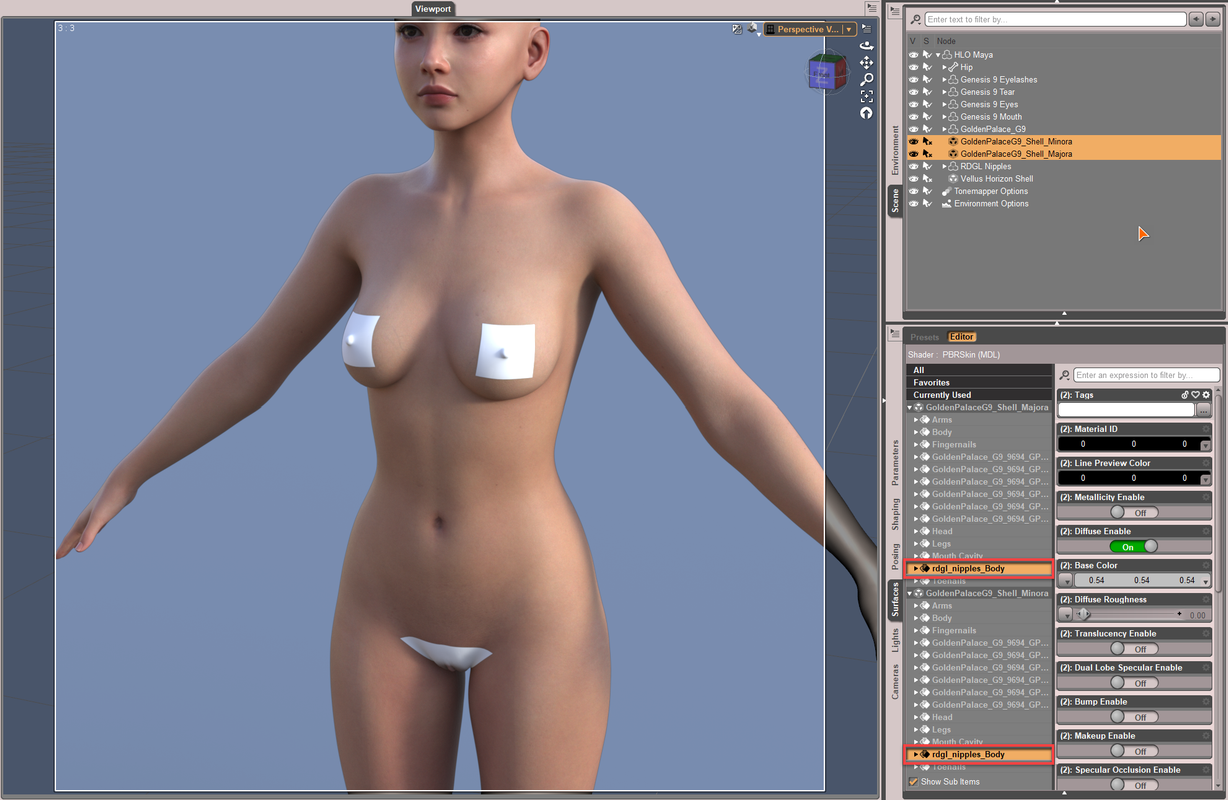
- Go to Preset tab, filter and apply PBR Skin Plus shader.
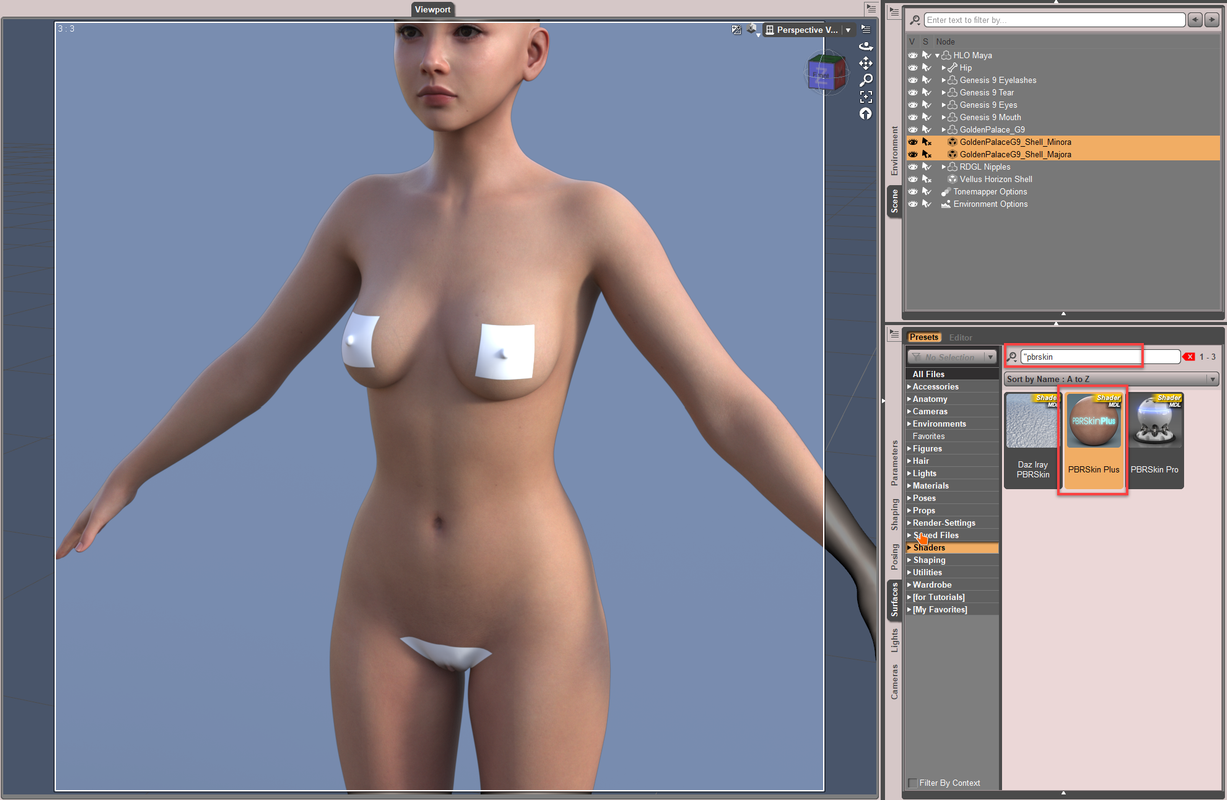
- Back to Editor tab, filter by Opacity, set it to 0. Then lock it!
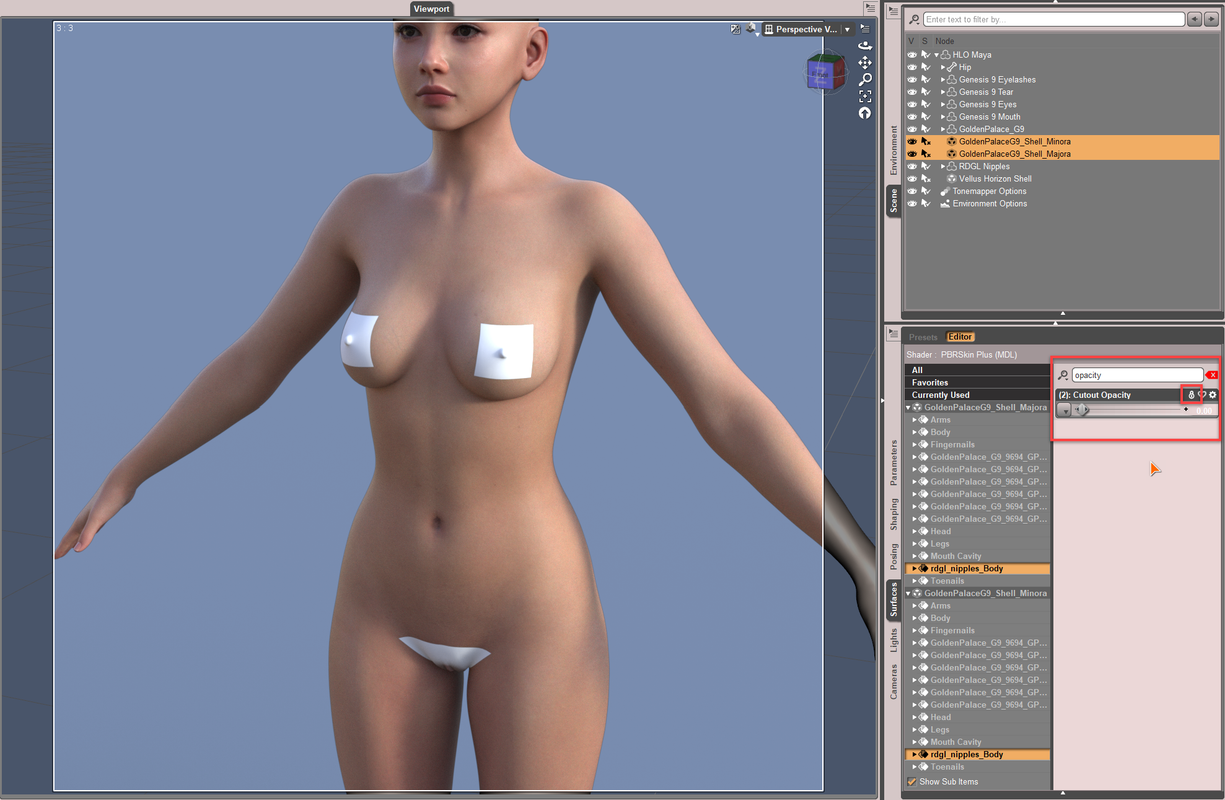
- Do the same to Vellus Horizon Shell but you need to select all surfaces of GP and RDGL nipple.
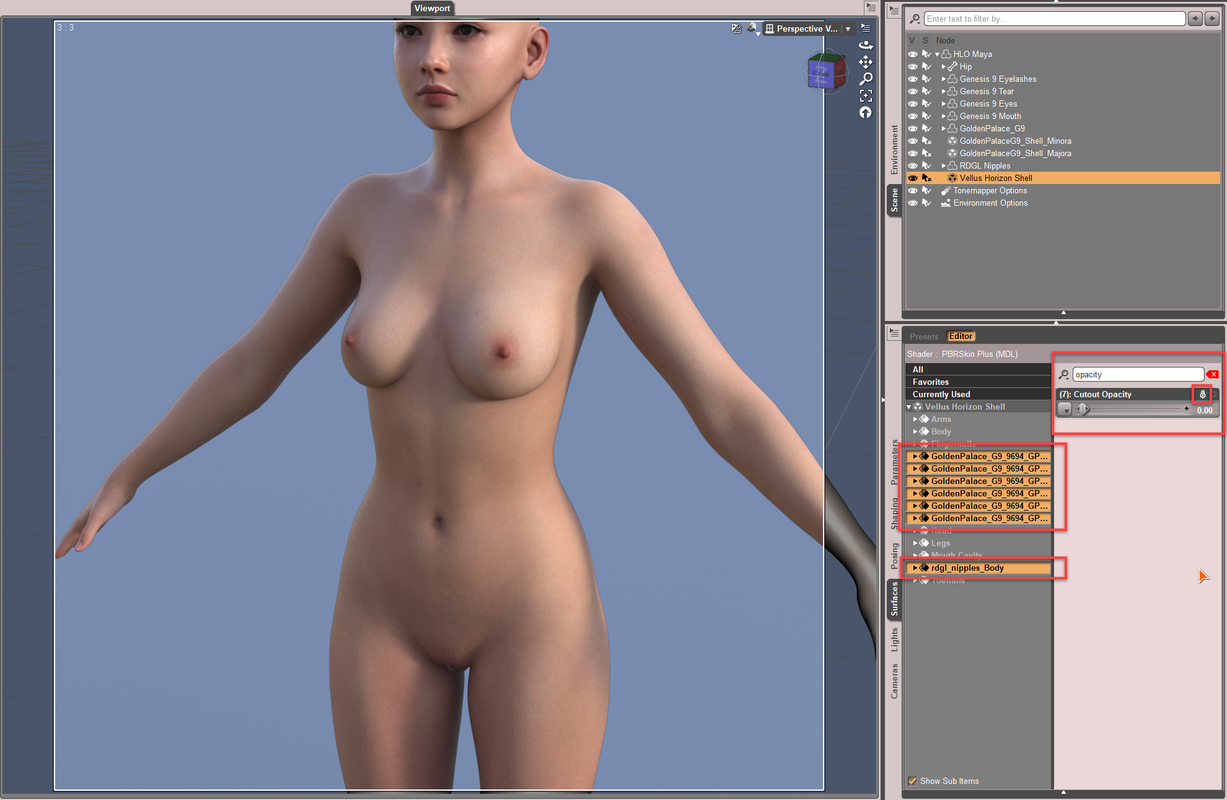
Issue is fixed. This way can be applied to all the similar cases.
With this way, no matter you toggle the tools of Geometry Editor, Node Weight Brush or Mesh Grabber, etc., the issue will not come back... unless you add more geografts and geoshells. If you do, fix the issue in the same way.
September 19, 2025 at 11:50 AM #2145844Thank you, it worked. I was having a bit of trouble finding the shaders because they're not on "presets" but "My Library" -> "Shader Presets".
I use "Texture Shaded" a lot and it appears white still. Is there a way to fix that? If there's not that's ok, at least in NVIDIA Iray it works fine
September 19, 2025 at 12:16 PM #2145849Nope, it shouldn't appear white or gray with Texture Shaded draw style because Cutout Opacity are already set as zero ~~
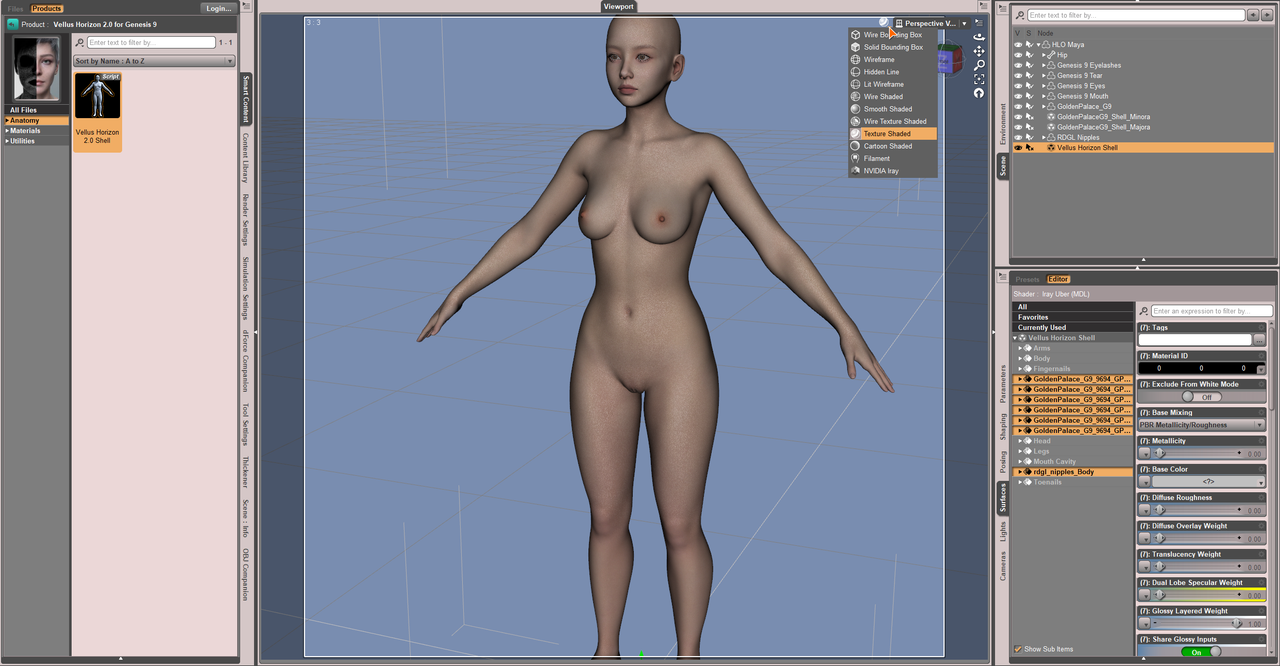
Any screenshot ?
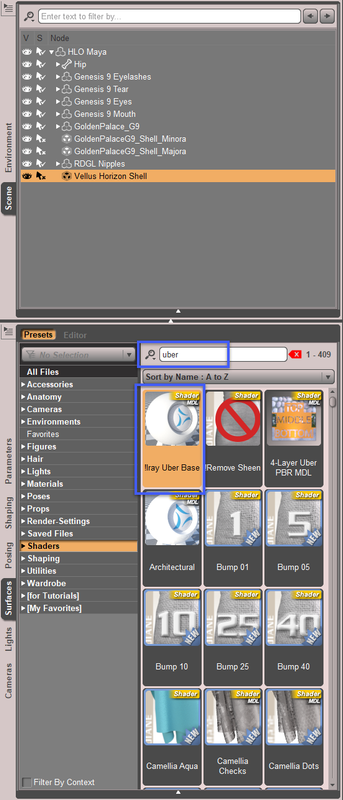
Edit: I just found that Vellus 2.0 uses Iray Uber shader rather than PBRSkin shader. So you don't need to apply PBRSkin shader to GP / RDGL surfaces on Vellus geoshell. Instead, apply Iray Uber shader to them:
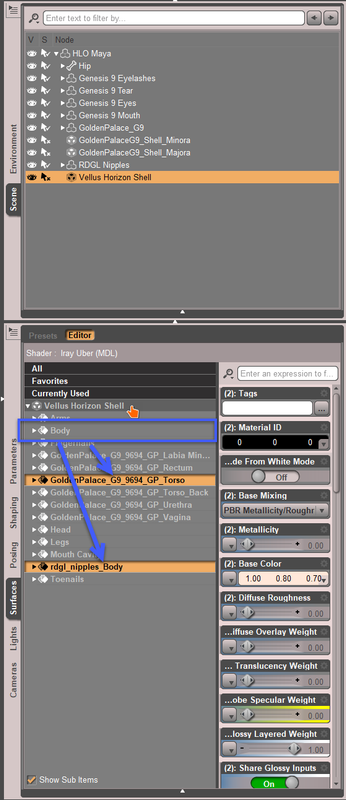
Then copy Body surface to GP Torso and rdgl_nipples_Body, so as to make the skin on those areas have vellus as well:
The case you have is a bit unique, i.e. mixed shaders + mixed geografts & geoshells ~~
Anyway, I attached the scene file for your reference.
https://mega.nz/file/jbQXAAra#yh-odx121MW97vNWZh7H3TDv27HSfzyqPAiNcoJp3-wSeptember 19, 2025 at 2:12 PM #2145856Yes, I hear you.
I re-organised things so that 'My Library' 'Preset' folder contains :
Camera
Lights
Render
Shaders
I find it a lot more intuitive doing it that way.
Then I always install things manually, which facilitates a non-standard 'My Library' hierarchy a lot better.
-
AuthorPosts








- You must be logged in to reply to this topic.
