Home Page › Forums › General Chat › Can someone dumb-explain Omni shader to me?
- This topic has 17 replies, 6 voices, and was last updated 2 years, 1 month ago by
 eelgoo.
-
AuthorPosts
-
August 31, 2024 at 10:37 AM #2088727
First I thought it's just a hair shader for dforce strand based hair because that's what people in Daz forum said. Then I read this: https://3dshards.com/forum/viewtopic.php?t=10&srsltid=AfmBOopgRsuh01l9sYGI-qfFd8Q9aWXRMyltEgU59238OLNmAUPDn0yW
The author used the Omni shader on hair/fur and skins and what I got is that in Daz parlance it goes Iray Uber->PBR->Omni. I have no idea what all this means other than renders should look more realistic with each new generation.
So G8 effectively yields to G9 from Uber to PBR. Given the lackluster reception of G9, Daz released Omni in April/2024, does this mean G10 is coming soon with Omni?
August 31, 2024 at 10:55 AM #2088728Anonymous
InactiveRank:
Good morning,
Hello, I would like to intervene even if my intervention does not have a direct link, but I hope that if this is the case, I hope that the cards / UV of G10 are the same as that of G9.
Because I already made the mistake of moving from G8 to G9 financially, by purchasing a certain number of products, and I must admit that it is starting to become boring, not to say boring.August 31, 2024 at 12:49 PM #2088733Wow, that's more than "not bad" IMO. The Daz plastic look is almost gone.
August 31, 2024 at 1:09 PM #2088738I understand the words you said but no idea how, hence the title of this thread xd
August 31, 2024 at 1:10 PM #2088739Sorry to say, I am a bit underwhelmed by that.
Fenrissa's V4 skins looked arguably better than that, admittedly at a much lower resolution.
BTW for anyone still with G8 I have found that the omni shader is in the G9 base files, which I don't have installed.
:0/
August 31, 2024 at 3:37 PM #2088772Depending on how I angle my hand in the light, I can get no reflection to a mild oil sheen. If I rub my face I can pick up the surface oils and get a stronger reflection. I think something in-between the example would be more realistic by either toning down the shine on one or increasing it on the other. I don't have a detailed eye for well... minor details.
I see little difference otherwise.I've found multiple G8 skins I like. I'm having difficulty warming up to G9 skins. Maybe this is why
August 31, 2024 at 3:52 PM #2088776So same playbook as G8, G9.1 with Omni Skin is coming...
August 31, 2024 at 11:11 PM #2088828As the appearance of skin, (hue, saturation, glossiness etc) in DS is about 90% related to the lighting used, I think that "which looks better" is largely pointless. I'm sure we've all spent hours getting a skin to look right, but when the lighting environment is changed it can/will look completely different from radiosity, lighting color temperature etc.
So I would say the important thing is to tweak your skins in the lighting environment you intend to render it in.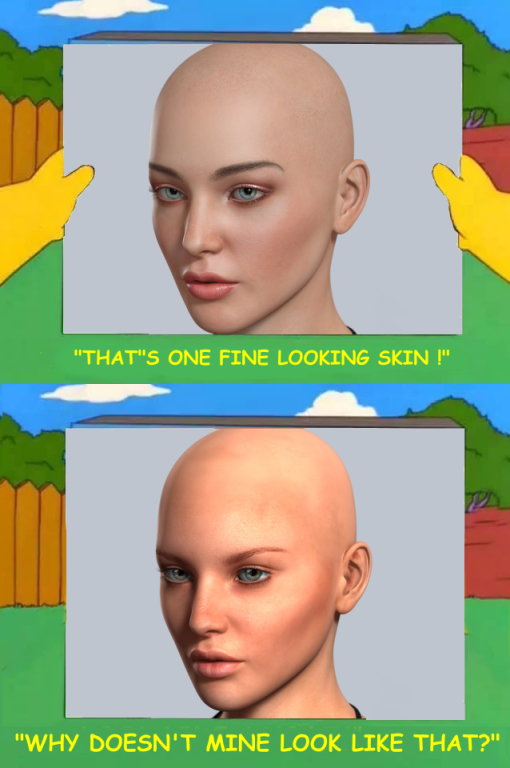 September 1, 2024 at 12:03 AM #2088833
But isn't the point of better skin rendering technology is that the user wouldn't have to work as hard, or needing advance skill sets, to use lighting tricks to get the skin to look realistic?
September 1, 2024 at 1:39 AM #2088842I don't really think it is but maybe. I think the issues I mentioned above would still apply no matter which technology is used and far more important than 8K micro detail normal maps or generic shaders. Nothing can substitute for a well-made skin texture/shader with good SSS and specularity settings, but you can't expect even that to look consistently good or the same in different lighting situations.
September 7, 2024 at 3:25 AM #2089676It's probably your lighting Larry but these images don't look very realistic. Could you try a less bright light-set and something less colour saturated... my eyes are bleeding. Isn't this a bit better...
 September 7, 2024 at 4:14 AM #2089684
Wipes blood from eyeballs,... *sigh* thanks mate. Looks much, much better. Skin details can now be seen and hugely more realistic 🙂 .
September 7, 2024 at 8:10 AM #2089700I know there is an almost an infinite alchemy of combinations, but I still think there are a lot of legacy skins which look as good, if not better.
:0/
September 7, 2024 at 8:30 AM #2089701I've already said this but how skin looks is about 90& lighting and <5% the actual skin used. So worrying about which skin to use is about 90% redundant. Anyway, choose any skin with imperfections, neutral hue and good shaders and Bob's your uncle, with good lighting half the work is already done.
September 7, 2024 at 8:59 AM #2089703Exactly, so the resource heavy G9 skinning is pretty much redundant too IMO.
:0/
-
AuthorPosts






- You must be logged in to reply to this topic.
