Home Page › Forums › General Chat › Goz for older version of DAZ?
Tagged: Goz
- This topic has 21 replies, 7 voices, and was last updated 1 year, 1 month ago by
 Pharrell Williams.
-
AuthorPosts
-
June 19, 2023 at 10:04 PM #1987412
I downloaded 4.6 Daz to make HD morphs, but i can't install the Goz plugin (dzgoz.dll) on the older Daz. Is there an older dll? Preferably not an .exe installer, because it automatically sets the path for the newer Daz. Or am I completely misunderstanding something?
Many thanks.
June 19, 2023 at 10:56 PM #1987468What's the version of your dzgoz.dll? There was an older version, but most of us did not back it up.. and 4.6 cannot use the latest version.
June 20, 2023 at 12:41 AM #1987484There's only one version in the Daz market, I have that.
June 20, 2023 at 1:09 AM #1987488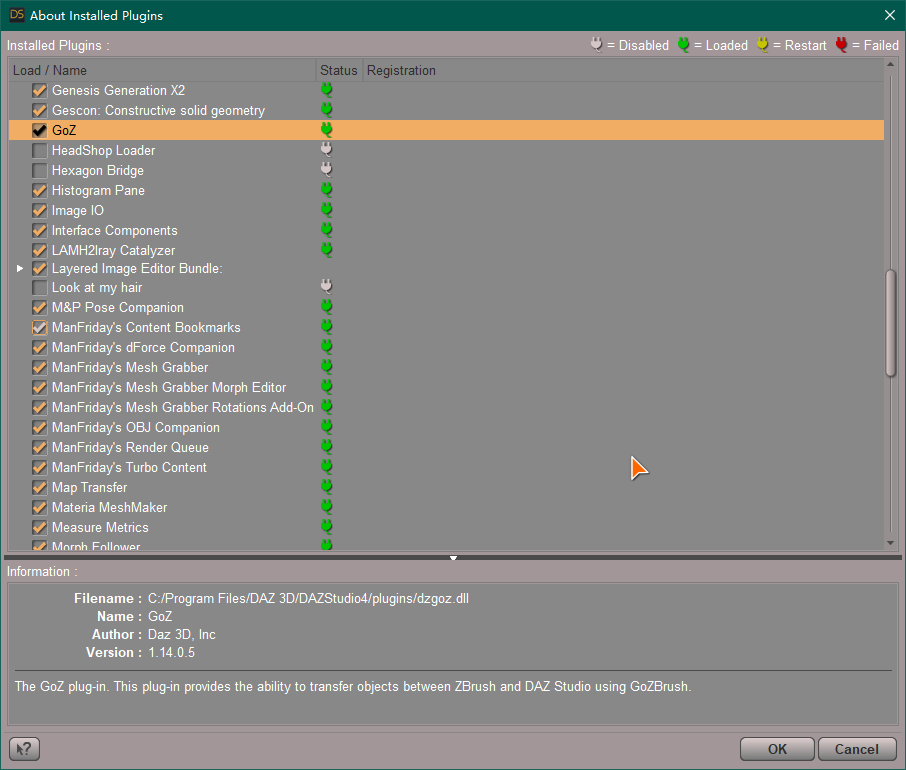
Latest version is 1.14.0.5, the version in 4.21 Pro GR is 1.13.0.17. Both of these vers. could not be used for 4.6.
You have to seek the version along with 4.6 since each release had a version of GoZ.
Should be Goz 1.3.x.xxJune 20, 2023 at 5:43 AM #1987547@yolo132 The oldest version I have is for 4.9, and it doesn't work for 4.6 either. You should even look for the ZBrush version of 2013/4 for compatibility in case you find that dzgoz.dll...
Anyway, once the morph is created in .dhdm, can't you launch it from Goz from a current (newest) Daz?June 20, 2023 at 11:45 AM #1987704How can I create a morph if I can't get the model in Zbrush?
June 20, 2023 at 12:02 PM #1987709@yolo132 In the "new" Daz Studio, send vía Goz the "base" resolution, and modify... Then, export .obj, and in 4.6, load in Morph Loader Pro....
June 20, 2023 at 1:11 PM #1987726Got the morph loaded in, but the result isn't too great.
 June 20, 2023 at 1:16 PM #1987728
What I did was:
Open Daz 4.21, load model to Zbrush, checking the "current resolution" box.
Sculpting in Zbrush
Exporting to .obj
Open Daz 4.6, loading Morph Loader Pro on the model & selecting the .obj, Morph Subdivision set to yes, Build resolution set to 2 (that is the original SubD level of the model in Daz 4.21) and then loading in the morph.I only sculpted a single line.
June 20, 2023 at 1:50 PM #1987746I don't know the system exactly... I've installed Zbrush twice, tried it, and it's the strangest thing I've ever used... Uninstalled. 😀
I think you have to use the "base" resolution to export to ZB, not one with high resolution, as the polygons will never match in number. Maybe others members with more ZB knowledge can help you.June 20, 2023 at 3:28 PM #1987778Alright, thanks for your help! You use Blender then?
June 20, 2023 at 4:48 PM #1987808@yolo132 No... 😀 I´m industrial designer: CAD/CAM software like Solidworks, Catia, and, sometimes, Rhinoceros. And, for fun, Maya and MotionBuilder.
June 20, 2023 at 4:54 PM #1987812June 21, 2023 at 1:32 AM #1987958Wait that's in Daz 4.21, makes it even more confusing how you have the Morph Subdivision option there.
June 21, 2023 at 2:10 AM #1987965I finally found the ancient GoZ version and it's working. Had to change the path to the old Daz in Zbrush since .obj method doesn't work for me.
-
AuthorPosts






- You must be logged in to reply to this topic.
