Home Page › Forums › General Chat › Please delete this post
- This topic has 6 replies, 2 voices, and was last updated 3 years, 5 months ago by
 Abad.
Abad.
-
AuthorPosts
-
May 8, 2023 at 7:55 PM #1968105
Please delete this post
May 9, 2023 at 4:09 AM #1968252Normally, in the installer zip there is a install.mel or The_name.mel in the same root of the version. You have to decompress the zip/rar/etc... Simply, drag&drop it on the Maya screen.
Others, you must manually copy to C:\Users\YOUR_USER_NAME\Documents\maya\plug-ins, or C:\Users\YOUR_USER_NAME\Documents\maya\scripts. If there are any folders/files with a .mod extension, they go to C:\Users\YOUR_USER_NAME\Documents\maya\modules.
They usually have a .txt with the installation instructions.
Then, already in Maya, you must activate them from the menu Windows/Settings-Preferences/Plugin manager.
If you have different versions, in C:\Users\YOUR_USER_NAME\Documents\maya there will be other folders like 2020 or 2023. Open the version folder, and you will find the plugins folders. scripts and modules. Do the same for each version.Those points are not needed for a simple answer. 😀
May 9, 2023 at 4:28 AM #1968257May 9, 2023 at 4:37 AM #1968261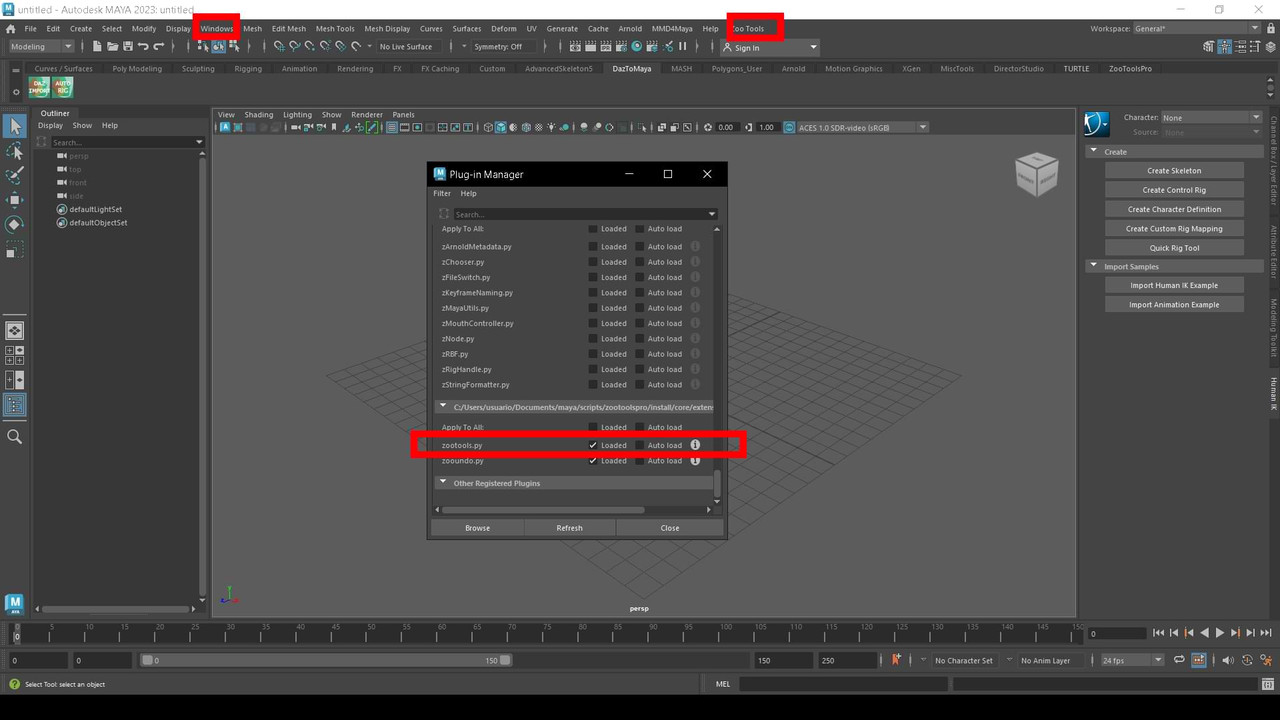
Rigth click/open image in new tab...May 9, 2023 at 5:06 AM #1968265Zoo include a pdf...
ZOO 2: DRAG AND DROP INSTALL
This document is the Easy Install/Upgrade instructions for Zoo Tools Pro 2. See the
Manual Install instructions for the manual install type.
Zoo2 is not compatible with Zoo1. Be sure you do not have Zoo Tools Pro 1
enabled. You can find the Zoo1 disable instructions at the bottom of this document.
To install, just drag and drop the file, "dragdropinstall.py" into Maya's main window.
Check 1: You must unzip all files into a folder before dragging the file in Maya.
Don't drag from inside your zip program.
Check 2: Avoid unzipping the files to locations where they may be automatically
blocked or protected like cloud locations such as Dropbox or One Drive .
1. Unzip all contents of the zip file into any folder. Do not drag from the zip.
2. Find the file "dragdropinstall.py" & drag/drop it into Maya's main window.
3. A UI will appear. Use the default folder settings.
4. Press Install/Upgrade Zoo Tools Pro. Check the success message.
5. Restart Maya , the ZooToolsPro shelf will appear.
You have installed Zoo Tools Pro 2 .
ZOO 2: HOW THE INSTALLER WORKS
This installer installs or upgrades Zoo Tools Pro 2 in two steps.
1. Copies/replaces the folder maya/scripts/zootoolspro into
yourPreferences/maya/scripts/zootoolspro
2. Creates/replaces the zootoolspro.mod file in
yourPreferences/maya/modules/zootoolspro.modMay 9, 2023 at 5:16 AM #1968266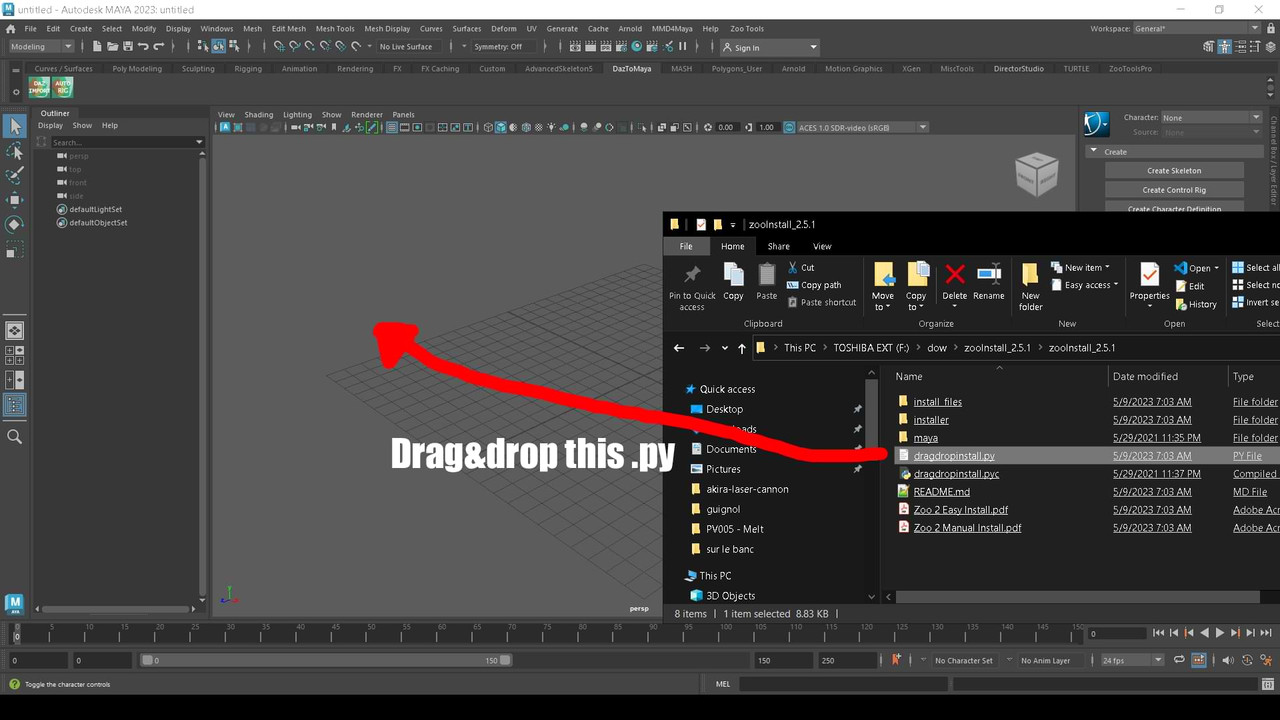
Then "load" in Plugins manager...May 9, 2023 at 6:11 AM #1968275I don't have the others, but it should be similar... Either they have an instal.mel or .py, or manually, copy the folders in my documents/maya...
Or later.. I´m going to work now.. -
AuthorPosts




- You must be logged in to reply to this topic.
