Home Page › Forums › General Chat › G9 to G8 conversion
- This topic has 16 replies, 8 voices, and was last updated 3 years, 6 months ago by
 Richard Y..
-
AuthorPosts
-
March 10, 2023 at 11:24 PM #1939157
Is anyone willing to convert P3D Amy HD for Genesis 9 to a G8.1, or G8? I just need the morph. Not the skin textures. But eyes and everything need to be good. I tried it, and the eyes are always a mess. Please test the G8 poses and make sure fingers etc are working properly.
I'll offer 2,000 points for it!
DD
March 11, 2023 at 3:31 AM #1939207Have you asked Griyar?
Cheers,
AnjaBearMarch 11, 2023 at 7:06 AM #1939233Fingers probably don't work because you didn't adjust the bones. Eyes tend to break because of this too. Use joint editor, right click the viewport and choose Edit > Adjust Rigging to Shape and hit accept.
March 11, 2023 at 4:46 PM #1939593@recktat19, I actually did that. The eyes still broke. Something to do with the bone/morph from the eyes is different than the G8. I figure wrapping it might work better. But I get all kinds of broken when I do that. LOL. So I figured instead of losing my sanity I'd ask here.
Maybe I'll have to try again. But I'll see if someone else bites first.
@Anjabear I have not. I feel like he reads these forums. If he wanted too. He likely would have. I don't want to put him on the spot.DD
March 13, 2023 at 3:15 PM #1940478I would be happy for all or any G9F converted to G8G!! Please upload if you have something!
March 13, 2023 at 3:17 PM #1940479March 14, 2023 at 12:19 PM #1940893So here is a screen capture of a conversion of P3D Amy from Genesis 9 to Genesis 8. I am converting the textures, as well. All is converted. A screenshot is the best way to show this because I haven't stumbled across all of the proper settings for the texture application, yet. I am including the morph and textures "bare bones" so to speak. It will be a bit of a DIY project. Place the textures where you like...apply as you like. You will need to apply the morph manually and adjust to rigging, erc freeze...etc.
The clones for Genesis 9 to Genesis 8, or the reverse has corrupted eyes, so any conversion using the clones will have corrupted eyes. This morph has pristine eyes.
Here is a link to the folder where you can find your new project. The link won't be around forever. In the folder is a zip for just the morph...and a zip for the morph and converted textures. Remember it is a DIY =)
Don't worry about points. It is a DIY project after all, lol.
Folder access here
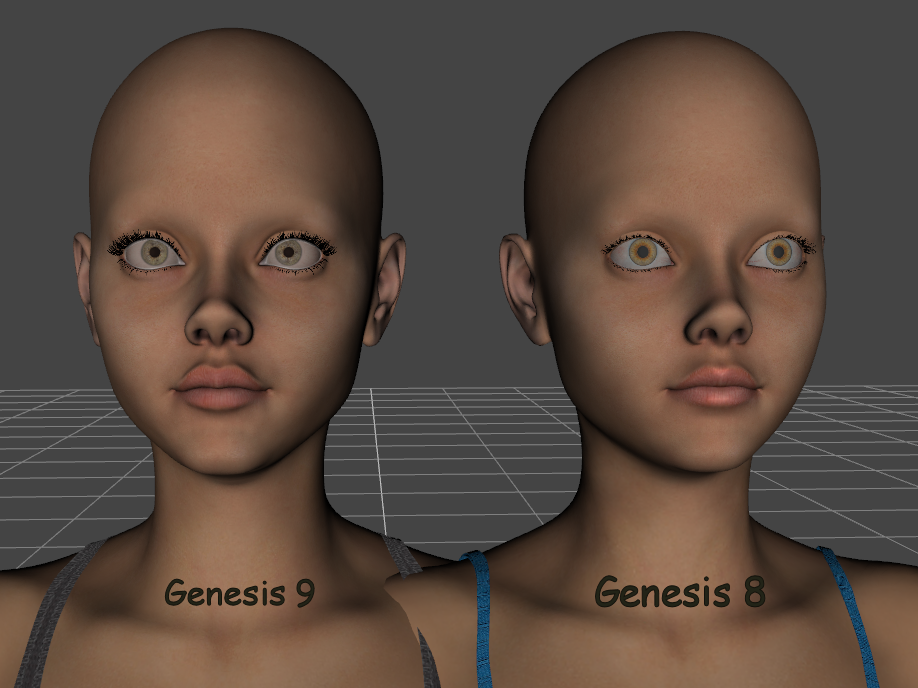
Did I mention it is a DIY =)
March 14, 2023 at 1:47 PM #1940926This is really interesting! How did you do? I'm trying for a few days to create morphs for the G8 figures using Zwrap. At the moment I made these two, plus countless experiments and trials:
Victoria 9 for G8F and MargHQ V4 for G8FMarch 14, 2023 at 2:22 PM #1940936The eyes are especially susceptible to getting mangled with the majority of processes used in converting. The process I used for morph conversion was almost entirely within DS. Granted, I used several steps for the process.
1) Load Genesis 8 female, set to base resolution, apply clone for Genesis 9 base and export.
2) Load Genesis 9 base. I use the developer kit version. No need for the rest of the items. (eyes, teeth, etc.)
3) Import The Genesis8_Genesis9 clone shape
4) Use the Transfer Utility tool to make the The Genesis8_Genesis9 clone shape a conformer for Genesis 9
5) Apply the desired shape to Genesis 9.
6) Hide Genesis 9 and export the The Genesis8_Genesis9 clone shape.
7) You now have a base morph from Genesis 9 to Genesis 8. However, they have screwy eyes.To avoid the screwy eyes, you need to use attenuate on morph import. I haven't figured out how to successfully use attenuate on multiple things in DS at once. So I set up base objs with different material settings or groupings to help expedite the process. For this project, I used UVMapperPro to isolate the eyes as 1 material, so I could just exclude them when I import the morph.
1) Import Genesis 8 female to DS
2) Export at base resolution
3) Reassign your exclusion area as a new texture/group using program of choice
4) Import your new obj into DS. The obj will be used for this portion (NOT Genesis 8 figure)
5) Apply your morph created earlier. Select the attenuate option and choose the area intended for exclusion. In this case, the eyes. A setting of 1 will apply the eyes only. A setting of -1 will apply everything but the eyes.
6) Set the morph to 100% and export. You will notice the eyes didn't change. That's exactly what we want.
7) Load Genesis 8 female
8) Apply the morph just created. No special settings needed.
9) You will see that the eyes aren't in the right place. You will need to adjust their position (x,y,z) and possibly their orientation (left-right, up-down) until you are satisfied.
10) Export at base resolution.You now have a morph with undamaged eyes. To complete the process you need to then import it, adjust rigging to shape and freeze erc...save, etc.
I know it seems like a lot of work. And there may be multiple paths to achieve the same results, but this process works for me...I don't see any way that's going to change, lol.
March 15, 2023 at 3:37 AM #1941181I've gotten it. I'm going to play with it some tomorrow and see what I can do with it. TY for your time in this Mxyzptlk. It is appreciated.
DD
March 15, 2023 at 5:49 AM #1941200March 15, 2023 at 12:38 PM #1941441Indeed it seems like a lot of work, but yesterday, just to convert with Zwrap MargHQ to G8F, fix the eyes and the mouth and the geometry ( which always gets messed up in the process), took me about 7 hours. But it certainly takes me a long time also because I'm self-taught and I probably take more steps than I really need.
Anyway, is there a tutorial of any kind of the process you used? I'd like to try it on. Maybe it's easier and faster than what I use.
March 15, 2023 at 2:19 PM #1941511A couple of posts up are all of the steps I used. No tutorial that I'm aware of. This is a process I've been using for a very long time. Maybe I should write one. If you follow the steps above, you have my workflow for the process. I'm always willing to help out or answer questions about it.
March 15, 2023 at 9:49 PM #1941633Nice DIY! @necro
Here's a HD version of G8.1F I made by using Wrap4D to preserve details of Amy-HD G9 AMAP~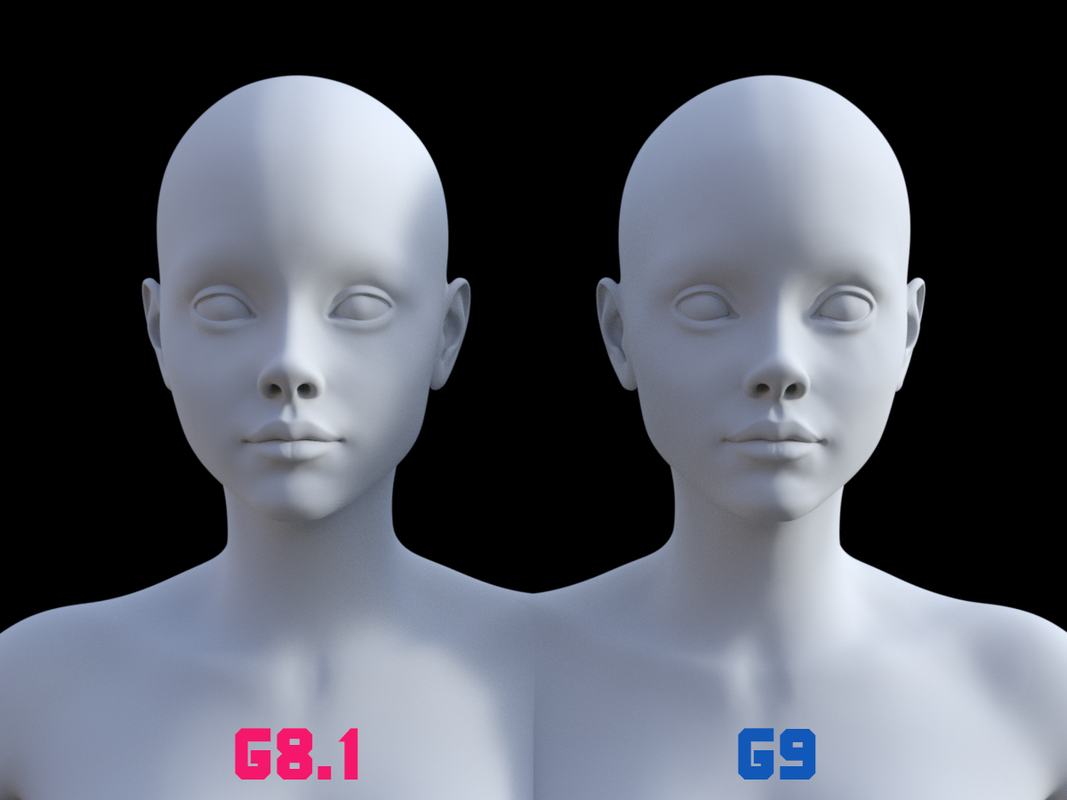
Everything is fine in terms of eyes, teeth, fingers, poses, etc. A couple of corrective morphs are included for expressions of Eyes Closed and facs-Eye Blink. Other expressions should be OK though I did not test a lot~~
I converted a couple of tex maps but I was lazy to set them up but only face & eyes. I believe textures done by @mxyzptlk could be fully applied.
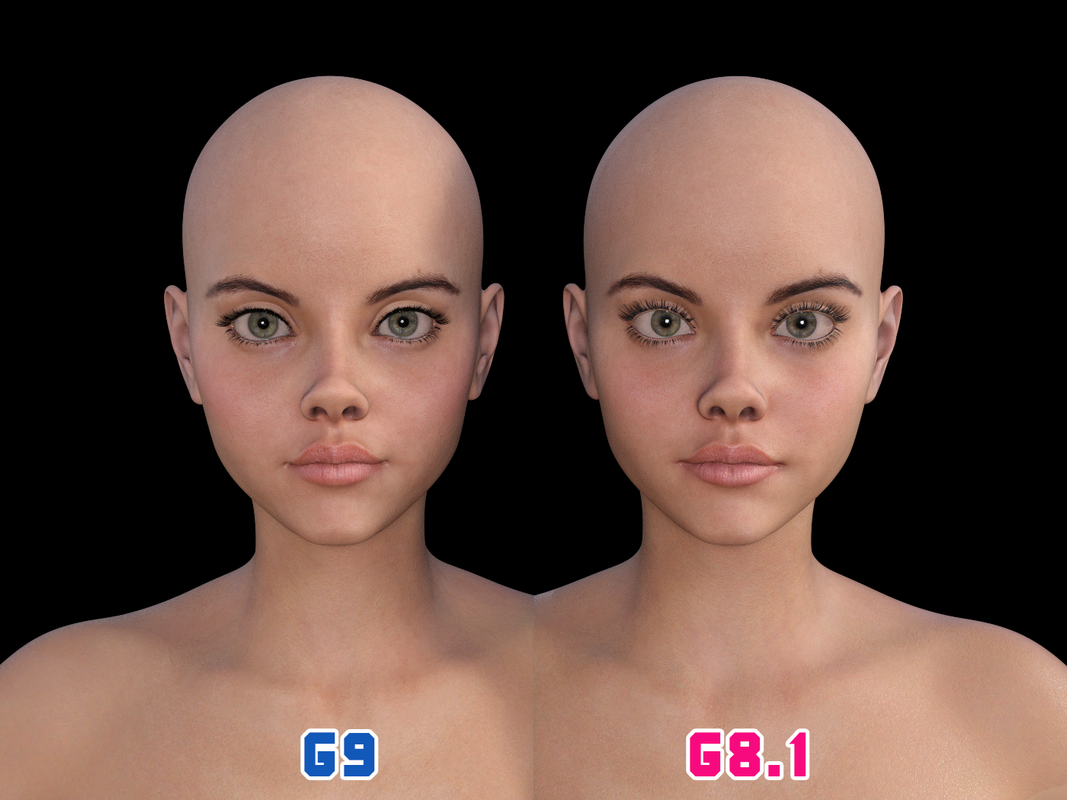
For fun~
https://mega.nz/file/qLxCDK4R#EGqF3PDYMQ1ZIfkcIYvK43zip5cKIjzucm_sSzvGGqcMarch 15, 2023 at 11:44 PM #1941664Cant wait to play with these. Now if only there were more hours in the day.
DD
-
AuthorPosts













- You must be logged in to reply to this topic.
