I've got a lot of saved items, mainly characters and scenes, that have very poor thumbnails attached to them. All have the texture or smooth render and some are not even focused on the item, like it picked a random camera's viewpoint.
Is there a way to take a screencapture and use that as the thumbnail? I'd prefer a image that is larger when hovered over since the ones now are about the size of a dime on my screen.
I just pose the character whichever way I want, take a screenshot and save it in the same name and location as the thumbnail.. it doesn't have to be small.. it can be any size you want.. and that will show up as the thumbnail..
Only problem is that I have to do it one by one..
.




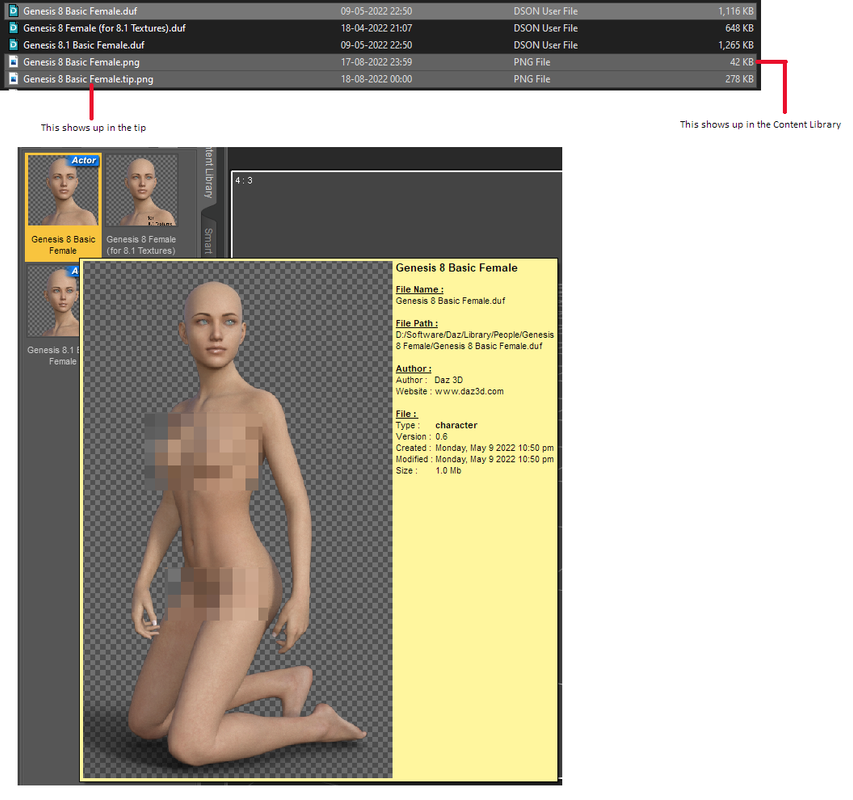
 .
.