Home Page › Forums › General Chat › Learning Iray 2022
- This topic has 11 replies, 5 voices, and was last updated 3 years, 10 months ago by
Oldwolf.

-
AuthorPosts
-
November 8, 2022 at 1:46 AM #1887314
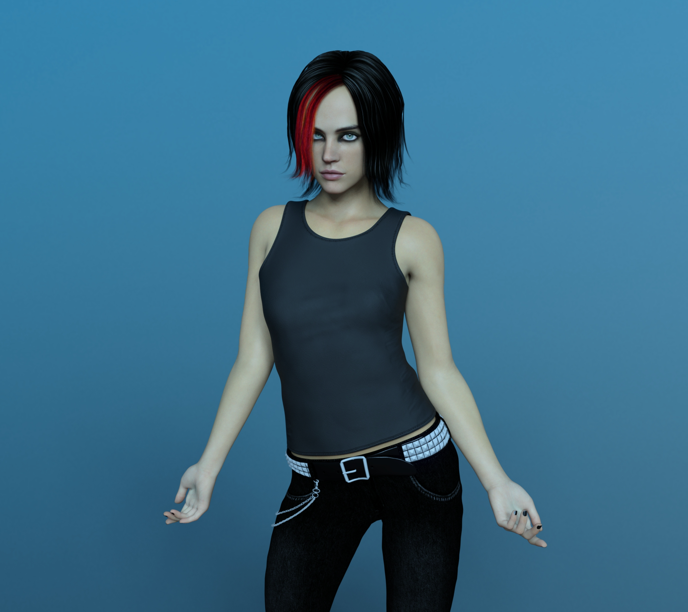
Rendered in Iray
CPU: AMD Ryzen 7 5700G with Radeon Graphics
GPU: NO
RAM: 32GB
Render Time: 12 minutes 47 secondsLooks like finally I'm learning to hack DAZ and I can render in Iray!!!
This is not perfect but it doesnt suck either!
Im gonna keep on tweaking the render settings and surfaces and trying different lights.Any suggestions or recommendations?
Im listeningNovember 8, 2022 at 1:52 AM #1887315yeah stop driving your self crazy with using iray with team red and just get octane render for free and use that?
November 8, 2022 at 1:53 AM #1887316I'm gonna try Octane then!
November 8, 2022 at 1:54 AM #1887317Where do I get Octane?
lol
November 8, 2022 at 2:09 AM #1887318As much as I prefer iRay because I know it and can't for the life of me figure out Octane plus don't want to take time converting shaders, it would probably be better for you to move to octane or even Blender rendering software since you don't have an Nvidia card so you will always rely on CPU which is slower.
November 8, 2022 at 2:13 AM #1887320Yes, Im gonna give it a shot because I still dont have an Nvidia GPU.
I'm watching the tutorials now.
Thank you guys!November 9, 2022 at 1:51 AM #1887749Actually... I'm an expert Octane fanboy. I was there from the beginning and still have my perpetual license. (I was not aware that they supported Radeon GPUs yet.)
- Its not worth even trying Octane if you don't have the REDSPEC skin shaders.
That's just my opinion.. but I'm never wrong so.. deal with it.
Ummm... At last check, the auto conversion of Iray shaders to Octane is just plain borked. You tend to get 100% glossy everywhere which necessitates changing every single shader in a scene before you can reasonably render. (Honestly I wish they'd just use a single simple shader for all textures when auto-converting. Then I could just get a 'good enough if you don't have it in focus' look, which is really what a lot of a scene is.)
- Creating your own shaders in Octane is super easy, and its easy to understand.
Iray... is inscrutable to say the least. Good luck figuring out what the Daz shaders are really doing.
- Most of my time spent on Octane renders was work on shaders\texturing to get them to look right.
I switched to Iray after I spent 6 hours converting all the shaders in one scene. It was amazing when done, but I could quickly get the same results with Iray without doing 6 hours of work.
Hands down, Octane is faster and easily cleans the performance clock of stupid old Iray. Daz outright lies when they claim Octane is slower.
November 9, 2022 at 5:26 AM #1887782@Captainron "I switched to Iray after I spent 6 hours converting all the shaders......" Who want's that?
I had the same issue when I used to import into Vue before Daz Iray came along. IMO a prog with native shader support will always beat importing and converting any day of the week. Unless you're a masochist.November 9, 2022 at 4:55 PM #1888008@Frank21 "IMO a prog with native shader support will always beat importing and converting any day of the week."
Its a catch 22 really. It depends on the complexity of the background scene, and the level of equivalence you want. Also, to be fair, there are times that the existing shaders just don't cut it, especially with older products. Its virtually impossible to fix the shaders with the mechanisms provided by Daz. You pretty much need to be an expert in order to perform minimal amounts of shader work. ("Customer Vicious" must be their mantra.)
By comparison, with Octane you can do simple work very quickly, and you can even fix up shader\UV work when the older materials simple won't cut it in an Octane world. In one case, I had a single texture for the entire surface of a build and grounds, so I created map to separate the grounds from the building. I then built separate shaders for both, and combined them using the map. Suddenly I have high detail grounds... (and sigh.. shitty buildings)
The real cut off for where Octane shines versus Iray is how often you have to run test renders. I tend to do that a lot in order to tweak my final works. Since Octane is blazingly fast, adjustments are simple and easy to do. With Iray, kicking off a render is just slow enough to tickle my ADHD in a bad way.
Some folks here may recall the days of 20 hour renders with Reality\Lux. The quality was there for sure, definitely comparable to Iray\Octane, but seriously... 30 minute test renders... I could watch a whole sitcom between test renders, then say, "Oh yeah, that Chrome could be more shiny..."
November 10, 2022 at 11:08 PM #1888476Maybe, if you could share some decent settings for Octane rendering for those of us used to iRay or the earlier 3Delight? I use iRay because I have a preset render settings I have developed, since iRay was first released, saved and know enough about the settings to tweak when needed easily. I use iray viewport instead of doing test renders. Pretty snappy on my 3090 for that.
Learning how to convert iRay shaders to Octane compatible though is likely to be a large step up hill for me as I have hundreds of premade, and well categorized using my own system, iRay shaders that do what I want whether using as is or ctrl clicking to save the textures but apply the shader. I've never actually used the DAZ built in shader mixer/creator/whatever it is.
November 10, 2022 at 11:45 PM #1888479This thread spurred my interest in Iray animation, temporarily anyway. I did a test with a very short basic animation at default settings and.... 30 minutes to render a 1.3 second video, I'm sticking with rendering stills. I suppose I could have dropped the render settings but I doubt that would have made much difference with my old 2080.
November 11, 2022 at 2:49 AM #1888510@Frank21
I tried out some animations once I got my new 3090 and though they came out well it still took me an hour and a half to maybe 1 hour 45 minutes to render 12 seconds of video at 960x540 at 30 frames per second (360 images) using a single figure against an HDRI background. I then upsized in a batch using Gigapixel AI to 1080p then turned into a video using photoshop. It came out well but I don't see myself doing many animation renders at all if it takes me a little over 2 hours to turn 12 seconds into a video.
-
AuthorPosts







- You must be logged in to reply to this topic.
