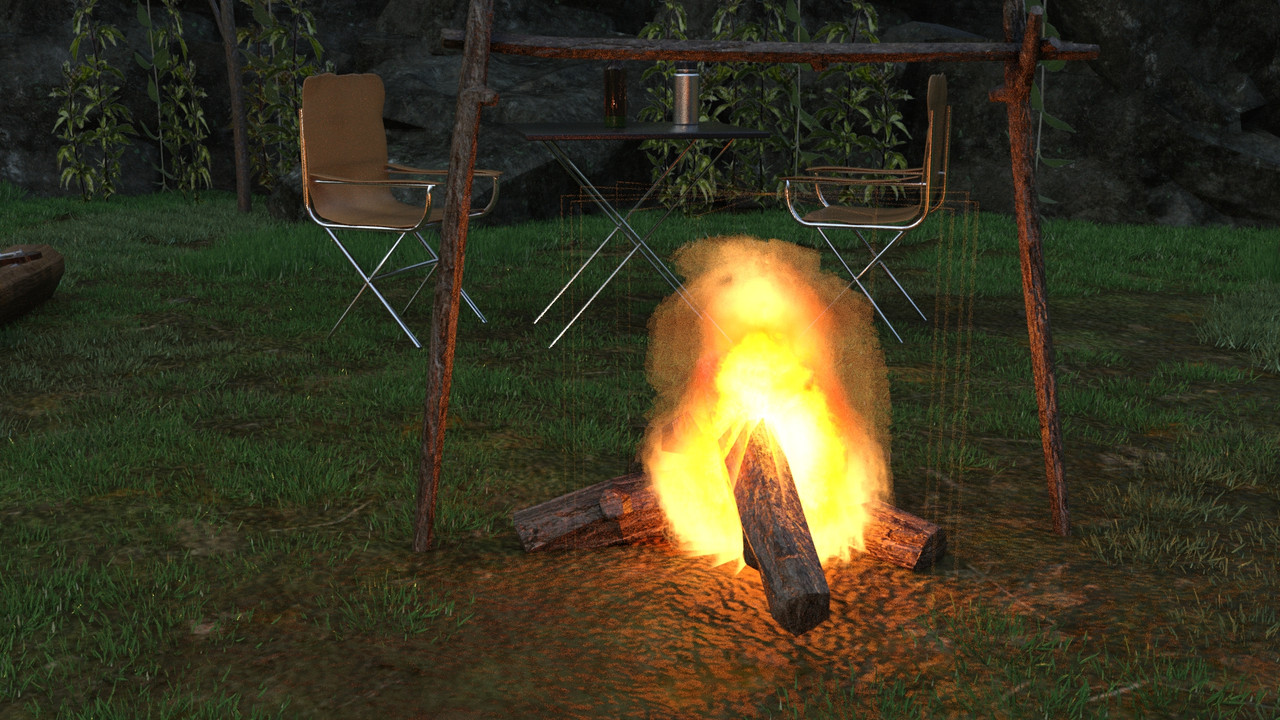
Hey everybody, I'm having this problem with the emissive planes in camping site, and can't figure it out.
The border of the plane shows the fire. I tried it in Daz 4.15 and 4.20 thinking it might be related to the iray update that wrecked the ghostlights. But it happens in both.
There's an opacity map on the plane, I tried lowering the cutout opacity...
It's a problem with the opacity map. Even before it renders, the lines are visible in texture shaded. Now to figure out how to change the opacity map. Larger black area maybe.
@cage
In the Surfaces tab, open the material you want, go to Geometry > Tiling and find Horizontal Tiles and Vertical Tiles. If you bump both of those down from 1.00 to 0.9 - 0.95 you should grow the texture just enough to eliminate those sloppy edges. Just tweak each one enough to eliminate the ghost glow and there you'll have it.
@amberkat, that's a brilliant idea and I understand the theory behind it. Thank you very much 🙂 I'm surprised that it doesn't work... It would be great way to do it, getting real time results like that.
The first opacity map I increased the black border on in ps wasn't big enough, and I had to fine tune it.
I think the photoshop method also runs the risk of superimposing incorrectly over the base color image where tiling could be involved. But I digress, I would swap my brain any day 🙂
 .
.