Home Page › Forums › General Chat › How make this Beam
- This topic has 4 replies, 4 voices, and was last updated 5 years, 9 months ago by
 Grak Thul.
-
AuthorPosts
-
December 28, 2020 at 10:05 PM #1653759December 29, 2020 at 3:50 PM #1653928
I haven't tried it, but this could provide another option.
December 29, 2020 at 4:37 PM #1653932Hi
Never tried in new daz but it can be interesting to do ithttps://www.daz3d.com/epic-props-godrays-volumetric-light-for-iray
https://www.daz3d.com/atmocam-for-iray
https://www.daz3d.com/horror-and-action-lights-for-figures-and-vehicles
https://www.daz3d.com/ig-iray-dawn-to-dusk-2-atmospheric-lightingDecember 31, 2020 at 7:20 PM #1654539Thanks for your suggestions.
I have tried several of them.
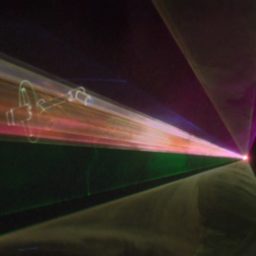
But nothing comes close to old "STAGE FX BEAMS" in old DAZ Studio 2.3
It should be easy to make visible light rays in 3D, but its nearly impossible.
Maybe I have to add beams in photoshop then.....December 31, 2020 at 10:10 PM #1654579Indeed, Iray renders lights "too real", so there is no rays unless there is something to reflect light to camera. I have been struggling with it for a while after switching from 3dlight which worked great with atmocam system and I still haven't found anything that works well enough for me 🙁 . SSS can work, but it bumps rendering time up enormously (my 1080Ti struggles with it to the point that I gave up), looks pretty flat/unnatural and there is no way to make it work only with one or limited number of lights so setup is pain. Cloud/fog props can help (for example https://zonegfx.com/cloudscape-creator-material-expansion/), but I yet have to find one I am happy with - they look pretty fake to me. Another option is fake volumetric lights (like godrays props) but these also tend to not look great. https://www.daz3d.com/epic-props-godrays-volumetric-light-for-iray and https://zonegfx.com/ireal-animated-dust-particles-bokeh/ (if you stack lots of them) kinda work, but are major pain to set up if you want any amount of ambient light
-
AuthorPosts







- You must be logged in to reply to this topic.
