photoshop question

Home Page Forums General Chat photoshop question

Viewing 4 posts - 1 through 4 (of 4 total)
  • Author
    Posts
  • #1440806
    globalrecession2009
    Participant
    Rank: Rank 4

    PHOTOSHOP QUESTION

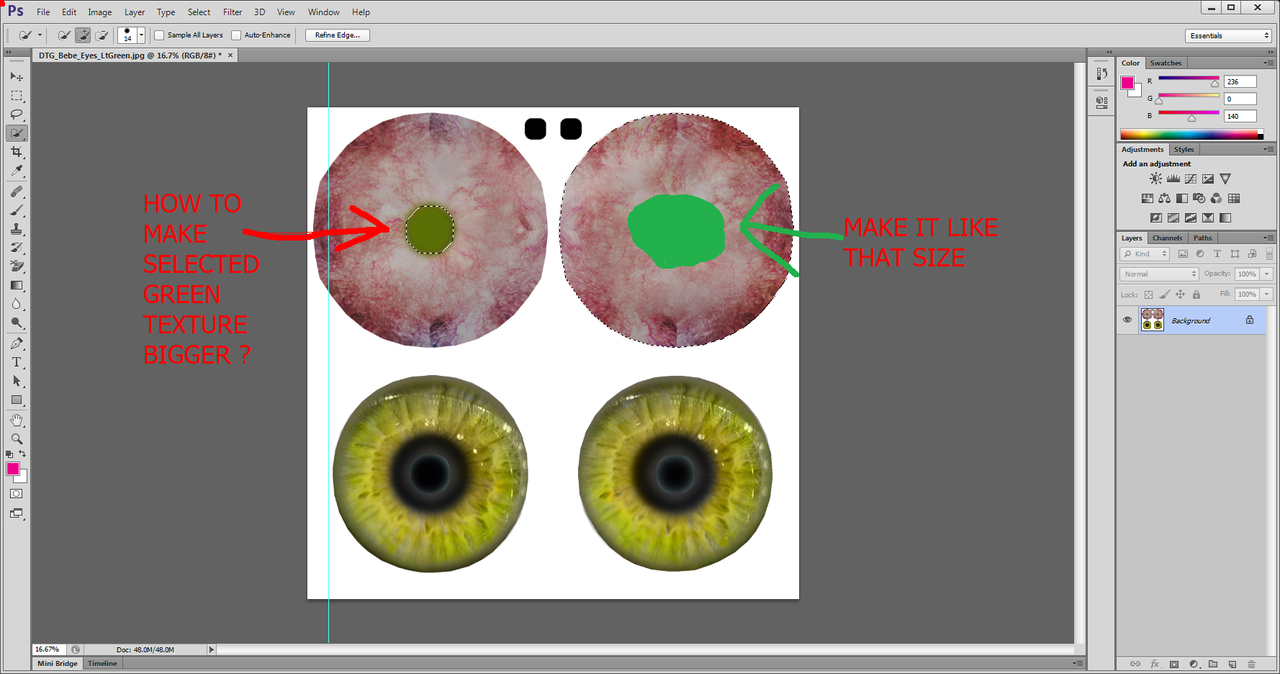
    The picture shows an example where i have some texture selected.

    I know that TO ENLARGE a selected item i can use the transform tool, the skew tool, warping and all that stuff.

    But im I am hoping that there is another way where i can just enlarge the texture exactly as its selected.
    Like enlarge it by 10% ......like make a freckle a little bit bigger or something.
    I think Im pretty sure i have done it before but i cant remember how.

    #1440935
    3Demon
    Participant
    Rank: Rank 6

    Are you saying you want to proportionally increase the selection size?

    If so, when making the selection HOLD Alt + Shift while dragging.

    Or do you mean that you want the portion of the pixels selected above to increase in size?

    If so, select the desired pixels. Copy/paste to a new layer*. Select the Move tool. HOLD Alt + Shift and drag away from center to increase size.

    *Pro Tip: Always use a separate layer for non-destructive safety measures.

    #1442171
    globalrecession2009
    Participant
    Rank: Rank 4

    Thanks i fixed it, my shift key is broken thats why it didnt work when i was rtyonh it before

    #1442205
    globalrecession2009
    Participant
    Rank: Rank 4

    right shift key works........left one is dead.
    now i know why i had some accounts locked because i put wrong password in because shift key was not working.
    Nice.......i thought i may gave been comprmised somehow......lol tis all solved ........lucky i never looged into my bank.
    If that got locked i would have been really worried

Viewing 4 posts - 1 through 4 (of 4 total)
  • You must be logged in to reply to this topic.


Post You Might Like