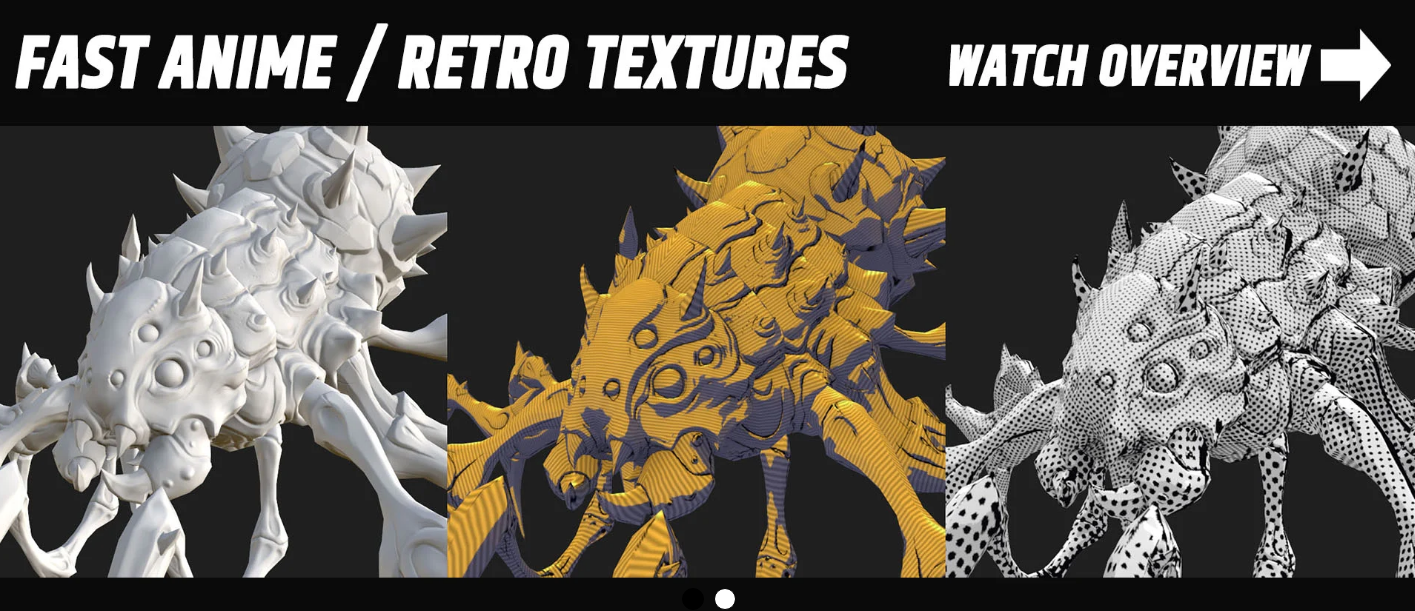
SimpleAnime - Fast Anime / Retro Texturing
Features:
Fast presets:
Golden Hour (amber / sky blue)
Hyper Retro 32-bit (white / purple)
Clean Anime (white / lilac)
Two-Tone Anime 2kage (lavender / indigo)
Backlit Anime (cyan / navy)
Ink Comic (cream / blue)
Manga B/W (black / white)
Handheld Green (lime / deep green)
CRT Arcade (warm / electric blue)
VHS Tape (orange / teal)
Old Stylized Hand Paint (cream / teal)
Create color base:
3 Options:
1) Layer below (Pass through)
2) Own Color
3) Image below
Light Controls
Light Yaw & Pitch: rotate and tilt the light direction freely
Light Color: tint the lit side with any color
Light Intensity: balance the lit side against the base albedo
Shadow Color: pick a custom color for shadows
Shadow Saturation: push shadows into vivid, colorful tones
Ambient Amount: control overall fill light
Light Wrap: soften the falloff between light and shadow
Shading Contrast: sharpen shading for bold, hyper stylized shadows
Light Temperature: optional warm/cool temperature-based lighting
Toon Controls
Toon Amount: blend between smooth shading and hard cel-shaded banding
Toon Bands: set how many shading steps the toon effect uses
Pixelate Controls
Pixelate: toggle a retro pixel art look on or off
Pixel Grid: set the pixel resolution, from chunky blocks to fine detail
Surface Controls
Specular Amount: add a baked sun gloss highlight to surfaces
Specular Size: control how tight or broad the highlight appears
Ambient Occlusion Amount: deepen contact shadows in creases and corners for added depth
Anime Controls
Anime Cel Amount: blend in a clean two-tone anime cel-shading look
Anime Shadow Yaw & Pitch: position the anime shadow direction independently from the main light
Shadow Threshold: move the terminator line to control where light turns to shadow
Shadow Edge Softness: choose between crisp, sharp shadow edges or a softer transition
Core Shadow: add a darker core shadow band for extra depth and definition
Rim Light Controls
Rim Light: toggle a glowing backlight that outlines your model's edges
Rim Color: choose any color for the backlight glow
Rim Yaw & Pitch: aim the backlight around the model, relative to the camera view
Rim Width: set how thick the glowing edge appears
Rim Amount: control the strength of the backlight
Rim Shadow Gate: limit the rim glow to shadowed areas for a true backlit look
Hard Shadow Controls
Hard Shadow Amount: layer a bold, graphic shadow on top of the base shading
Hard Shadow Yaw & Pitch: aim the hard shadow independently from the other lights
Hard Shadow Threshold: move the terminator line to set where the shadow begins
Hard Shadow Edge Softness: keep shadow edges razor-sharp or soften them slightly
Hard Shadow Tint: color the shadow with a multiply tint for stylized moods
Second Shadow Band: add an extra shadow step for deeper, layered shading
Ink Lines Controls
Ink Lines: toggle hand-drawn style ink linework baked into the texture
Line Color: choose any color for the lines
Line Amount: control the line opacity
Line Threshold: adjust how sensitive line detection is, from minimal to detailed linework
Line Edge Softness: keep lines crisp or give them a softer, brushier edge
Concave Lines: draw lines into crevices, folds, and creases
Convex Lines: highlight ridges and raised edges with linework
Silhouette Lines: add outline strokes along the sides of the object
Silhouette Yaw & Pitch: rotate the silhouette direction to control where outlines appear
Normal-Map Edge Lines: pull extra line detail from the normal map
Normal Edge Width: set the thickness of normal-map detail lines
Shadow-Side Bias: concentrate ink on the dark side for a comic-style shadow effect
Ink Light Yaw & Pitch: set the light direction that decides which side gets heavier ink
Grain Noise:
Grain: toggle a film-style grain texture on or off
Grain Amount: control how strong the grain appears
Grain Scale: adjust grain size, from coarse and chunky to fine and subtle
Grain Color: blend between monochrome grain and colorful RGB noise
Grain in Shadows: add extra grain to darker areas for a gritty, analog feel
Duotone Controls
Duotone: toggle a stylized color-grade effect on or off
Duotone Amount: blend between the original colors and the duotone look
Duotone Shadow: choose the color for the darkest areas
Duotone Mid: choose the color for the midtones
Duotone Light: choose the color for the brightest areas
Comic Noise:
Dots: toggle a comic-print dot pattern on or off
Dots Amount: control how strongly the dots show through
Dots Scale: set the dot density, from big bold dots to fine print detail
Dots Angle: rotate the dot pattern for a classic printed look
Dots Ink: choose any color for the dots
Palette Controls
Posterize: reduce colors to flat, distinct levels for a graphic look
Posterize Levels: set how many color steps each channel uses
Retro Dither: add a classic dither pattern to break up color banding
Palette: remap colors to a preset retro palette
Palette Amount: blend between the original colors and the chosen palette
Retro Screen
CRT / VHS: toggle a retro screen and tape effect on or off
Scanline Amount: control how visible the horizontal scanlines are
Scanline Rows: set the scanline density, from thick retro lines to fine detail
Chromatic Aberration: add RGB color fringing for an authentic analog glitch look
Conventions Controls
Invert Tangent Green: flip the normal map's green channel.
This plugin let you you create any cartoon, anime, or retro texture in just minutes!
It will also optimise your work with less layers and loading times.
Software: Substance Painter
Blender, addon, Addon, blender, blender addon, Texture
https://nhanceschool.gumroad.com/l/SimpleAnime?layout=profile

