Duf Thumbnail Provider v1.3 - Windows Explorer File Preview
Duf Thumbnail Provider v1.3 - Windows Explorer File Preview
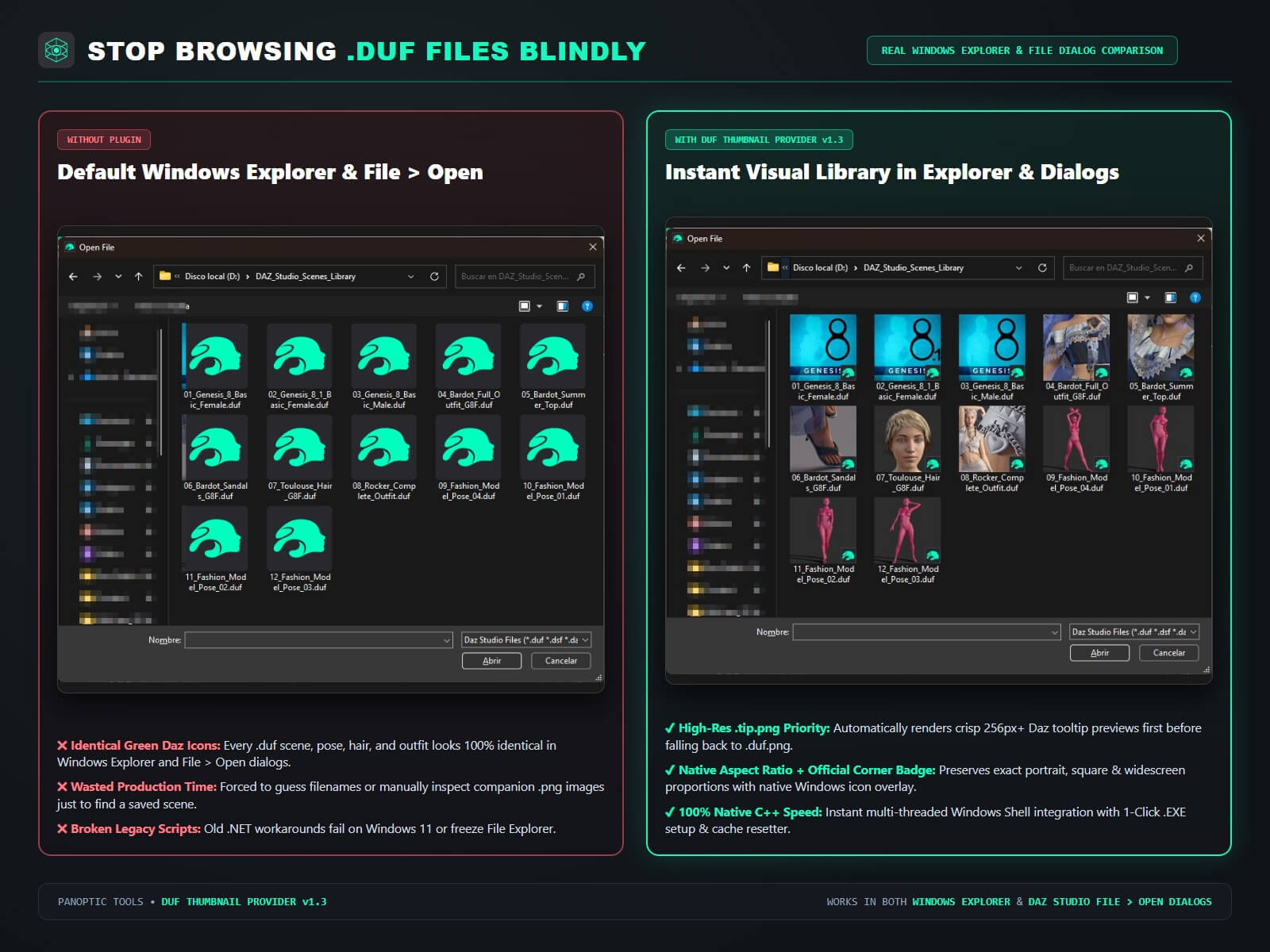
Stop browsing your Daz Studio (.duf) folders blindly in Windows Explorer and File > Open dialogs!
By default, Windows 10 and Windows 11 display the exact same generic icon for every .duf file on your hard drive - forcing you to guess filenames or manually inspect companion .png images just to see which scene, character, pose, hair, or material preset is which.
DUF Thumbnail Provider v1.3 by Panoptic Tools solves this permanently at the native Windows Shell level. Once installed with a single click, both Windows Explorer and Daz Studio's own File > Open / Merge dialogs automatically display crisp, high-resolution 3D previews directly on your .duf files across all your drives and folders.
KEY FEATURES & ARCHITECTURE (v1.3):
- Smart 4-Stage HD Priority Engine: Automatically detects and renders Daz Studio's high-resolution ".tip.png" (256x256 / 512x256) tooltip images first so your Large and Extra-Large Explorer icons look razor-sharp - falling back seamlessly to ".duf.png", ".png", or ".jpg" previews.
- True 32-Bit ARGB & Native Aspect Ratio: Preserves exact portrait (91x120), square (1:1), and widescreen (16:9) proportions with full alpha transparency, High-Quality Bicubic sampling, and native Daz corner overlay badge (zero ugly grey letterbox bars!).
- Works in Both Windows Explorer & Daz Studio File > Open Dialogs: Hooks directly into the Windows IThumbnailProvider Shell API so every file picker in Windows and Daz Studio displays instant visual previews.
- 100% Native 64-Bit C++ COM Extension: Zero dependency on .NET Framework, SharpShell, Java, or background tray apps. Uses zero RAM or CPU when idle.
- Dark Studio Fallback Badge: If a saved .duf file has no companion image in its folder, a clean Dark Studio "DAZ .duf" badge is rendered instead of a blank icon.
- 1-Click .EXE Installer & Standalone Uninstaller Included: No command lines, no regasm, and no manual Registry edits. Includes both "Install_DufThumbnailProvider.exe" and "Uninstall_DufThumbnailProvider.exe" with built-in Windows thumbnail cache purging.
WHAT'S INCLUDED IN THE ZIP:
- Install_DufThumbnailProvider.exe (1-Click Native GUI Installer)
- Uninstall_DufThumbnailProvider.exe (1-Click Uninstaller & Thumbnail Cache Resetter)
- DufThumbnailProvider.dll (Native 64-Bit Windows Shell Extension)
- UserManual.pdf (Illustrated Dark-Mode Quickstart & Troubleshooting Guide)
- README_INSTALL.txt
SYSTEM REQUIREMENTS:
- OS: Windows 10 & Windows 11 (64-Bit)
- Supported Files: All Daz Studio 4.x (.duf) Scenes, Characters, Poses, Wearables, Hair, Materials, Lights, and Camera Presets (Genesis 1, 2, 3, 8, 8.1 & 9).
panoptic tools
https://www.renderhub.com/panoptic-tools/duf-thumbnail-provider-v1-3-windows-explorer-file-preview

