Home Page › Forums › General Chat › what type of map is this?
- This topic has 15 replies, 3 voices, and was last updated 3 years, 6 months ago by
 Richard Y..
-
AuthorPosts
-
April 13, 2023 at 7:35 AM #1955974
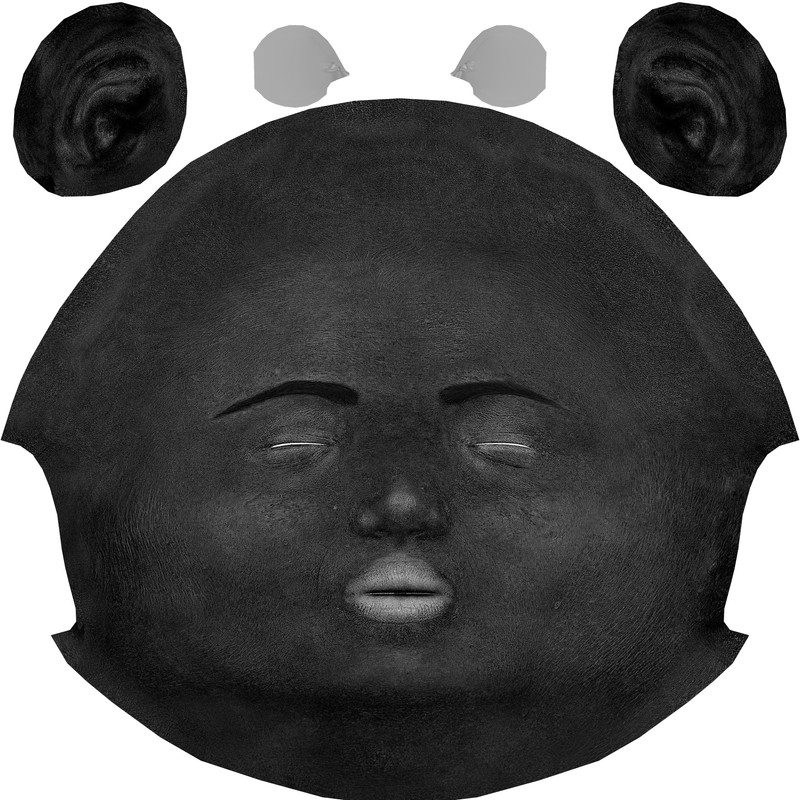
Anyone know what the actual name of this type of map is? And if possible, a software recommendation on how to generate them.
 April 13, 2023 at 9:06 AM #1956011
Could be Specular Map or Roughness Map ~ You may use substance painter(Pt), ShaderMap or Materialize (freeware) etc. to generate them, and plus some post-work (Ps) if needed...
April 13, 2023 at 3:15 PM #1956137@windreaver0118 Yes, i've already tried shadermap and materialize, but neither produced a map looking anything like this one. These maps usually come with DAZ as base materials for Genesis and are present in a variety of shader settings. Ive seen it both glossy and roughness settings and others. So I tried to narrow it down to figure out the specific name of the type by looking at other characters that use these maps and going to their store page to see what type of maps were listed as coming with the character. It said specular. So that added to the confusion because i've seen other specular maps that looked nothing like this. So now I dont know if its a specular map, or a glossy map or a roughness map.... or maybe all of them combined into one?
April 13, 2023 at 8:20 PM #1956244@littlepleasures thanks for the detailed response. So it's some kind of "combined" map as I assumed. So if I understand correctly, trying to create one based off an image such as a basemap is inaccurate a would need to export to an .obj and create one based on the actual geometry.
So for something like human face and body skin, wouldnt just the standard one that ships with Genesis 8,8.1,9 etc be pretty much the same since everyone has nose ears "reasonably" close to the same geometry (and no reason to need to create new ones?)The part that confuses me most about this map is the bump details. Almost like a normal map, where do those grooves come from? Are they skin details or something to reflect light?
April 13, 2023 at 8:25 PM #1956245@gts6
Well, in order to have subtle change on a character's skin, sometimes I use ShaderMap to generate different specular / roughness map 'cause it's pretty quick, just need a couple of clicks, like this. It's 3DA Airlie G3F's face texture map: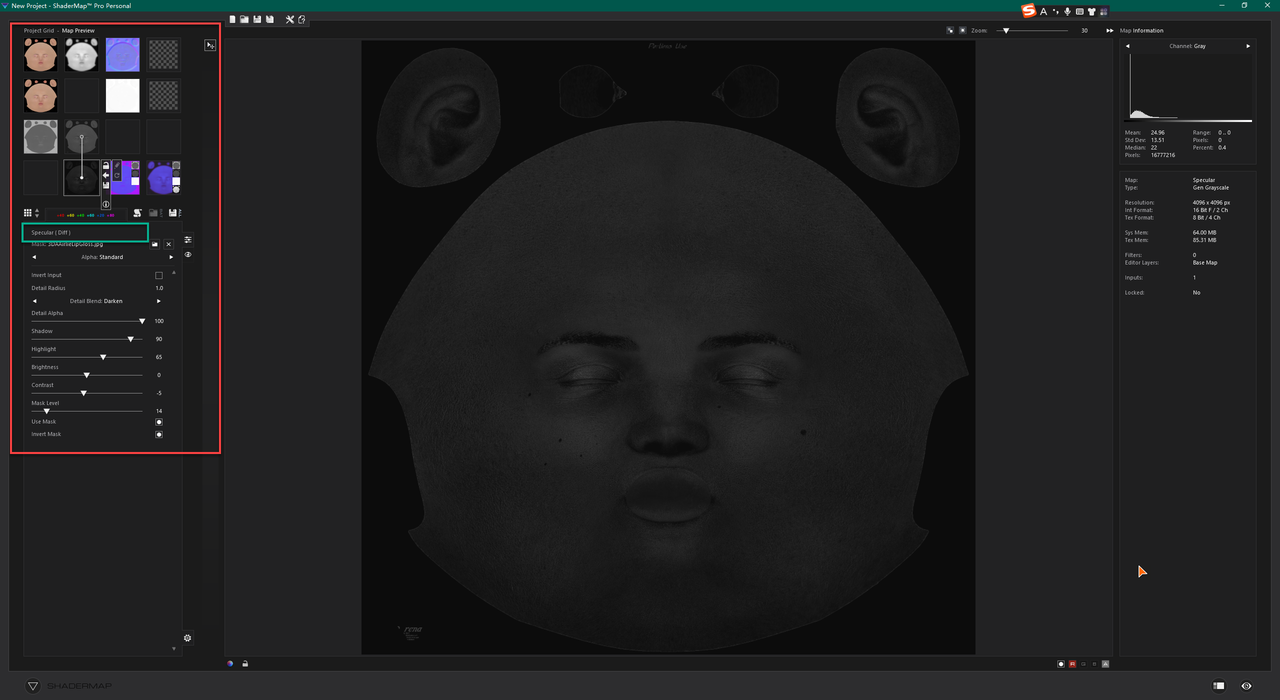
You set the proper input map and tweak some params, that'll do ~
If you know VAM, notice those G2F based characters mostly use such similar specular maps...Those bumps may come from diffuse map when you generate new maps, or if you use Pt or Mari, you can paint skin details on designated layers then generate these maps accordingly.
April 13, 2023 at 8:41 PM #1956249@windreaver0118 I've tried making those maps in Shadermap and they do come out looking much like the one you posted, but not like the one I posted. See close up on the one I posted theres a lot of "grooves" and texture almost like a normal map. The ones shadermap produces does not have those, are they important for something like a roughness map?
April 13, 2023 at 8:50 PM #1956252@gts6
The map I posted also has some 'grooves' if you take a look at close-up, but the original diffuse map of this character does not have much details. So it still depends on the map you use or make...April 13, 2023 at 8:59 PM #1956254@windreaver0118 Maybe i'm doing something wrong in shadermap then. Did you use a regular basemap and generate the map? Or did you do some processing on the base with another map first, then generate the map from that new one? Which map did you use for the target, the spec or roughness or gloss ?
April 13, 2023 at 9:08 PM #1956258@gts6
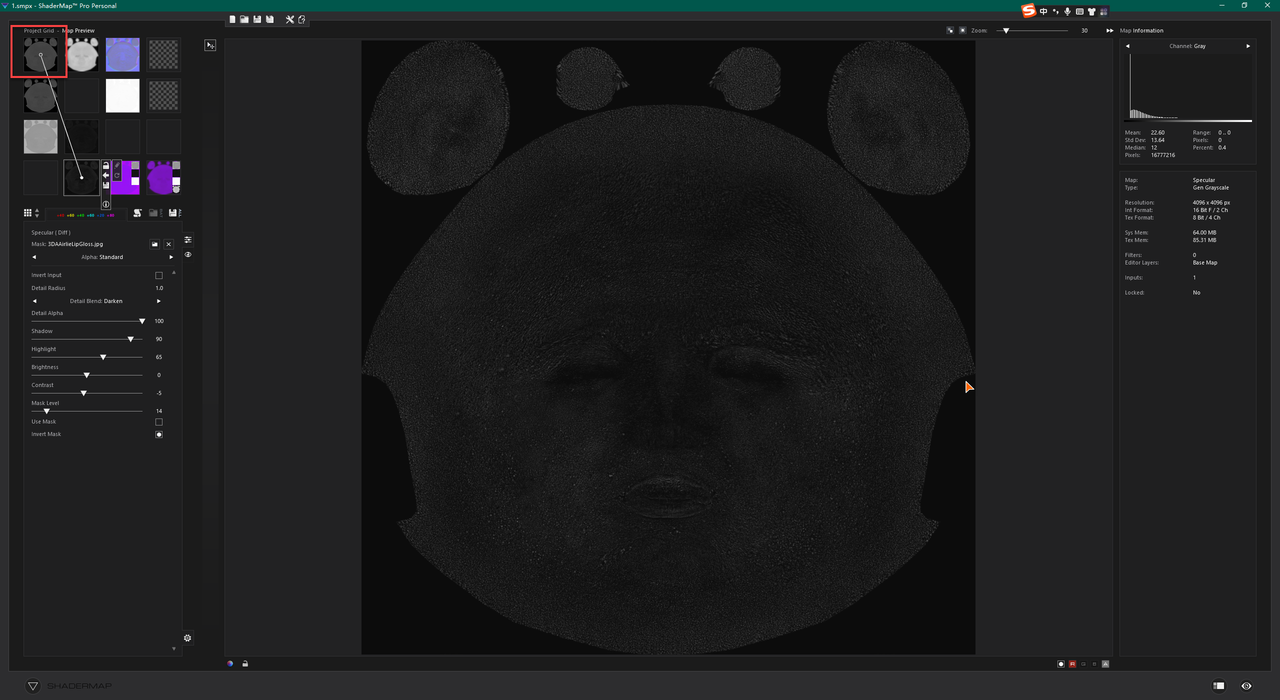
I just used Metalness as the input map since it was quick. If diffuse map has less details, you may use some good Bump maps as the source image, then you'll have more details or 'grooves'...Like this one:
 April 13, 2023 at 10:59 PM #1956280
@windreaver0118 I tried it that way, I did come much closer to the one you posted, still not as crisp details of the skin as the one I posted, but the rest looks similar. But I have seen other maps that do look similar to the regular gray specular map that shadermap spits out if generated right from the diffuse/base map. And a specular map output from crazybump also looks much different than the one I posted and different from the one from Shadermap as well. That one seems to have elements of multiple maps the way the one I first posted does. So, I think I have a better understanding of this map, is this the case: the one I first posted, and the one from crazybump are basically combinations of multiple maps (and thus they are seen in multiple places in a surface, such as gloss,roughness, and specular fields of a surface). Whereas the maps in shadermaps are separated:specular map, metalness map, rough, and glossy maps. And If I use these I would have more granular maps and each would go in its own relevent spot in the surface, unlike the combined one which is one-size-fits-all. Is this assessment correct?
April 14, 2023 at 7:54 AM #1956390@gts6
Yeah, I believe so. All these layers (R/G/S..) may use the same map or you make / generate different ones to make subtle effect change. ShaderMap mostly follows the industrial naming convention of PBR materials but you can tailor-make diverse maps based on combinations.
Or further use the software like Pt to paint more details on them... it's all up to you.April 14, 2023 at 9:39 AM #1956492It usually occurs in "Iray maps"...
Iray works in a "peculiar" way, like any rendering engine, with "its names, and classification".
I think that with "Substance" or "Marmoset Toolbag" you can do something..., especially if you do it "new/original" from a mesh created in Z-Brush..., which "I think", exports maps: Lo I'm sorry, but I'm clumsier with Z-Bush than with Rhino for organic modeling... My thing is "pure and hard" CAD/CAM...
Otherwise, then Gimp or Photoshop to modify..
Or "Facegen"...April 14, 2023 at 3:31 PM #1956647Ok thanks to all of you for the input. I think I have a grasp on it now. And at the end of the day, and many experimentations, I come to discover no matter which of the variations of this type of map I used, the end results between them was not really noticeably different at all (at least not to my eyes)
April 14, 2023 at 4:30 PM #1956686😀
As per my exp, in most cases noticeable difference may be seen on Dual Lobes and Top Coat layers after replacing the maps, and tweaking the dials might be needed as well...April 20, 2023 at 12:03 AM #1959085@inversekinematics I've tried pixplant demo but I couldnt get it to work, it kept crashing as soon as it opened up. So I put it aside that day and tried bunches of others (shadermap,crazybump, mindtex,materialize, xnormal & prob a half dozen others lol) They all have pro's and cons. But i'll have to revisit pixplant check out the videos.
-
AuthorPosts





- You must be logged in to reply to this topic.
