Home Page › Forums › General Chat › using v4 props on G8.. errors when loading scene
- This topic has 4 replies, 3 voices, and was last updated 6 years ago by
 eelgoo.
-
AuthorPosts
-
October 16, 2020 at 1:14 PM #1635595
Hello lovely community, I have a small problem, sometimes i do use some amazing props such as piercings and or hair from the V4 generation onto a G8 character.
The items load fine and render very well, I sometimes have to do some adjustments like position and apply shaders but other than that, I am super happy I can still use those (as some items/hair don't exist for current generation, from a decade ago).
The problem arise if I close the scene and re-open it. 99% of the time said items appear as a "block". I post an image so that you can understand what i mean and it is very frustrating to delete the object and re-add it. When a character has hair and earrings and piercings it means re adding 4+ items, up to 10 maybe. It's also happened sometimes when I open a scene with a V4 character, for some reason it doesn't save well and certain items i need to add again.
Does anyone have the same problem? is there something i do wrong?
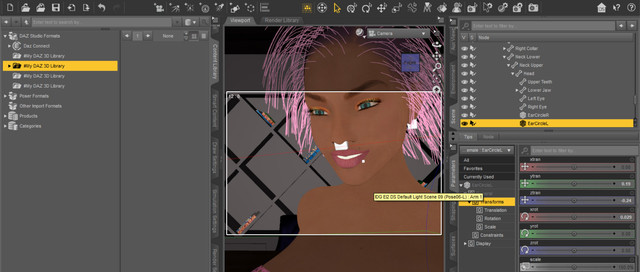
EDIT: something curious happened as I connected an external unit that i use for backup. If said drive is connected, a folder on it gets created, with the following directory path:
data\auto_adapted
and inside it all the 8 items that i used from the poser folder. Now, why that is, it's a mystery to me, so if the external drive is connected, daz automatically creates a folder there and successfully imports the props/hair, but why is that, it's a mystery.
Hope anyone can understand better and give me a hand, as ideally i'd like to work on my main drive and not have to connect my external hd to import scenes.. lol!
EDIT 2: It seems there are some bugs with DAZ if one has multiple folders configured as source files, in particular with Poser items I have noticed in my settings the first folder was setup as on the external drive so it automatically went there to create converted V4 objects. So if the drive was not connected it wouldn't automatically go to my main drive and give an error. It seems that if I only keep one drive as the source, it now works.
But will run more tests, sorry for the post, maybe i shouldn't have it afterall 🙂
October 16, 2020 at 8:05 PM #1635657What version of Daz Studio are you using? 4.12? Build number? This is usually a cr2 to duf conversion problem, try to save the prop as duf first, as a subset, and then apply it. Mixing cr2, pz3, and other older poser formats with a duf creates problems.
October 16, 2020 at 10:14 PM #1635672Are you saving the whole scene as a duf?
If so that may be a consideration.
Any hair/clothing I am using on a character, once I have it as I want it & fitted satisfactorily I save as a Wearable Preset.🙂
October 17, 2020 at 6:45 AM #1635710yes I need to understand how to save the converted items that i have adjusted to my G8 figures as a wearable preset but somehow I failed to learn how to do that yet 😀
And at the same time I also need/want to save many old items that are poser original files into new duf files, so i deffo need to learn both things.Finally, I read somewhere in the forum that once i have a character with all morphs and clothes that i like that i could save the whole character with everything applied for later use, how can i do that so that i don't have to import a whole scene that maybe has more than one character + background + lights? that'd be useful as well!
October 17, 2020 at 7:57 AM #1635713Well, there are various 'save as' options.
Personally I seldom use the 'save as scene' function, but it can be handy for a custom kitbash scene setting.
I use 'Save as Wearable Preset' a lot.
For instance, I first load the character, often from a previous 'Save as Character' duf I have set up covering both morphs and textures, as some vendors do not provide a single click character load duf.
I will then set up the hair & gens I wish to use on the character.
Ensuring they are correctly fitted / parented to the character, I will save that as a Wearable Preset.
I will then do the same with a seperate wearable preset for the clothing outfit I wish to use.
So when I wish to use that character again, I have them up & running in a few clicks.
🙂 -
AuthorPosts






- You must be logged in to reply to this topic.
