Home Page › Forums › General Chat › Using G8F G8M as low-poly props instead of billboards - a workflow + questions
- This topic has 10 replies, 3 voices, and was last updated 5 years, 7 months ago by
 John Lund.
-
AuthorPosts
-
February 21, 2021 at 12:35 PM #1668586
For a long time I have wanted to be able to create scenes with a lot of G8F characters but as things are now it's not possible with DAZ3D. One solution is to use V4/M4 but it has its drawbacks and using billboards definitely has a lot of drawbacks. Decimator sounded like the holy grail but apparently it's not possible to save the result in order to build up a library of figures to be used another day.
I really wanted to turn G8 into my own low-res figures and sometime ago I got a tip from this community (think it was here (https://zonegfx.com/forums/topic/creating-low-poly-people-for-scenes/), participants @ulysses @jrnkmail @sonytony @globalrecession2009 @legolas18 @abad @baconsmoke @frank22 @amberleaf) that G8F could be converted into a prop. Recently I found time to dive into that and have now figured out a reasonable workflow for doing just that.
Preliminary testing with one G8F-prop multiplied 50 times = 50 props in a simple HDRI-scene, and 5 different G8F-props multiplied by 10 = 50 individual G8F-props, works fine in viewport and can be rendered with Nvidia 2080 GTX.
BUT, I have also tested a much lower number of G8F-props (5) + 4 "normal" G8s in a more complex scene with tons of billboards that suddenly caused problem with the render...so need more testing but the principle should work.
EDIT: I just re-tested the same scene I previously had problem with...it just works fine now. I guess it was a bad version of DAZ that caused the memory problems.
In case someone else is interested, here is the workflow:
1 - Place G8F in a group named like "PROP - VYK_Teyla G8F in bikini and heels"
2 - Unparent all -figures- (basically all clothes, hair, genitals etc) from G8F and put them into the group
This makes it easier to have control over what has to be converted, i.e it's easy to forget the eyelashes, eyebrows etc (just to be clear: when converting G8, all figure-items like clothes, hair, genitals get "spitted" out, so they need to be converted in their existing place and then placed in a group including the G8-prop for it to work properly).3. Unparent all -props- from G8F (i e earrings, glasses etc) and put them into the group, they will be last in the group and are NOT necessary to convert. How to know what's a -figure- and what's a -prop-? = they have slightly different symbols in the Parameter Tab.
4 - Convert all -figures- to props
a) Select a wearable item (it is possible to select all wearables in one step, BUT, they will have to be converted one at the time)
b) Edit/Figure/Rigging/Convert figure to prop5. Save the file as something like "All figures converted but not G8F".
The reason for this is that IF you want to have the SAME POSE but different clothes, hair, character, skin, make-up etc - you don't have to convert the figures that will be the same (like eyelashes, eyebrows, character, hair or whatever you want to have the same).6. Convert G8F in the final step, as with the figures, do it with Edit/Figure/Rigging/Convert figure to prop
Now everything is props and as long as you only move the GROUP they will stick together properly.7. Save the group "PROP - VYK_Teyla G8F in bikini and heels" as a scene subset with a nice descriptive name.
The prop is now ready to be merged into a suitable scene.
Questions
Is there a better way of doing this?
My idea was to have several sets of hairs and clothes for each G8 in the group and just change what is visible depending on the need, BUT, converted clothing and hair items makes the size of the total .DUF file surprisingly big. Why is that and can something be done about it? A few simple clothing/accessory items can become bigger than the G8-prop itself. Yes, yes, I prefer G8F butt naked but sometimes a little something is...nicer.
I can't get Genesis 8 Female Genitalia or New Gens for G8F to have the correct color, they become darker (and greener I think..) than the surrounding skin. It's ok with a tanned skin (on distance) but not if the skin is pale. What can be done about that?
Is it a way of converting all figures to props in one click? Now they have to be converted one at a time. I really wish to find a super-fast kind of work-flow...
Would be happy for all sorts of input!
February 21, 2021 at 1:38 PM #1668593Yeah, wish that was possible in DAZ....
February 21, 2021 at 6:51 PM #1668673@Legolas18
Are you doing a completely real-time game? Unreal is such an utterly different environment to Daz. One is for real-time and one is geared towards pre-rendered animations and stills. I'm trying to figure out how you just jump from one to the other. It seems you would have to completely change the kind of game/artwork you are doing to do something like that. What is your experience so far with this change?February 24, 2021 at 5:46 PM #1669431my workflow:
- if needed use Decimator to create even more lowpoly
- export figure with cloth and hair to obj
- import obj
- copy materials and delete original or create another figure to export/import
- done🙂
February 24, 2021 at 6:13 PM #1669439Thanks @maxxp2!
Sounds like good ideas! Will definitely test that!
One question though:
"copy materials and delete original or create another figure to export/import"
What do you mean with that?
February 24, 2021 at 7:24 PM #1669460I used File/Export and then Wavefront Object (*.obj)
When I re-import the G8F, everything is perfect apart from the surfaces, i e skin is much lighter and looks a bit like glass. I guess iRay got lost in the process...
How do I fix that? I guess the part "copy materials" could solve it, but how do I do that?
If the material thing can get solved - this will work like a charm!!!
February 24, 2021 at 8:54 PM #1669494I figured out how to do it!!
Everything has the right texture except the hoops/earrings, I guess it's because hey are props and not figures, so they have to be done individually.
But it is something white in the lower part of the eyeballs:
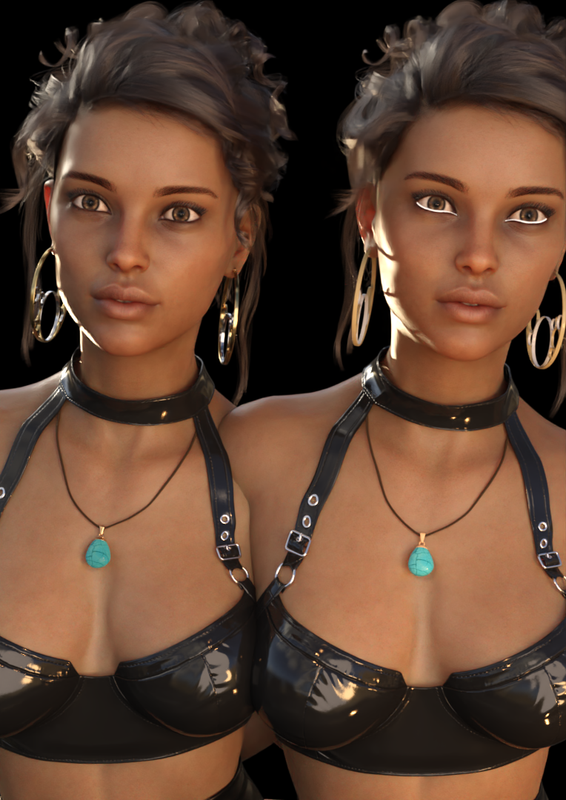
What's that and what can be done?
Thanks for an excellent workflow!!!
February 24, 2021 at 9:47 PM #1669509Found out what the white is: It is EyeMoisture_Genesis_8_Female_EyeLashes. It's just to set Cutout Opacity to 0 and it looks great!
Thanks a @maxxp2! I think this is a winner!!!
February 25, 2021 at 7:03 AM #1669629The shaders from the imported obj might be 3delight and when you copy the shaders it will be ignored. After import I just select all shaders before copy and put the iray uber base shader on them.
Regards Moisture, if you use the prop closer to the cam you can also just put a water shader on the moisture.
February 25, 2021 at 12:47 PM #1669723@maxxp2 yes I noted that things like older hairs needs to be converted with the Uber base.
About moisture: Aah, that's good to know, but as the OBJ-figures is intended to be used on a distance I guess it wont be visible.
Next step is to see what decimator can do!!
February 26, 2021 at 2:45 PM #1669957@maxxp2 I hope you have time to help me a little bit more....!!!
I tested Decimator and it works. The characters skin and body is quit OK down to 15%, at 10% it gets distorted at close-up but I think it's possible to get down to 5% if used on distance.
Two problems:
1. I can't figure out how to save the reduced OBJ in order to create a library with low-poly characters to be used another day...! There is a LOD-id that is saved that should mean something but I have no clue how to use it. There is some microscopic info here: http://docs.daz3d.com/doku.php/public/read_me/index/10673/start, but not about saving or exporting.
2. As the whole character, hair, outfits etc is ONE after exporting to OBJ, it´s not possible to have different reduction for different parts. The character can easily be reduced to 15% but the hair collapses long before that. Is it a way to export to OBJ with different items intact?
Hope you have time to come back with some tips, much appreciated!
-
AuthorPosts





- You must be logged in to reply to this topic.
