Home Page › Forums › General Chat › Turbo Content Didn't Install
- This topic has 10 replies, 7 voices, and was last updated 6 years, 7 months ago by
hansolocambo.

-
AuthorPosts
-
September 21, 2019 at 11:43 PM #1255494
Hey everyone,
Has anyone got Turbo Content to install? I've tried all sorts of ways but no luck. If so would you post the DLL file it creates. Otherwise the 4000 points I paid for this is well, wasted.
ThanksSeptember 22, 2019 at 12:28 AM #1255540I agree Amber - the .dll for the plugin folder does not seem to be getting installed. Looks like we have the same issue we had with the render queue by the same artist.
If the original uploader could supply the .dll file that woule be much appreciated or as Amber says it is a useless upload.
If I am missing something on how to upload it by all means please enlighten me.
SDL.
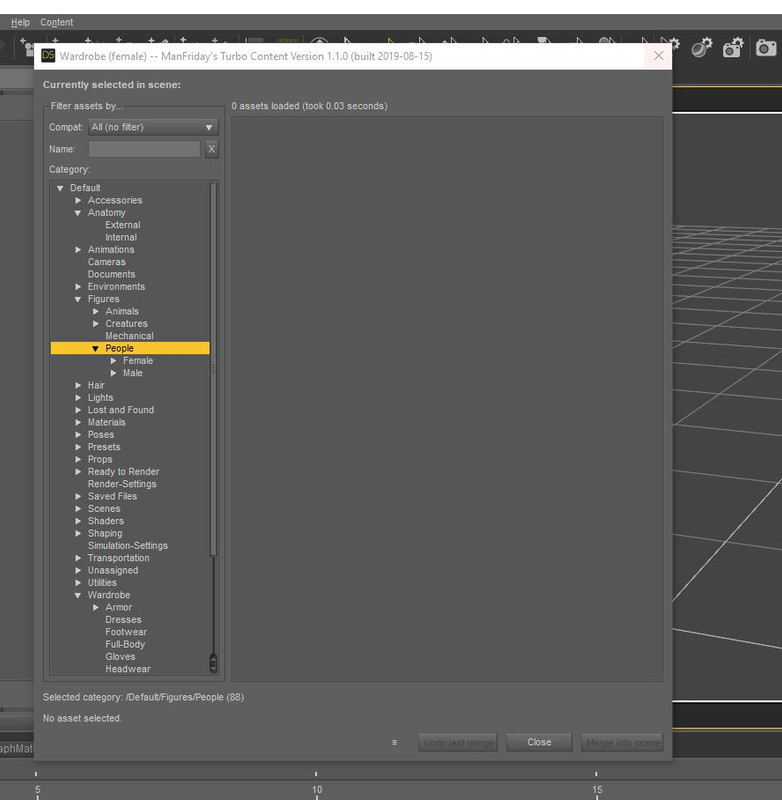
September 22, 2019 at 12:52 AM #1255555I was able to install it, but the problem I have is that it can't show me all the products, for example it doesn't show any characters.
 September 22, 2019 at 1:07 AM #1255565
That is listed as an issue under the forum topic for that asset. Let me see if I can find the link:
https://www.daz3d.com/forums/discussion/comment/4856596/#Comment_4856596
Seems to be if you have custom file paths or excessive assets.
And please enlighten us with how you installed it. Or pop up a link to the plugin .dll if you can and that is easier for you ?
SDL>
September 22, 2019 at 1:11 AM #1255568September 22, 2019 at 1:19 AM #1255574@ShadowDemonLord
Thank you for that link.
I just installed from the link on this site and do not understand which .dll file you are talking about. Like the rest of the products that are in the .exe format. My products are in another partition so they are not in the main DAZ path but this plugin was installed in the main DAZ path because I could not change the path, I think. And the other thing was that I didn't need to go into the (Help/About Installed Plugins) or (Windows/Panes(Tabs)) . It was itself shown after the installation, after the Help as the "Content" (it is obvious in my image).September 22, 2019 at 5:15 AM #1255732Thanks guys - now working.
No idea why the .dll does not install reliably - I have no other issues with installs.SDL.
September 22, 2019 at 6:44 AM #1255815Thanks, now working 🙂
September 22, 2019 at 8:09 AM #1255895Hi all,
I have posted this info in General and Requests, as we as adding it to the download folder.
I have also added the pdf manual [which I had to find after I had installed Turbo - as it was not provided as a separate file. DUH!!The original DAZ download only contains the exe file. So that is all there is to provide.
In 4.11 I found the Content options on the top row of tabs, next to help.
No problem selecting option for figures/people [separate male and female].
As mentioned below - while you still have the purchase link re-request download and select pdf manual, if you want to read through thoroughly before installing.TURBO CONTENT INSTALL README;
For those that have/or will download Turbo.
[This note will also be added to the download folder].Even though the install is an exe file, it should be treated as a DIM zip file.
So, put the exe file in the Install Manager CONTENT LOCATION folder.
[ where the DIM zip files are. ie. C:\Users\Public\Documents\DAZ 3D\InstallManager\Downloads] or wherever you hid it.Start Daz Install Manager [check, work offline, so as not to connect to Daz]
When loaded Turbo should show in Available to Install section.
Install.
I have also added the pdf manual, so you can read up on it before installing [or while pulling hair out].
If you download again – before the purchase link expires – you can get this info and the pdf manual in the folder.
September 22, 2019 at 12:57 PM #1256152Anonymous
InactiveRank:
It's a matter of permissions. I had to take ownership of the Daz folder in the program files for it to have permission to write into it.
After that it installed the plugin without a problem.
Unfortunately it's of no use if you don't use smart content 🙁March 22, 2020 at 7:33 PM #1528529Don't fight to install it. Works only with smart content. And even there it can't find everything IF the installer is not done properly by the vendor. So basically : useless. Too bad, it sounded good at first...
-
AuthorPosts








- You must be logged in to reply to this topic.
