Quick Fix for Waxy/Translucent Skin?

Home Page › Forums › General Chat › Quick Fix for Waxy/Translucent Skin?

Viewing 5 posts - 1 through 5 (of 5 total)
  • Author
    Posts
  • #1967605
    Anonymous
    Inactive
    Rank: Rank-1

    I am working on some renders, and the skin on one of the models is looking kinda waxy... especially in the fingers.

    Is there a surfaces setting/slider that I can adjust to have less of that hand-on-top-of-flashlight 'glow"?
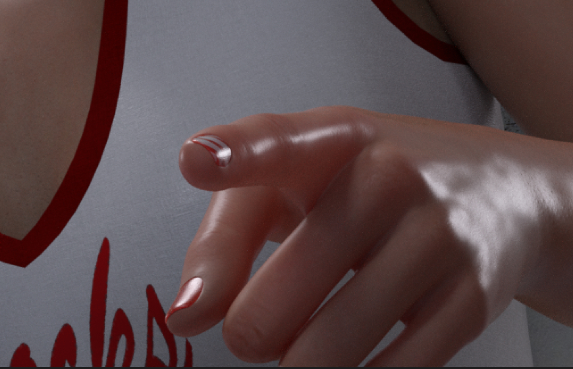
    Waxy Finger

    Along with the glowing finger problem... how can I knock back some of the skin sweatyness/shininess.

    Sweaty Finger

    In both cases I tried to fiddle-faddle with the surfaces sliders, but I wasn't getting the right one... and then I got the settings all messed up and had to start over from a save.

    I know it is something simple... But maybe I am too simple minded

    #1967704
    TunaMcButter
    Participant
    Rank: Rank-2

    Honestly I think its your lighting making it look that way, let me elaborate there are photography lighting packs for daz here i think getting some will help you

    #1967736
    ColdBeer31
    Participant
    Rank: Rank 5

    Are you possibly using PBR shaders? In this case: If you change them to Iray Uber the problem should be solved.

    #1968070
    ADAM
    Participant
    Rank: Rank-1

    My nonprofessional solution would be to load a different skin on her and see what it looks like. If its the same then its probably the lights. If not then its not the lights. =)
    I would then compare the skin settings to each other.

    I had something like this happen with poser figures in Daz. I think my solution had something to do with glossy setting but I forget.

    #1968173
    Frank21
    Participant
    Rank: Rank 5

    Lower the SSS setting.

Viewing 5 posts - 1 through 5 (of 5 total)
  • You must be logged in to reply to this topic.


Post You Might Like