(Solved) Problems with Look At Me II Pose Control?

Home Page › Forums › General Chat › (Solved) Problems with Look At Me II Pose Control?

Viewing 5 posts - 1 through 5 (of 5 total)
  • Author
    Posts
  • #1832874
    DazHakz
    Participant
    Rank: Rank-1

    I've been having issues with Look At Me II Pose Control. I'm wondering if I am missing an update, or if my DS setup is the one at fault. If it is a missing update, I would gladly pay for the product and get the latest version, but I want to be sure first.

    I'm using Daz 4.20.0.17 x64.

    "Look at each other" script works the first time, but after closing the window, any other attempt will fail with the following errors (happens with any figure, G1 through G8.1):

    [DEBUG] :: sourceHeadSliders 
    [DEBUG] :: sourceHeadSliders [object Object],[object Object],[object Object]
    [DEBUG] :: Error TypeError: Type error

    Could anyone help confirm this is an issue with the posted version?

    #1832880
    gts6
    Participant
    Rank: Rank 5

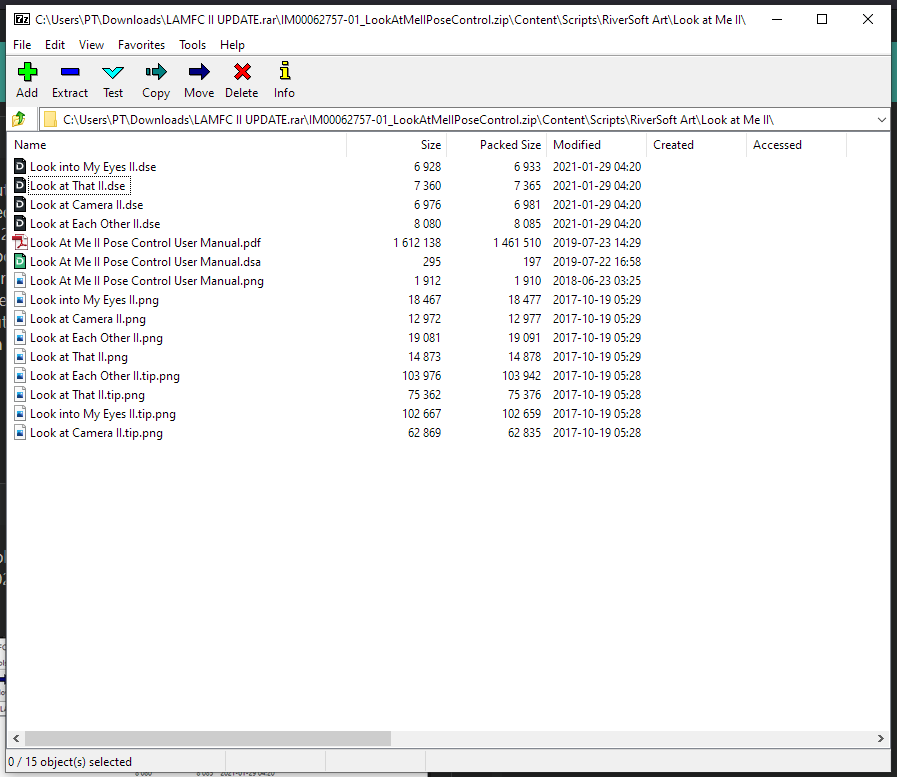
    I use this without issue, but i'm not sure if its the same version as here on ZG. I just checked in the .zip file I have and I can see most of the files are modified dated 2017 except a few of the scripts are dated 1/29/2021 (looks like an update in 2021) Not sure if this is the "latest" update or not, but that is the one I use without issue.
    If you don't have those updated scripts from 2021 in your version, then you are prob out of date. In which case, let me know and ill give you an updated version (or upload here but not sure if I can since the one here is not "Dead")

    #1832883
    gladson1976
    Participant
    Rank: Rank 3

    The one in the blog does say "Update" and I just downloaded it.. there are files from 2021 there.. will check it out and see if I get the issues that DazHakz gets..

    #1832904
    DazHakz
    Participant
    Rank: Rank-1

    I found the issue, it seems one of the scripts I am using in my workflow to zero the figure is breaking Look At Me II somehow, which is strange, because it only sets rotations to 0, but I was able to reproduce it.

    I'll dig into the script and check what it does.

    Thank you guys for jumping in. The posted product works fine.

    #1832950
    gladson1976
    Participant
    Rank: Rank 3

    Glad you got it sorted out.. which was the offending script ?

Viewing 5 posts - 1 through 5 (of 5 total)
  • You must be logged in to reply to this topic.


Post You Might Like