Posting Error on request forum?

Home Page › Forums › General Chat › Posting Error on request forum?

Viewing 4 posts - 1 through 4 (of 4 total)
  • Author
    Posts
  • #892538
    Pearl Waters
    Participant
    Rank: Rank 6

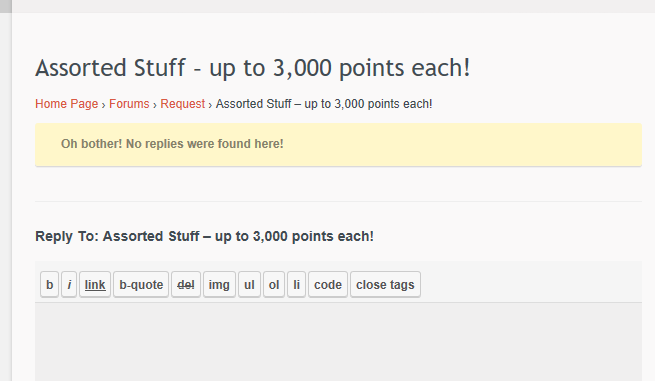
    Every time I've tried to post a new thread in the requests section the past few days, I've been getting an error that says no replies found, and then the thread never appears in the forum. Has anyone else been experiencing this problem?

    Here's a screenshot of the error page:

    #892545
    AndyMc4
    Participant
    Rank: Rank 3

    Yes, I had this problem consistently for a while, but no longer! @EvilMonkey sent the following:

    The issue you’re talking about with ‘links’ making your post disappear into the ether isn’t new. It’s just when you use the built in ‘link’ button/code from the post form. I think it’s supposed to be to block bots from posting walls of text with various nefarious links hidden within but it just ends up being annoying I know. You can however just post the link addresses and they are clickable within your post, you just can’t make them ‘pretty’.

    In a nutshell, just copy the "htpp://....." string into your post as a text string and everything works.

    Hope this helps

    Andy

    #892555
    Pearl Waters
    Participant
    Rank: Rank 6

    Thank-you!

    #893491
    EvilMonkey
    Participant
    Rank: Rank 6

    Yeah, it seems to be an anti-spam mechanic but doesn't result in a warning page telling you that's what it is.

Viewing 4 posts - 1 through 4 (of 4 total)
  • You must be logged in to reply to this topic.


Post You Might Like