Home Page › Forums › General Chat › Measure Metric; This plugin must be registered to be enabled.
- This topic has 9 replies, 3 voices, and was last updated 1 year, 2 months ago by
 Yuta.
Yuta.
-
AuthorPosts
-
August 8, 2025 at 11:07 AM #2140158
I download UPDATED Measure Metrics Latest For DAZ Studio 4.23 from ZoneGFX
I install the plugin via Daz Install Manager by placing IM000 zip folder into
C:\Users\Public\Documents\DAZ 3D\InstallManager\Downloadsand I launch my Daz Studio 2.24 to input the given serial number but I get this message
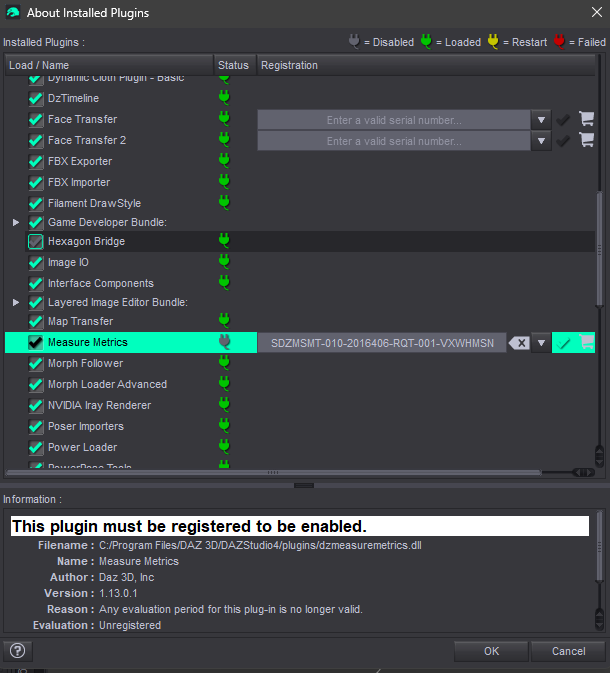
This plugin must be registered to be enabled.
Filename : C:/Program Files/DAZ 3D/DAZStudio4/plugins/dzmeasuremetrics.dll
Name : Measure Metrics
Author : Daz 3D, Inc
Version : 1.13.0.1
Reason : Any evaluation period for this plug-in is no longer valid.
Evaluation : UnregisteredFurthur Note: I did try an alternative way by installing .exe file but it still give the same result and I also have dzmeasuremetrics.dll in my C:\Program Files\DAZ 3D\DAZStudio4\plugins
I really need help with this.
August 8, 2025 at 2:12 PM #2140188From the top drop down menu:
Help
About Installed plug ins
Highlight Measure Metrics
Enter serial in field highlighted.
Once entered, you will see a green plug icon next to the title.
🙂
August 8, 2025 at 3:25 PM #2140200Hello
I already did that by input the serial number and click on the tick symbol but it show up this instead.
 August 8, 2025 at 4:57 PM #2140209
For some reason, it hasn't accepted that code.
Copy & paste, but make sure you have no additional spaces copied over.
August 8, 2025 at 10:51 PM #2140276I installed MM to see if I could help. All I did was run the DS4_MeasureMetrics_1.13.0.1_Win64 application. it installed MM. i then cope and control+V (pasted the S/N. And everything went perfect. I suggest using the application and see what happens.
August 9, 2025 at 3:54 AM #2140295I use DS4_MeasureMetrics_1.13.0.1_Win64 to install Measure Metric and I make sure there is no additional spaces when input the S/N, it still show up the same result.
Is there something wrong with my Daz Studio? I am using Daz Studio 4.24
August 9, 2025 at 11:56 AM #2140346I am not sure. But you first put MM manually into the program folder. Did you delete those files before running the installer? I am running the same version of Daz3D. I ran the installer. Copied the S/N. Then used CTRL-V to paste. Then I manually moved the updated file into the plug in folder.
I suggest starting the install from scratch if you haven't already. By purging all the MM files. Other than that. I don't know another suggestion.
August 9, 2025 at 2:43 PM #2140354Do I have to login my account in Daz Studio or work offline?
Where can I find the updated file?
August 11, 2025 at 12:51 PM #2140584There are 2 Measure Metric files in the download. One is the installer, that I ran first. Then entered the S/N. Then I updated the MM with the 2nd folder (IM00016684-02_MeasureMetricsForDAZStudio423Win64bit.zip) The 2nd folder is the update (I am assuming, it may not be anything different. I am no expert.) of the DLL file that you move to the C->Program Files->DAZ3D->DAZStudio4->plugins folder.
Once again. Did you delete the DLL file in the Plugins folder and delete any hidden app data, then start from scratch? I really can't do much more than this to help you understand file structure in a Windows computer if you are already not familiar with working inside the directories.
August 12, 2025 at 5:02 PM #2140821I clean install Daz Studio and Measure Metrics, delete all the related files in my drive yet it still give me the same result.
[ SOLUTION ] My Daz and Windows is the problem
I try to run Daz Studio “Run as Administrator” but it pop up a box saying Daz Studio permission error "Daz Studio cannot run elevated permissions". So I search online and watch a YouTube video to solve this issue,
1) Open Registry Editor
2) Computer\HKEY_LOCAL_MACHINE\SOFTWARE\Microsoft\Windows\CurrentVersion\Policies\System
3) EnableLUA > right click > modify > change 1 to 0
4) File > Export... and save the file to the Desktop with a name like "Daz Reset"
5) Double click the file and agree
6) Open Daz “Run as Administrator”
7) Help > About Installed plug ins > Measure Metrics > Input S/N
Note: I couldn't click on the tick icon, I instead press the enter key. Then it finally pass!Further Note: I also notice that some of the Measure Metrics content is missing, I fix this by extracting IM00016684-21_FigureMetricsforDAZStudio46Content.zip into C:\Users\Public\Documents\My DAZ 3D Library
After Measure Metrics is activated, restore EnableLUA to 1 in the registry and reboot.
-
AuthorPosts





- You must be logged in to reply to this topic.
