Home Page › Forums › General Chat › Manfridays render queue fills up disk space
- This topic has 13 replies, 6 voices, and was last updated 4 years, 9 months ago by
 Frank21.
-
AuthorPosts
-
January 14, 2022 at 6:59 AM #1766839
As the title says, this plugin i suspect fills up disk space a lot, like 40-50 gbs alot. After a few days it emtpies the disk or purges the files it creates. I am not tech savvy but i am fairly sure that plugin is the culprit.
Is there any option to stop this? or should i stop using that plugin?
January 14, 2022 at 9:09 AM #1766855I use it a LOT for a long time and have not noticed anything like that.
January 14, 2022 at 9:14 AM #1766856I am not sure either what is goign on, i also notice it when i get render failed to render will retry or when i schedule 10-15 renders. From what i have seen there is no option or anything that is relevant to this.
edit: I notice that if a scheduled render fails 2-3 times for whatever reason the disk fills up, when the schedule ends the disck empties, but not always. Eg it might empty 5 gbs, and in a next render schedule it will empty the rest. Not sure what is going on.If i render without the manfriday thingy disk never fills up
January 14, 2022 at 9:30 AM #1766858I'd suggest getting a disk space analysis tool that will show you what's using your disk space and where. I prefer SpaceSniffer as it's free, quick and easy to use.
January 14, 2022 at 9:45 AM #1766862Not working on win10, will try to find a similar one
edit: deleted many files, also noticed that each scene for daz is 900 mbs or 1gb, is this normal?
I suppose the plugin stores files or whatever thats why the disk fills up. Sometimes it deletes them right away and some not. Will keep an eye on that
January 14, 2022 at 1:07 PM #1766925No, they should not be that large. With a single character it should be anywhere from a few MB to 20, 30, 40 depending on the scene.
I put 5 cents that you have re-used the same character over and over instead of starting with a fresh one. For whatever reason, a G8F can become many 100s of MB after being used many times.
Delete one character at the time and save the scene each time. With no G8F I am sure the scene is much smaller. (Also note that some hairs can consume up towards 100 Mb while others are under 1 mb.) Then save all necessary presets for your character like body, head, skin, LIE etc and start with a fresh G8F.
It will become a much smaller file and workflow in viewport will be faster.
January 14, 2022 at 1:20 PM #1766928@Kinkygr. SpaceSniffer definitely works on Win10, I'm using it right now and have been for years...
Is it the actual saved scene .duf files that are that large? If so, that's really large; I just checked a 9-character scene file and it's only 20mb. I wonder if the plugin is collecting all the image maps and geometry and storing them with the scene file for some reason.
January 14, 2022 at 2:30 PM #1766948Weird, mine crashed twice then dled one windir something. Could be im doing something wrong then with the scenes? Eg i use 1 character and use save as scene, i then merge scenes to another character.
Could be the problem there? Its not like i used a ton of morphs or whatever. Some times the viewport is fast others it takes eons. Could be problematic characters too. I will retry the same scene with different models to see if its a skin problem
January 14, 2022 at 3:06 PM #1766956The only time I had scenes ballooning up to over 1Gb in Daz was when I was using Z's Fit Control on clothing. Even simple scenes exploded. I'm not sure the most recent versions do that these days though. It was a few Daz versions ago.
Are you using dForce though? That will also balloon a scene up in size.
(Also I use WinDirStat for that kind of thing).
January 14, 2022 at 6:29 PM #1767014No dforce, i avoid those because i think they make my scenes take longer to load-render. Might be something i am doing wrong since i am not daz savvy. Though i must say i freed 5 gb worth of space and had 20 gbs free. Closed daz and bam now i have 15 gb free space. I have no clue wtf is going on.
I will try to find some ransomware or malware program and scan, maybe i got something
January 22, 2022 at 7:40 AM #1769274I've never used that plugin. If you are not using an Nvidia card, DS uses your cpu and your system memory to render. Textures can be very large. When your RAM fills, it then uses virtual memory on your disk drive, very slow and when you run out of that DS can crash. DS also holds the scene in system memory even if it uses your video memory until the scene is rendered.
January 22, 2022 at 8:05 AM #1769276yeah i figured something like that might be happening, i dont understand why it doesnt release that memory right away when the render is finished. It might do it the next day or the day after that. I am still looking into it. So far malwares and all that are negative
January 22, 2022 at 8:19 AM #1769282i dont understand why it doesnt release that memory right away when the render is finished.
It's been like that since Iray was first introduced into DS and people on the Daz forums have been complaining about it for just as long. It's one of the reasons I switched to Blender for rendering. I can render from the command line, a three-line batch file is all that's needed to batch-render an entire directory of blender files, and if one render crashes it won't effect any of the others.
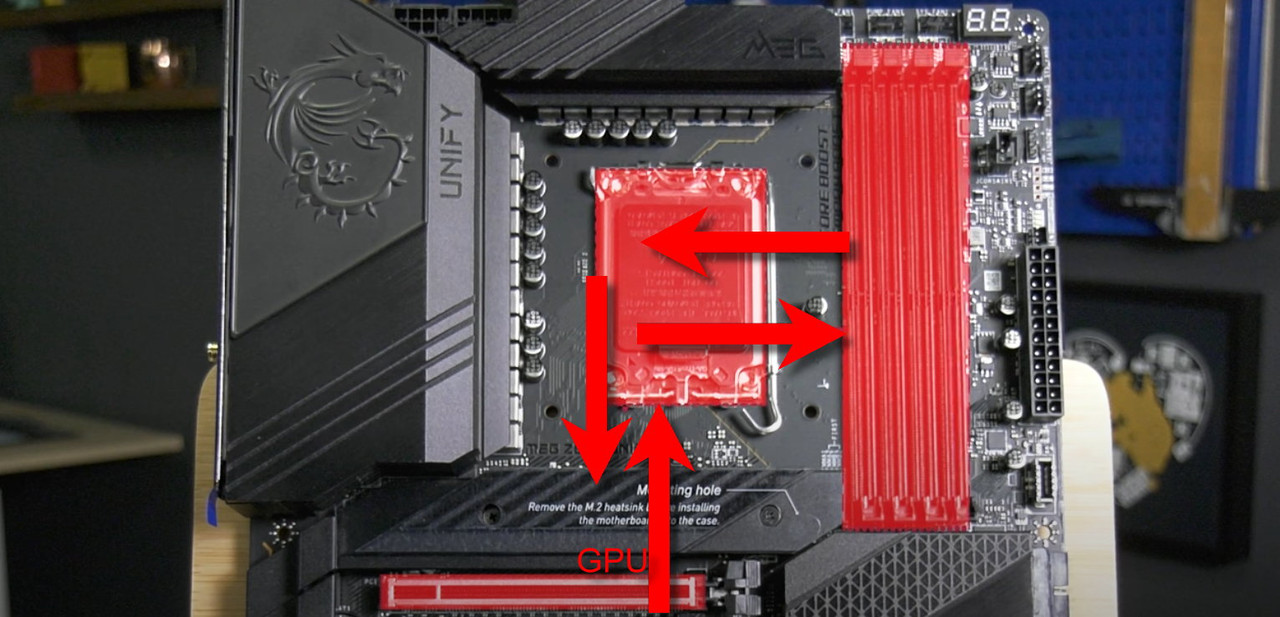
January 22, 2022 at 8:39 AM #1769284It basically looks like this when GPU mem drops to CPU.
GPU is forced to access sys memory by communicating through the PCIe bus to the CPU, then to the sys memory (your memory sticks), back to the CPU, then back to the PCIe bus where your GPU is.
As you would imagine, this is a much slower process than having mem available in the GPU itself, and particularly so if you don't have much sys ram.
-
AuthorPosts








- You must be logged in to reply to this topic.
