ManFidays Redner queue Part 2

Home Page › Forums › General Chat › ManFidays Redner queue Part 2

Viewing 4 posts - 1 through 4 (of 4 total)
  • Author
    Posts
  • #1774514
    GAMI SETA
    Participant
    Rank: Rank-2

    Couple days ago i had a thread about the render queeu and the filling of the disk for no apparent reason. Still searching that one

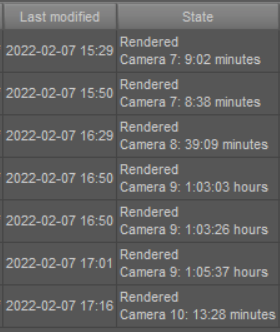
    Today i noticed another issue. I made a scene with 3 figures and one light system, the figures and the light are the same in all scenes. The only thing changed is feet and hands to simulate the dance i am rendering. Also the camera changes from point a to point b (bit to the left bit to the right)

    Renders go from 8 minutes to 1 hours plus
    image

    image1

    ps extra points to to daz for saving a render scene in pristine condition and afterwards when you render it to see feet clipping the floor, hands inside butts, glasses floating etc. Epic stuff

    #1774530
    SkippyTheMeh
    Participant
    Rank: Rank 3

    I'd bet a 1000 points that the reason for the time jump is that Iray had a problem with your GPU and dropped back to CPU-only rendering (almost certainly down to Iray's memory management).

    As for the other problem, I had that a few months ago. I never did work out what caused it (I suspect a I used either an odd combination of morphs, or one of the morphs was corrupt, but it eventually went away on it own) but I could sort-of fix it by moving any of the characters bend/twist/side-to-side dials a fraction. The char would then snap back into place.

    #1774532
    GAMI SETA
    Participant
    Rank: Rank-2

    hey skippy forgot to add, though i wanted to in the first post, that the rendering is on cpu. Dont have nvidia card

    As for the disk filling up, i am still looking into it, Could be some windows 10 hoopla.Just posting info, maybe soemone down the line will come up with something.

    #1774539
    SkippyTheMeh
    Participant
    Rank: Rank 3

    that the rendering is on cpu. Dont have nvidia card

    Looks like I owe you 1000 pts then! I still suspect memory management though. Have you tried rendering the last quick and first slow scene manually to see if the render times remain the same?

Viewing 4 posts - 1 through 4 (of 4 total)
  • You must be logged in to reply to this topic.


Post You Might Like