Home Page › Forums › General Chat › How the **** does DAZ Studio work???
- This topic has 10 replies, 5 voices, and was last updated 6 years, 9 months ago by
 eelgoo.
-
AuthorPosts
-
January 25, 2020 at 9:44 PM #1442375
I've tried using Daz Studio a few time and I was never able to install or load any content. Just now I downloaded it, installed it and then tried to install a prop from a rar file. Documents/Daz 3D/Studio/My Library. I dropped the content folder into there.
The file (Dropship Griffin, downloaded from here) doesn't show up in the Smart Content tab. I can see it in Conten Library however. But when I try to load it, I get errors that all the textures are missing (which they aren't) and then all it loads is a grey box. I can't even import that grey box as an obj, I just get a 1kb file.
Is Daz Studio just a joke? It can't be that difficult to install content into it, can it? There's no explanations anywhere, could somebody maybe tell me how to do it?
January 25, 2020 at 10:29 PM #1442432hmmm... Where to start.... For content that comes in a zip file and looks like IM0000000-01_SomeItem.zip, you can use DAZ install manager.
As for other items, the file layout inside an item is specific, The most important thing to remember is the runtime files. Make sure the runtime directory from your product is going to en up in the runtime directory of our library. Hope that helpsJanuary 25, 2020 at 10:31 PM #1442433You copy the folders INSIDE the content folder then paste those into your
Documents>Daz3D>Studio>My Library.
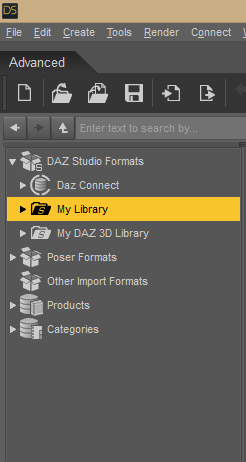
They don't show up in smart content. They show up in your My Library in Daz.
Older Poser Items will show up under Poser.
 January 25, 2020 at 10:43 PM #1442442
Am I correct in assuming you are not using Install Manager?
January 25, 2020 at 10:46 PM #1442447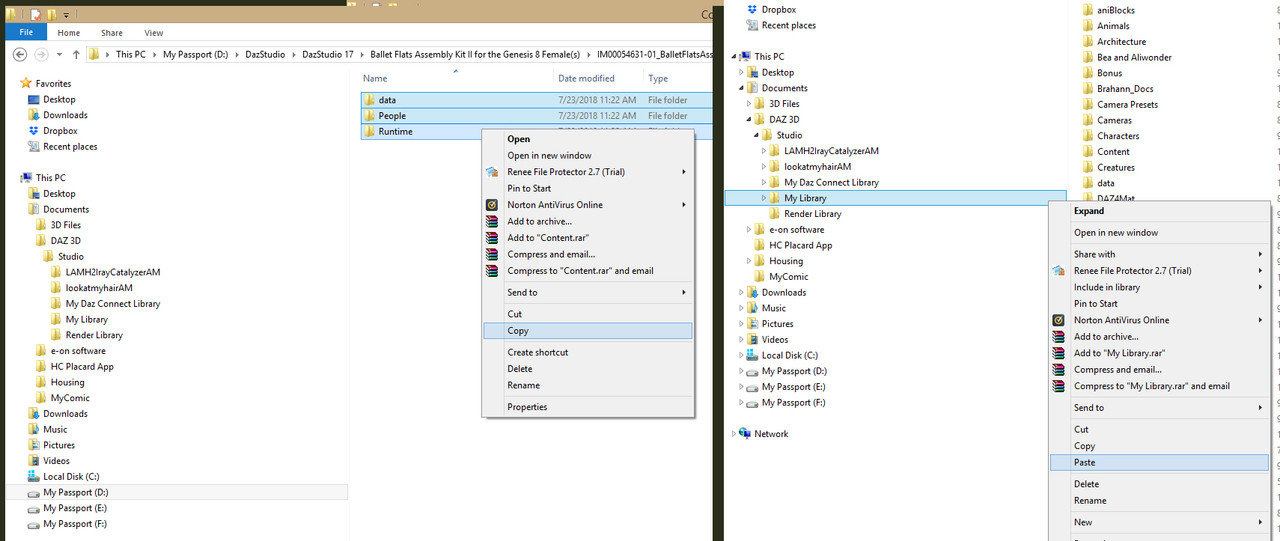
To view a larger image, right click the pic.January 25, 2020 at 10:50 PM #1442450Let them get a handle on the manual install first since thats what they tried.
January 25, 2020 at 11:45 PM #1442515Ah... okay, I get it. If it can't read the content folder, then why is every Daz item in a content folder? Makes very little sense...
I'm not using the Installer, For one, I'm old fashioned, I like to have control over what goes on, for the other, if I remember correctly the content manager installs all the genesis files and I didn't want that yet, I just wanted to try something out.
January 26, 2020 at 12:40 AM #1442579Its not that it can't read the content folder, its that you're bypassing the installer and doing it manually.
If you were to use the installer to install the file , it would.January 26, 2020 at 4:46 AM #1442769Is Studio looking in the right place for the content folder? If you put the folder someplace other than the default, you need to tell it where to find it
January 26, 2020 at 6:16 AM #1442833No, default folder. I got it working now, the problem was the content folder and me not using an installer.
Thanks everyone!! 🙂
January 26, 2020 at 8:59 AM #1442989If you prefer the tighter control of a manual install, check out this sticky.
' https://zonegfx.com/forums/topic/manual-install-to-ds/ '
🙂
-
AuthorPosts








- You must be logged in to reply to this topic.
