Home Page › Forums › General Chat › HID g9 females: I don't get it
- This topic has 18 replies, 9 voices, and was last updated 2 years, 9 months ago by
 NobunagaOda.
-
AuthorPosts
-
January 10, 2024 at 3:58 PM #2052835
I grabbed some HID females for g9 and when I load them they all have massive bodies which don't match the promos at all. Am I missing a product or something?
January 10, 2024 at 4:26 PM #2052842No idea. TBH I am giving G9 characters a very wide berth!
I am sticking with G8
:0/
January 11, 2024 at 12:58 AM #2052901thats strange..i have a lot of HIDS G9 characters and no issue at all with them...did you just install G9 with the morphs?
January 11, 2024 at 9:17 AM #2052935I have these nistalled:
- starter essential
- anatomicals
- essentials expansion
- headshapes
- body shapes
- expressions
- victoria 9I can't tell though if they are the original release or if any have been updated.
January 11, 2024 at 9:41 AM #2052937Now it would be interesting which of the HID characters you try to load so that a proper troubleshoot can happen. Also there are some morphs that have errors in them and instantly load at 100% even if you don't want it, so check for that as well
January 11, 2024 at 12:25 PM #2052950I've found that HID's characters tend to have wider/thicker bodies than their inspirations tend to have, even back with G8F. If what you're referring to is even more than this, perhaps a screenshot or two might help.
January 11, 2024 at 3:30 PM #2052980As an example, here are, from left to right:
- Base G9 feminine
- Ai
- Ariel
- Ashely
- Cereza
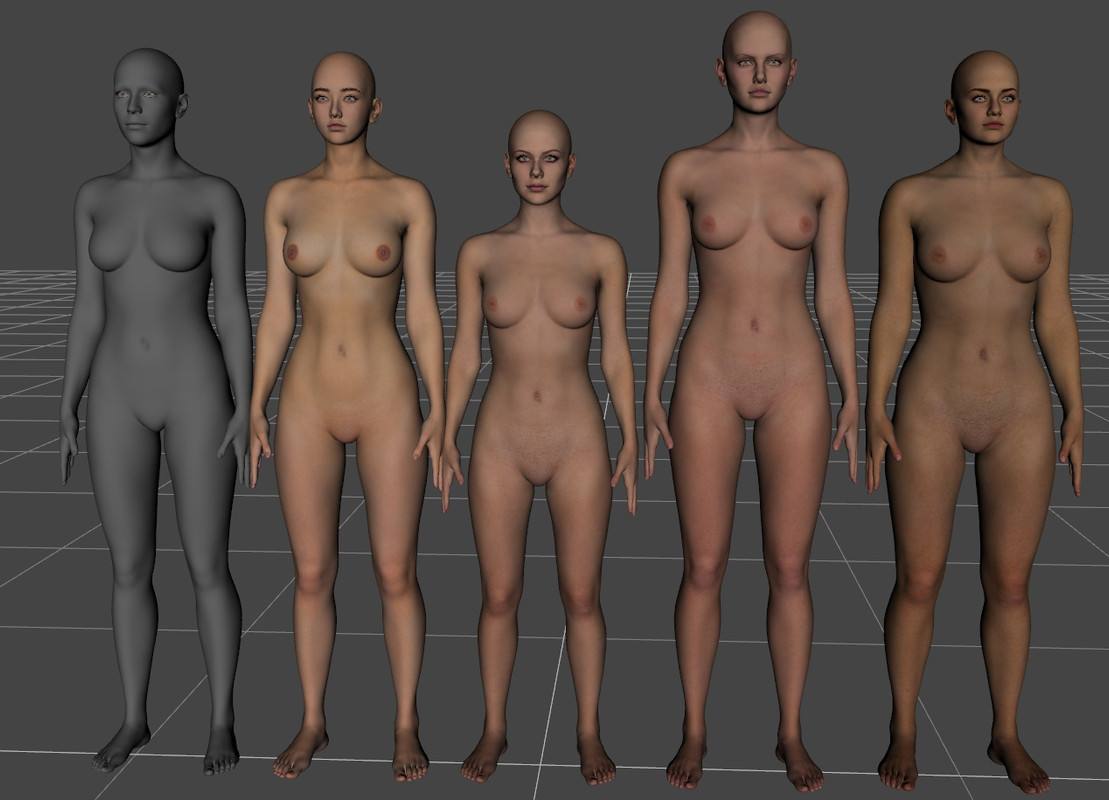
I did manage to make them look individually different but I am still bummed at how some of these are massive. Duval you are right of course, HID tends to make them bulkier than their originals, but even so, just in this line-up of characters, Ariel is the only one to be shorter than an average male. It looks very odd.
January 12, 2024 at 3:43 AM #2053078Those to me look pretty standard for HID characters. HID is known for using the same body and does no additional sculpting for different characters. I don't know why HID is so popular. The faces only have some resemblance, and barely, under few camera angles and lighting while the body and skins are the same for every character and not of particularly high quality.
January 12, 2024 at 9:50 AM #2053099I basically haven't treaded much into G9 territory. I grabbed a bunch of HID characters as to try them out, see how they behave, across a consistent base. Not that I am very impressed so far, what with how they look butchy. You have to start somewhere, and I was a bit tired of Mousso and BlueJaunte... time to look for something else I guess ^^;
January 13, 2024 at 12:19 PM #2053250I have a similar problem with CB G9 female characters; they look really chunky and sort of shapeless - especially their necks which appear short and almost masculine looking.
January 13, 2024 at 12:35 PM #2053253Thankfully some merchants are still producing decent new content for G8F, even if out of the box she has the opposite problem.
She is a bit of a giraffe.🙂
January 13, 2024 at 3:11 PM #2053267Select Genesis 9 in Daz (the character you loaded)
Go to Parameters look for "currently Used"
Read the list....sometime a figure will load with "leftovers"
If this is the case take a new genesis 9 figure....zero it and save.
Use this figure in the future
For years I was loading figures that had nothing to do with what I bought!!!
LuckJanuary 14, 2024 at 5:51 PM #2053504To elaborate:
There are characters and morphs that are badly packaged with non-zero default values, which causes them to be activated for each and every character/figure (using the same base figure) that is loaded onto the scene or saved in an older scene.To fix any ill-behaving morphs, do as follows;
1. Load your base figure or the developer version. ("Genesis 8 Basic Female/Male" or "Genesis 8 Female/male Dev Load") to an empty scene
2. Select the figure
3. Select "Show Hidden properties" in the Parameters-Tab, drop down menu (right-click)
4. Zero the figure (Found in Parameters-Tab, drop down menu)
5. Memorize the figure (Found in Parameters-Tab, drop down menu)
6. File->Save As->Support Asset->Save Modified AssetsJanuary 14, 2024 at 6:20 PM #2053509Footnote:
The above written explanation works, it was not written by me but a
member of Daz. I copied and pasted what I was sent.
It was written years ago and unfortunately cannot credit the author
The only plagiarism that exists is at Harvard!January 15, 2024 at 5:03 AM #2053544Despite the giraffe statement, the tallest character in the lineup is probably still shorter than G8f.
-
AuthorPosts












- You must be logged in to reply to this topic.
