Home Page › Forums › General Chat › HELP!!! having problems loading genesis 8.1 chars
- This topic has 10 replies, 7 voices, and was last updated 3 years, 9 months ago by
 Leon8813.
-
AuthorPosts
-
January 8, 2022 at 5:47 AM #1764967
Whenever I try to load a Genesis 8.1 character they end up looking like this
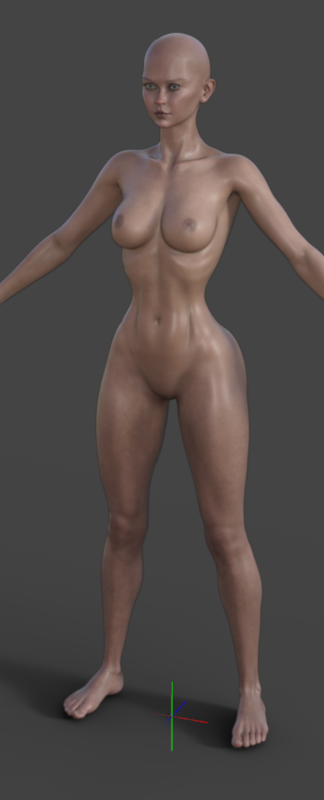
I've tried reinstalling daz and the Genesis 8 Starter Essentials
I also grabbed a fresh copy of one of the 8.1 girls just in case too with no luck
Ive tried loading multiple 8.1 characters and have the same problem with each of them
Currently running Daz 4.16
Any tips would be great
January 8, 2022 at 5:50 AM #1764970It seems when you load the char, some other morphs are also loaded with it. After loading the base G8.1F, go to parameters (with hidden parameters visible) and see what other morphs are active.
January 8, 2022 at 5:58 AM #1764973You have a non-zero morph. You need to reset your base character. Easy fix 🙂
https://www.daz3d.com/forums/discussion/473516/genesis-8-loading-with-wrong-shape
specifically for 8.1 I believe
https://www.daz3d.com/forums/discussion/514701/unwanted-body-morphs-upon-loading-new-characterJanuary 8, 2022 at 6:46 AM #1764974Some would say that's the ideal female form LOL. Big breasts, nine inch waste and thunder thighs. What are you complaining about? My tastes however run somewhat differently.
January 8, 2022 at 7:50 AM #1764989Did you install any new character recently?
Some characters have bugged dsf file, they automatically loaded whenever you load a new character.
Just click your character in scene tab and then click on currently used to see what it is, and then you can either delete the character that caused this or download notepad+++ and edit the bugged dsf file, there is a guide on daz3d forum but I cant seem to find it at the moment.January 8, 2022 at 8:48 AM #1765010“Just click your character in scene tab and then click on currently used to see what it is”
This doesn’t work since the morph is on by default, it won’t show as being used.
This is a fairly common occurrence and a very easy fix. It’s caused by a morph not saved at zero when the artist created it, so when you install it loads automatically. Follow the guide in the link I posted “correctly” and your problem will be solved. No need to uninstall or edit the dsf either. The problem will only return if you reinstall the offending morph/character. The fix simply returns all morphs to zero by default.
January 8, 2022 at 6:41 PM #1765139OMG you guys rock!!! It was a very simple fix when you knew what to look for.
THANKS for the HELP!!!!
January 10, 2022 at 6:54 PM #1765643Another way is use the DSON editor, a usefull software.
Just edit the Duf, in scene/modifiers. Delete all "strange" object/node, and save. It make a backup automatic...
https://zonegfx.com/dson-editor/January 11, 2022 at 12:11 AM #1765699@ethiopia
Yes they should and the sad thing is that, for me, this happens far more with DAZ products than Rendo. DAZ I think, like video games these days, depend too much on updates. It's damn lazyJanuary 11, 2022 at 5:08 AM #1765778I don't think Daz does any QA these days with products sold in their store if judged by complaints on their forums. Their only response is "put in a ticket" so basically they're handing off the responsibility for QA to users to find the problems.
January 15, 2023 at 5:32 AM #1914003i simply compared with other file morphs and find a error.
},
"channel" : {
"id" : "value",
"type" : "float",
"name" : "Value",
"label" : "Jodie Holmes Morphs V20",
"auto_follow" : true,
"value" : 1,
"min" : -1,
"max" : 1,
"clamped" : true,
"display_as_percent" : true,
"step_size" : 0.01
The correct is:
i simply compared with other file morphs and find a error.
},
"channel" : {
"id" : "value",
"type" : "float",
"name" : "Value",
"label" : "Jodie Holmes Morphs V20",
"auto_follow" : true,
"value" : 0,
"min" : 0,
"max" : 1,
"clamped" : true,
"display_as_percent" : true,
"step_size" : 0.01
Just edit the file with notepad and save, reload the figure in a clean scene.
-
AuthorPosts









- You must be logged in to reply to this topic.
