Home Page › Forums › General Chat › Geometry Editor problem
- This topic has 6 replies, 3 voices, and was last updated 4 years, 7 months ago by
 Frank21.
-
AuthorPosts
-
March 22, 2022 at 3:39 AM #1787073
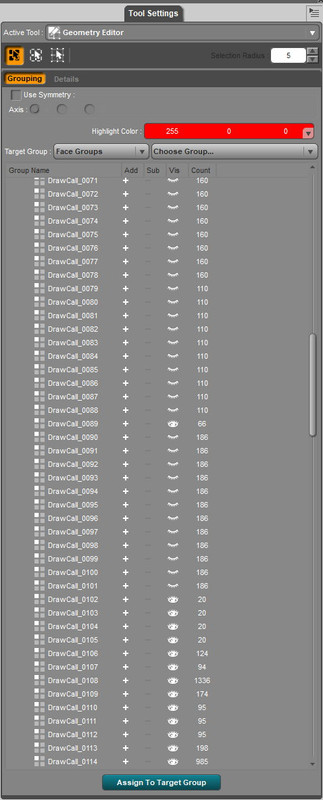
I've got a scene where I've hidden about 30 bits of geometry with the geometry editor. The problem is that DS doesn't save those changes when saving a scene, so when I open it again I have to find and hide them all over again from a geometry list of more than 100.
To save time I made a text list of the associated parts to hide but it's a pain to keep repeating the process. The Assign to Target Group doesn't seem to do anything.
Any work-around or do I just have to live with this?
 March 22, 2022 at 4:15 AM #1787076
Anonymous
InactiveRank:
I'm not too sure about it, but AFAIK You can select to delete the hidden Polygons and the save with a new name.
March 22, 2022 at 4:21 AM #1787079Thanks Trader. If someone could walk me through that process I'd be very grateful.
March 22, 2022 at 1:14 PM #1787175I just use the right-click menus for that. First you create a new surface, then you select things and put them into the new surface.
When the Geometry Editor cursor is over the 3D item, right-click and then...
Geometry Assignment > Create Surface > [type in a name]
Start the name with 0 (zero) so it will be at the top of the list, like "0_Example"
Now you'll see 0_Example in the Surfaces tab.
Select an area, then right-click again...
Geometry Assignment > Assign To Surface > 0_Example
All of those pieces are moved out of their original surface and into the new one. Then you can turn the opacity of the new surface down to zero, or make any other changes you want.
This all sticks if you save as a complete scene. Good luck!
March 22, 2022 at 3:30 PM #1787206InactiveRank:I just pick the polygons I want to delete and then right click on the scene
Geometry visibility/Hide selected Polygons
and
Geometry Editing/Delete hidden polygons
I save with a new name and it loads without themMarch 24, 2022 at 10:23 PM #1787898Thanks for that Freddy and Trader.
March 26, 2022 at 12:24 AM #1788442Thanks LP for that. The reason I wanted to hide/delete the geometry is because just making it invisible interferes with cloth simulation even though the geometry is hidden. So if I hide it by making the surfaces invisible it's still a problem. Also my characters are behind the "hidden" geometry so I can't select them, pose or alter their clothes, without changing cameras. What I'd like to do is delete the geometry (parts) altogether.
I've worked around the problem for the scene so it isn't still an issue for me ATM.
Thanks for your help. -
AuthorPosts



- You must be logged in to reply to this topic.
