Home Page › Forums › General Chat › G3 nipples are now sunken?
- This topic has 7 replies, 5 voices, and was last updated 4 years, 3 months ago by
joeyjojoshaboob.

-
AuthorPosts
-
July 19, 2022 at 5:37 PM #1833168
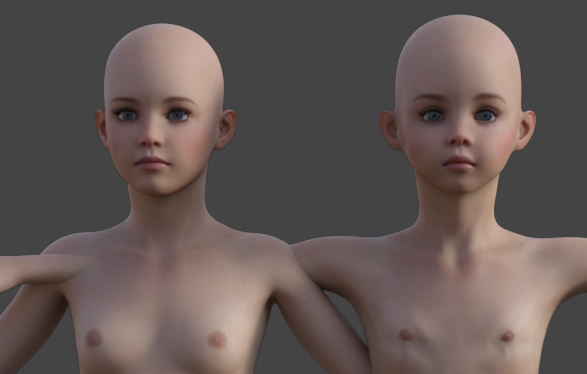
I haven't used G3 characters in a while but I noticed when I load one that was fine in the past it now loads with shrunken breasts and the nipples are inside the chest. I looked through all the settings and none are negative. The only thing I can think of is the default morph is wrong but when I load the standard g3 character it looks fine. I also removed all characters in the directory and just added back the one to test thinking that another morph was causing a problem but it's still the same.
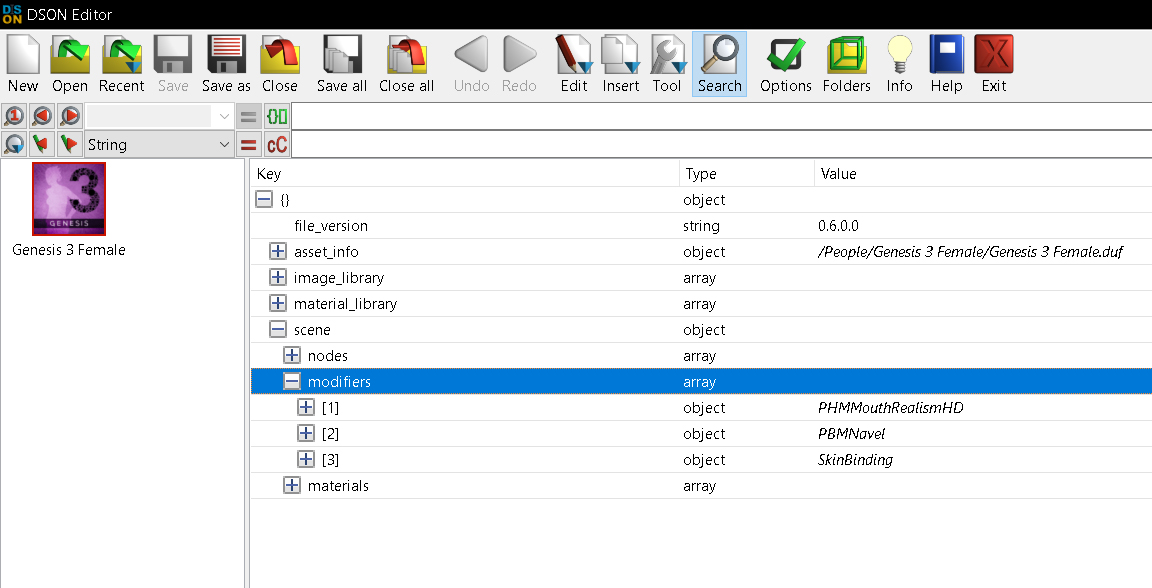
Where should I be looking for the issue?July 19, 2022 at 8:29 PM #1833206Open the YourCharacter.duf in DSON Editor. Look for some strange in "modifiers". Delete "the strange mod" and save.
 July 19, 2022 at 10:49 PM #1833236
There really isn't anything there that shouldn't be there. Is it possible the gen3 base figure is different which makes all the morphs adjust incorrectly? I've tried reinstalling the g3 essentials but it didn't do anything
Just noticed doing a side by side with a g8 version character that the head, neck and other areas are also deformed. This isn't just with one or two but pretty much all of the G3 characters now look different than before.
 July 20, 2022 at 12:15 AM #1833247
I had something somewhat similar happen in the past, although not with the nipples. Everytime I loaded certain characters, the thighs would be "deflated", it looked like a shark had bitten chunks of flesh off them or something, you could see bony sections with meat missing.
The solution for me was one of the muscle morph packages, one of the settings kept having a ridiculously out-of-range value (like negative -62345, for example). Not sure what was causing the characters to default to those strange values, but resetting the values manually did fix it. You might need to do something similar, look at all the currently used values and look for something way out of range.
July 20, 2022 at 2:08 PM #1833440hmmm. still nothing that extreme.
I tried resetting the shape to 0 and then reapplying the body and then it came out correct, but this only works with a few characters since some just want to load a new model and not apply the shape.
I really don't want to wipe everything out and start from scratch but it looks like I might have to.July 24, 2022 at 5:13 AM #1834580late to the party but Boot Daz and go to
HELP
TROUBLE SHOOTING
VIEW LOGselect all delete and save.
Then load the BASE G3 figure with no morphs.
Go back into the log and see what morphs are applied.
If you see something that doesnt look right it probably isnt.
find out the path and delete it.If that doesnt work go to
PREFERENCES
SHOW HIDDEN
then scroll through everything and see if something isnt set to 0 that might be screwing with the chest.July 25, 2022 at 1:55 AM #1834844Are you using the Growing Up morphs (judging from your image) @Joeyjojoshaboob because that sort of chest deformation is usual for that morph set. Playing with other slider dials with negative and positive values like Breast Gone, Breast Pointed, Areola Perk, Youth Chest etc. can fix that pretty quickly.
July 25, 2022 at 11:34 PM #1835249Found it, there was a character that was a G3/G8 morph but didnt show up in the G3 list. It did show up in the log though. Deleted that and the G3 is back to normal and all the morphs apply normally. No idea why it wasn't in the list though.
-
AuthorPosts







- You must be logged in to reply to this topic.
