Home Page › Forums › General Chat › FUR Shader
- This topic has 17 replies, 2 voices, and was last updated 2 months, 1 week ago by
 Chpugzi.
-
AuthorPosts
-
August 22, 2026 at 5:39 PM #2185405
Hey guys - I've searched high and low, but can't find a good collection of fur shaders that I could "learn" something from. Is there any of you who knows of such a collection/s/info, TIA.
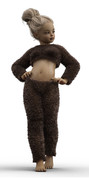
(I have Faux Fur, but it's lacking in adjustments, and unfortunately I don't remember where Faux Fur comes from)
 August 23, 2026 at 12:20 PM #2185472
I don't know if it's Oso shaders I have, it says Author: dazcontentqa
Thanks for the tips @3demon
August 25, 2026 at 4:08 AM #2185608Most likely, it's a weight map. You can apply it to any clothing and adjust it through the Surfaces tab.
August 25, 2026 at 8:39 AM #2185625@ramabay but I get an error when trying to save a Shader preset, it says:
Selection error: An object in the scene with geometry, and one surface of that object must be selected to save a Shader Preset. ??? I tried everything. Do yo know how it's done properly?August 25, 2026 at 9:05 AM #2185626@felicia
Since it's a garment on your screenshot, you just need to save it as a Material Preset instead. Just make sure to select the garment first in the Scene pane. You can also save it as a Hierarchical Material Preset — that one saves the materials for the main figure along with all attached items like clothing, hair, etc. Looking at the screenshot you posted above with that fur-like clothing, that effect is most likely controlled via weight maps anyway.August 25, 2026 at 10:49 AM #2185640It's applied to a Geoshell I called Body paint, which can be switched on/off for the different surfaces/groups.
August 25, 2026 at 11:23 AM #2185646Actually, since you're using this texture on a Geoshell, you can probably use it without the Geoshell at all by applying it directly to the garment itself. For example, that's exactly how the fluffy texture on the hat is done in the Cozy Kitty PJs set.
August 25, 2026 at 11:37 AM #2185647Cool tip, - I dl Cozy Kitty PJs set, to see how it's done.
My wish is just to be able to save the Shaders I come up with myself, but it's obviously harder than it seems ;/August 25, 2026 at 12:06 PM #2185653What do you mean by 'shaders you come up with yourself'? As far as I know, the main shaders in Daz are the standard Uber shader for almost everything, and the simplified PBR shader used for figures since the 8.1 and 9 gen characters. There is also the Omni Hair shader, though it was occasionally used experimentally for characters, and the old 3Delight shader, which is basically a mammoth by now. Do you perhaps mean your own shader settings (material tweaks) rather than creating actual shaders from scratch? Because creating a custom shader is a completely different story.
August 25, 2026 at 12:13 PM #2185654RE:Do you perhaps mean your own shader settings (material tweaks) rather than creating actual shaders from scratch?
Yes.
August 25, 2026 at 12:24 PM #2185655As I wrote earlier, you select any object - geoshell, clothing, character, or any other object and save it as a material preset. You can also save all textures entirely, including the character's textures, which is saved as a hierarchical material preset, after selecting the figure itself, meaning your character, beforehand. This way, your personal texture settings are saved.
August 25, 2026 at 1:06 PM #2185659Ok - thanks for your help.
Shaders (obviously) work way different than I thought.
August 25, 2026 at 1:16 PM #2185660Np
August 26, 2026 at 8:34 AM #2185729It helped to take a break and restart my PC, (cache thing?) so now your suggestions work perfectly.
Thanks again for your help/patience @ramabay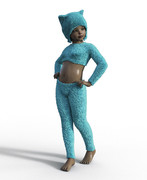 August 26, 2026 at 10:50 AM #2185741
Np, you can also adjust the color and other parameters, creating unique combinations with textures from other clothing, for example, or creating them yourself. The Uber shader itself is very flexible.
-
AuthorPosts



- You must be logged in to reply to this topic.
