Home Page › Forums › General Chat › Embarrassing Situation Poses? (examples in Post)
- This topic has 11 replies, 4 voices, and was last updated 6 years, 8 months ago by
 Mark Sinister.
-
AuthorPosts
-
February 29, 2020 at 10:47 AM #1494303
Hi there, I am here once again to ask for any pose sets that include poses like these
Example1
Example2
Example3
Example4
Example5Or similar Poses that fit the theme of someone walking in on an embarrassing Situation.
If you know of anything / find anything like that or similar please let me know.
Any help is appreciated 🙂February 29, 2020 at 11:05 AM #1494327You do know you can make these yourself right? Not one of these look like complicated poses. I'm sure you can find a base pose somewhere and just move the arms and change the expressions.
February 29, 2020 at 11:08 AM #1494331Good photo references are always a good place to start. 🙂
February 29, 2020 at 11:35 AM #1494369@masin
Yes, I do know that but my poses always look awkward / not human at all and after hours of trying I usually just give up and opt to searching it on the internet which coincidentally also happened with this one.
After 2 1/2 hours of work the pose I created looked more like someone completely shattered his back- and shoulder bones and tried to awkwardly get his hands in front of his face.February 29, 2020 at 12:16 PM #1494405The trick is to find base poses and adjust from there. You don't have to pose the whole model from scratch, just get the basic then start moving the hands, head, neck and waist to the pose you need. I personally use pose controls instead of bends for head, neck and waist. They adjust whole parts more naturally IMO.
Also don't use to large of numbers to turn your body parts or it will start to look like broken joints.
Then you just need to position your camera. I find a lot of people just don't know how to adjust their camera to make the pose look interesting. Crops, angles, and rotations all those make up the image as well. I fake a lot of bad poses with really good camera angles.
It's not as hard as you might think.
February 29, 2020 at 12:46 PM #1494431Yep a judicious angle & crop can salvage a less than perfect pose. 🙂
February 29, 2020 at 1:28 PM #1494476@masin
What do you mean with Pose controls? Do you mean the Front-Back, Bend and Twist values here?
And Camera angles are unfortunately not really possible as I am only taking renders of People from a fixed point for it to fit perfectly into the game I am making. Example shown here.
And yes, I do know that the lighting from the game doesn't reflect on the characters at all and this is because I have just implemented screen tint change in game.February 29, 2020 at 2:22 PM #1494543Don't sweat the camera angles.
No those are Transform controls. I usually use those when I can't get detail poses out of my pose controls. You get bend controls when you select the part of the body and adjust things after you use your pose controls.
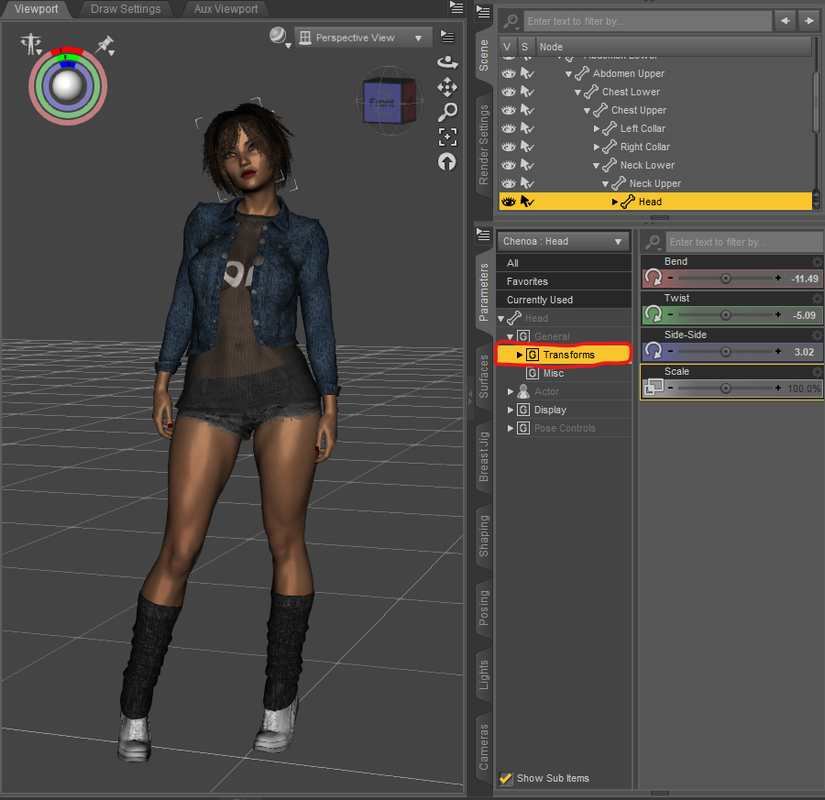
Pose controls work in a wider way than Transform controls. Pose controls if you want to move the arm it will usually affect the shoulder, upper arm and lower arm all in one go this way you don't have to pick the shoulder, upper arm then the lower arm.
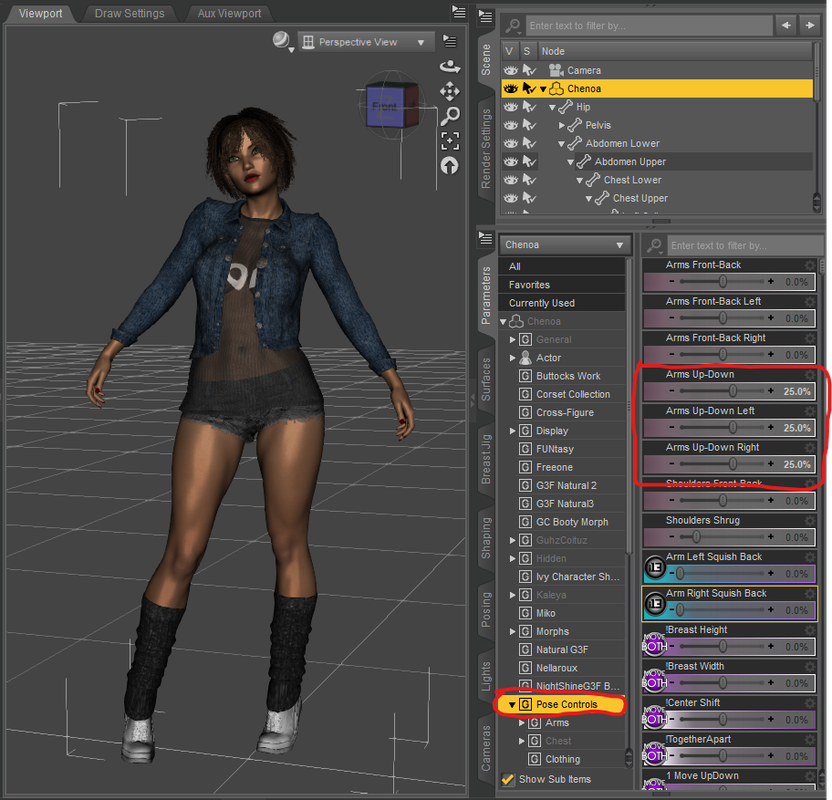
Most people will just move the upper arm not affecting the shoulders which will sometimes make it look wonky and odd. Now after I adjust my arm I would then go into Transform controls to tweek each part of the arm and hand and fingers to how I want it.
A real good example is turning and bending the head. If you use G3 characters you have one head and 2 necks to adjust. You have the Head then the Upper Neck and then the Lower Neck. If you just turn the head alone you're already behind the 8 ball.
With Pose controls when you pick the head and go to Neck you will see all the controls you really need to change everything in one go for all those parts of the body. Making the head look more natural in its bends and turns. Then you can go to Transform controls to tweek here and there if need be.
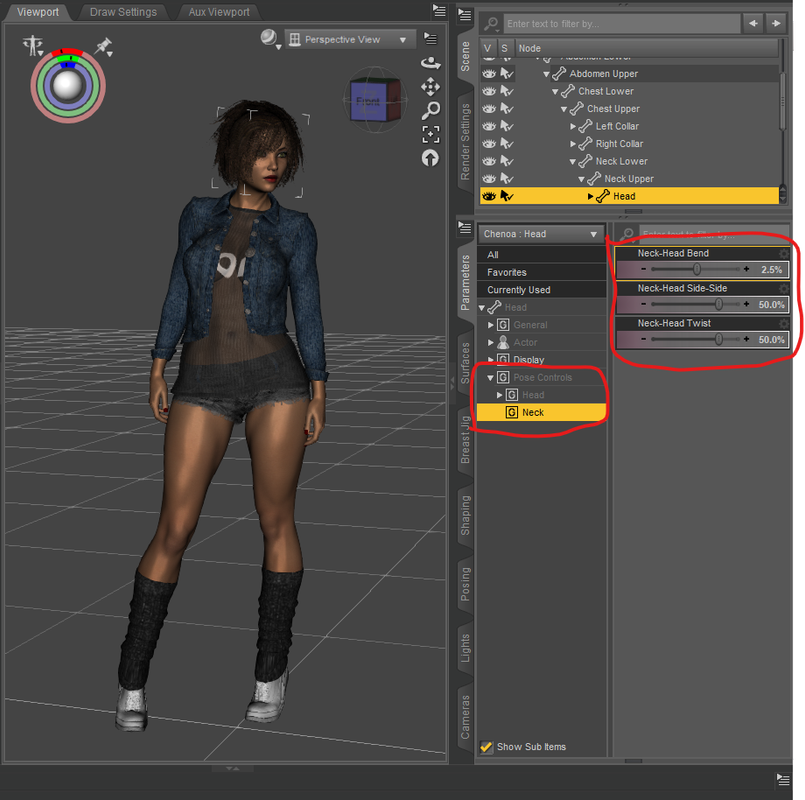
Normally I don't have to do much after I use Pose controls on the head. Once it's done it just comes down to picking and expression.
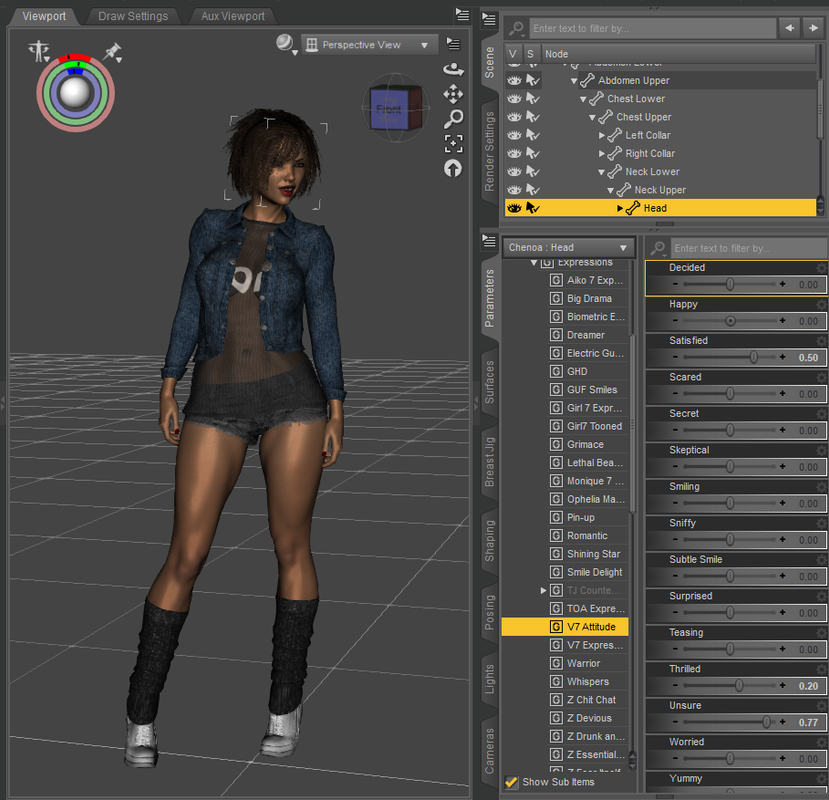
But Pose controls aren't great for everything but it very helpful for certain body parts. Me, I like to use it on the Head, the Hands, Torso (sometimes), arms and legs (sometimes depends on if I'm moving both or one each). It's all preference.
But all this comes after I find a pose from a product that I want to use. Find a full body pose, then look for a partial pose (if any) then start Pose controls\Transform controls.
February 29, 2020 at 2:38 PM #1494561Oh one more thing that's going to be helpful to you with your renders. When I want to get my characters to look at the camera I create a Primitive Ball and select each Eye Ball and chose Point at the primitive object. Then I move the primitive way from the character face until the eye stop looking crossed.
If your character is looking at the camera it sometimes looks cross eyed because the physical camera is to close to the characters face. It's better to make your character look at a primitive object and move the primitive away to make it look like the character is looking at the camera itself.
This can also help with looking at other characters too or parts of other characters like a bird sitting on another characters head. Sometimes looking directly at the object makes the eyes look weird when characters are close to each other.
It might just be me but it sometimes looks weird.
February 29, 2020 at 4:28 PM #1494688@masin
Oh god how have I not found and used those till now? Thank you so much for showing me this with that much detail 🙂
And the tip with the eyes will also spare me a lot of work, before I adjusted them manually and each one separately because they always either looked cross eyed (when using point at camera) or like they are looking through you in the distance (when only using the side-side and up/down).
A small thank-you for your effort should also arrive any minute now 🙂March 1, 2020 at 12:26 PM #1495879Interesting and useful conversation, we can always learn from each other (particularly as Daz Studio is so lacking in clear instructions). Sometimes the Zone chat is far more informative than Daz forums...
March 1, 2020 at 3:11 PM #1496059Thanks. I mainly just make wardrobes for my characters that I post on Instagram so I spend a lot of time trying not to post the same pose over and over again. I also practice lighting using render settings and lights, and when this site has a art contest I try to go all out and use everything with Photoshop to try to win, lol.
I want to get into animation but this program isn't really that great at doing it. That's my real bane!
-
AuthorPosts






- You must be logged in to reply to this topic.

