Home Page › Forums › General Chat › Daz Studio 4.16 update?
Tagged: Daz Studio 4.16
- This topic has 54 replies, 25 voices, and was last updated 4 years, 3 months ago by
sandeep.

-
AuthorPosts
-
December 7, 2021 at 3:08 PM #1755614
Well,! I do have not any problems with dforce and as piddlyd observation, It works much faster.
BUT BUT....Only 4.16.0.3 is working for me. The last 4.16 is not working for me at all.December 7, 2021 at 4:01 PM #1755631Anonymous
InactiveRank:
Fixed after updating my card drivers. Duh...
4.16 seems to be a lot snappier than the older DS 🙂
December 7, 2021 at 4:24 PM #1755649@Piddlyd Thanks a lot for the tip!
So you mean that DAZ somehow prevents memory pooling? Hmm, will test OC SCANNER X and see if I can figure out what is going on. One of the GPUs is much cooler than the other one, something is wrong....
December 7, 2021 at 8:18 PM #1755774I'm not 100% sure, but it seems to me that the color presets for some hair are broken in 4.16. So the black preset for "Evelyn Hair for Genesis 3 & 8 Female" looks gray. On other colors it is not so noticeable. Some other hairs is broken too.
December 7, 2021 at 11:36 PM #1755810@Chonakz You're welcome! When I was buying my GTX 1080 - at that time in the DAZ forums, the advice was that DAZ3D saw no benefit from using nvLink to join two like cards - but, would use as many UNLINKED GPU card cores as you had in the system - up to the max memory of the card with the LEAST amount of memory...
Does that make sense? If you had a 4 or 6 GB... whatever was the mid range card at the time... a GTX 760, I think... and a 1080 with 8 GB... you would be limited to scenes with a max size of the card with the SMALLEST amount of memory - but it would use every GPU card when rendering.
So, instead of getting another GTX 1080, I got an RTX 2080 - and sure enough - both with 8 GB... and scenes that were taking hours were done in less than an hour. BUT... sometimes one of the cards, generally the GTX 1080... I would hear that it wasn't spinning up... and checking the logs I saw it failing... so I got that OC Scanner X utility from EVGA and I could SEE when I was maxing out the memory on the GTX 1080 and it was falling back to CPU rendering.
But what I really *want* at this point is a GTX 3080 with 24GB of memory.
If you CAN pool memory on DAZ 3D... the possibilities of nvLink with 48 GB of rendering memory is HUGE. So... I hope something has changed and my understanding is out of date.
December 8, 2021 at 2:31 AM #1755853"....up to the max memory of the card with the LEAST amount of memory…" @Piddlyd
That's my understanding too.
That's not to say a 2nd card is necessarily pointless because CUDA cores will stack and work together to decrease render times, even if Vram is not pooled. But if a scene doesn't fit to one of the GPU's Vram, it will sit idle and do nothing at all.
So if you have a 3080 (12GB Vram) and a 3090 (24 GB) and the scene requires 16GB, the 2080 will not only not pool memory, but will be neglected entirely during rendering.
Also both cards will need to support the same version of Iray for the DS version you are using. So old drivers might be another issue why a 2nd card is sitting idle.December 12, 2021 at 3:27 PM #1757350I updated today and I'm getting significant longer times to open scenes, it kinda sucks
February 1, 2022 at 7:08 PM #1772413I just updated to 4.16. Does it really matter if I update through Install Manager?
I have installed many add-ons from Zonefx will it affect if I run Daz while using Internet?
February 2, 2022 at 2:30 PM #1772645It shouldn't matter, but I generally just nuke-n-pave as a matter of course by downloading the latest package and installing over the old one (it uninstalls the previous version but keeps all the settings.)
April 28, 2022 at 9:55 PM #1801430What really annoys me most is DAZ’s policy of completely removing older versions and addons from downloads.
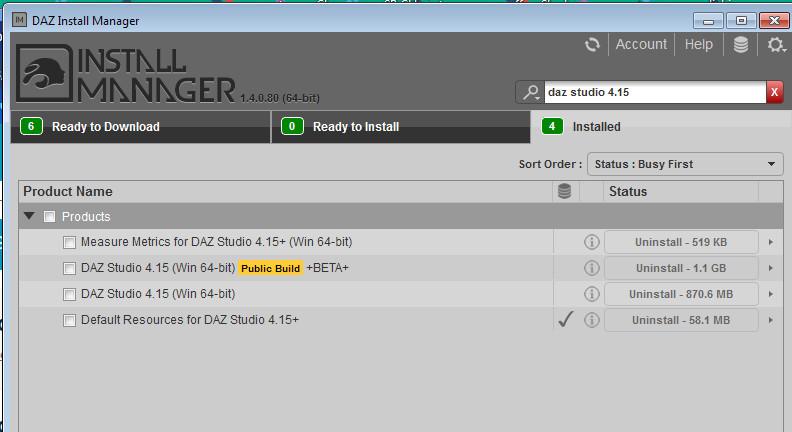
I had downloaded 4.16 a few months ago but had not noticed (read: I forgot) download the Default Resources For DAZ Studio 4.15+. Now I can't get it anywhere anymore because DAZ3D has released 4.20 and deleted all the add-ons from the previous versions.
F*...ing frustrating!
April 28, 2022 at 10:18 PM #1801435Just confirm if the one I pm'ed is right or not.
April 28, 2022 at 11:20 PM #1801452Thank You Cage 🙂 .
(If I understand correctly) If there is a + sign after the filename in the Install Manager window, then this is the correct version (I guess...).
https://www.daz3d.com/forums/uploads/FileUpload/bc/aaf4a06634c617e72ebb2886377a20.jpg
April 28, 2022 at 11:32 PM #1801454Ok. I checked the version and YES it seems to be exactly the correct version!
So, once again:
Thank You, THANK YOU CAGE 😀 😀 😀 !!!
April 28, 2022 at 11:37 PM #1801456@nakkimakkara1989 -
don't worry about the default resources, they are backward compatible, they add features (like FACS and other 8.1 features) or fix old bugs, but current resources always work in legacy Studio.April 29, 2022 at 1:00 AM #1801478Ah, that's a very good to know 🙂 .
Thanx Amber 😀 .
-
AuthorPosts














- You must be logged in to reply to this topic.