Home Page › Forums › Art Showcase › Calling Home
- This topic has 10 replies, 5 voices, and was last updated 4 years, 10 months ago by
 hotgirl69.
-
AuthorPosts
-
December 10, 2021 at 6:44 PM #1756771
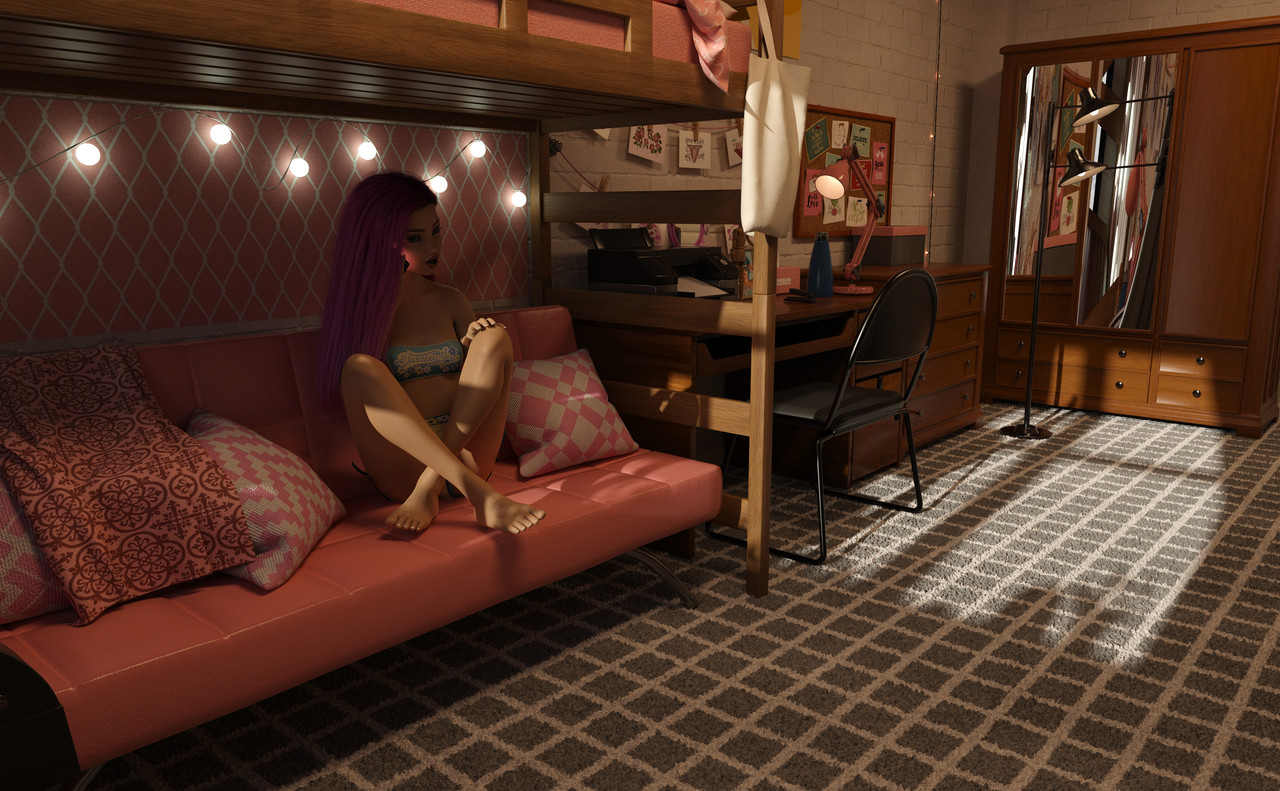
Just a quick render I did today as the feeling struck me. It's of a first year who's feeling lonely and is calling home just to hear a comforting, familiar voice.
Any constructive criticism is always welcome, as I am still just starting out...just don't be rude about it! Thanks! 🙂
 December 10, 2021 at 8:49 PM #1756800
I really like it! Has a nice feeling to it and fits your theme...
Hugs
AnjaBearDecember 11, 2021 at 3:05 AM #1756887I like it too. The mirror reflection looks a bit wonky. Might want to change the shader, or maybe it's the geometry.
December 11, 2021 at 5:17 AM #1756898@AnjaBear Thank you!
@Frank21 I agree, but unfortunately I noticed it after the render. Rookie mistake, I guess lol but I'll be sure to pre-check everything in Iray before I final render
December 12, 2021 at 4:00 AM #1757216Nice scene but lighting is flat and there is no depth
December 12, 2021 at 10:02 AM #1757258I like the posing and love the emotion, but as @Xsanderbx says, the lighting feels a little flat. If you don't mind a suggestion, I'd get rid of the light coming from the window (or change the colour temp and strength to give an evening or night-time feel) then angle the desk lamp up increase the light coming from the desk lamp to focus the light on the figure. The would pull your eye to the figure. As it is, she's lost slightly in the shadows and it looks odd to have bright daylight coming in from the left and have several room lights on at the same time.
One of the things that threw me when I started out is that the render camera acts like a real camera; it doesn't 'see' as much light as a human eye (and that's despite being an amateur photographer for over a decade previously!), so you either have to accept that your image won't have the same dynamic range as what you'd see if you were in the room, or you need to do what film and TV productions do in real-life and cheat with using off-screen fill and spots lights to add light to the scene in order to get the look you want.
December 13, 2021 at 3:58 PM #1757566@SkippyTheMeh Thank you for your suggestion and in-depth reply! I am noticing in my renders that my characters are not as well lit as I want them to be. I will have to find a way to add spotlights that not only light up my character but doesn't look too much like a random light shining from nowhere!
December 13, 2021 at 4:41 PM #1757570Try using area lights or 'ghost lights'; basically a plane with an emission shader applied. IMO they look much better than spot lights. I'm on my phone ATM, so apologies for the short reply but when I get back to my desk tomorrow I'll try and add some more details and links to resources.
December 13, 2021 at 10:32 PM #1757638Just a note on the mirror issue - I had the same problem today using a mirror prop borrowed from another set. If you want to be sure there won't be any distortion then use a primitive plane, (Create-New Primitive-Plane). It has only 2 dimensions (no depth) so it can't distort reflections. I put it just in front of the mirror prop and it worked perfectly.
December 13, 2021 at 11:44 PM #1757650@SkippyTheMeh That's a fantastic idea that hadn't even crossed my mind. I wasn't liking the way spotlights were looking when I really wanted the whole body lit. I will try this on my next scene. Thank you!
December 13, 2021 at 11:46 PM #1757651 -
AuthorPosts







- You must be logged in to reply to this topic.
