Home Page › Forums › General Chat › 8.1 male leg deformations in some 8.1 poses?
- This topic has 6 replies, 6 voices, and was last updated 4 years, 5 months ago by
 ADAM.
ADAM.
-
AuthorPosts
-
May 10, 2022 at 7:22 PM #1806384
*EDIT*
I found it! It was friggin' Mervin. So, he'll be getting the boot. It was, of course, buried in the hidden sliders.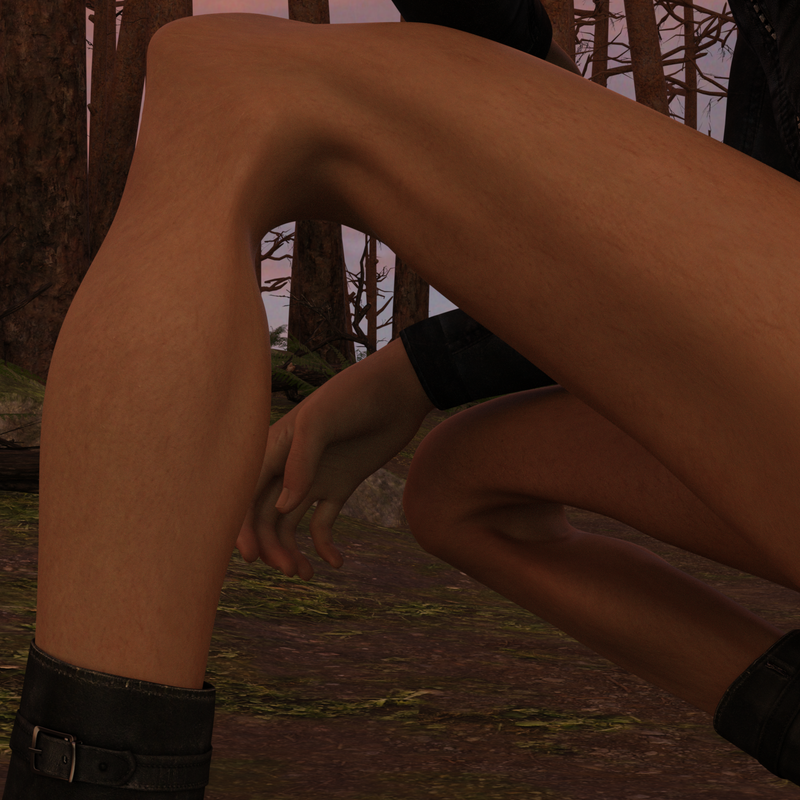
I just want to do a crouching pose without this happening. I tried bend control and looking for rogue morphs, but this is what it continues to do. Anyone know of a fix?
May 10, 2022 at 8:27 PM #1806405Maybe just select the LEG and ZERO the pose and fix the bend?
It looks like the POSE you are injecting has some stray shit inside of its hierarchy, or is using something it shouldn't be.
Anja
May 10, 2022 at 8:40 PM #1806414It seems to be doing for every crouching pose I tried, both for 8 and 8.1.
I guess I'll just have to keep poking around 😮💨 at least the last time something similar happened other people had the same problem and I just had to yeet a troublesome character from my library.May 10, 2022 at 8:53 PM #1806418You checked for rogue morphs by ticking "show hidden properties" from the hamburger icon under preferences? Take a quick look for percentages above 100 or below 0.
Other than that try zeroing each morph. And like Anja said, check for morphs that you didn't dial in.If you installed stuff recently, try uninstalling it one by one.
May 10, 2022 at 9:07 PM #1806421This deformation (at least for me) is typical of the auto pose enhancer. Sometimes it does a great work, sometime it creates exactly that deformation. You just need to tone down the % of the thigh area.
May 13, 2022 at 2:28 PM #1807690This is a handy little utility...
https://zonegfx.com/dial-control-for-genesis-to-genesis-8/
There's been a few times when posing a figure I've experienced a similar problem. I have this in my script menu, one click and you can check what morphs and values are dialled in. When I've experienced problems, there's been an excessive value in a parameter, as in -400 for example. I simply reset the value in Dial Control and the problem is solved.
This has been the quickest way I've found to solve any morph issues.
May 13, 2022 at 4:47 PM #1807748good to know, thanks for the update
-
AuthorPosts












- You must be logged in to reply to this topic.
