Home Page › Forums › General Chat › 7zip problem with daz file
- This topic has 8 replies, 3 voices, and was last updated 6 years ago by
 globalrecession2009.
-
AuthorPosts
-
September 28, 2020 at 7:54 AM #1631586
In the early days I used winrar and it would often gimme extraction errors.
Discovered good old 7zipz and have never looked back since.
So, with daz downloads I have always used 7zip to drag files from .rar zips into my content folder.
I never have any problems but today I was installing some content to different content folder and came across this error.
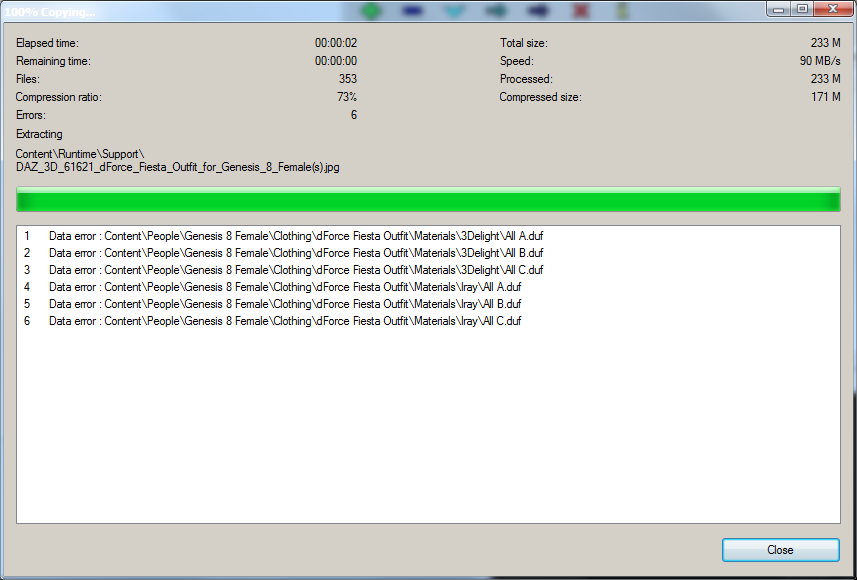
The product .rar file is IM00061621-01_dForceFiestaOutfitforGenesis8Females and is from the Gabriela 8 Pro Bundle.
I decided to try extract with an old version of winrar that i had and to my suprise it extracted the .rar without the error.
I am using the latest 7zip and wonder if any one else has this problem extracting this product with 7zip.
I already have the dress in my main content folder so i have obviously extracted it before. I am thinking I must have used winrar to extract it for the first install because thats the only way I could have extracted in the first place. I am curious to know what would be causing the error with 7zip. Can anyone else open it with 7zip?September 30, 2020 at 8:40 AM #1632058Can you give me the url of that product? It IS strange that 7zip has errors, but there is always an exception. I would like to know what OS are you using it on (I guess Win) ...
This shouldn't happen to you ... You're doing something wrong.
Rule number 1: NEVER install with the drag&drop.September 30, 2020 at 9:12 AM #1632067Ok...Now, I have the "dForce Fiesta...". And yes, the duf´s ara in blank.. O bites.
Or error from the Vendor, or the uploader.
I think, the first..September 30, 2020 at 10:44 AM #1632081Well. Now, I think is a problem for the stupid uploader.. This works fine.
Fiesta...September 30, 2020 at 10:45 AM #1632082I delete this link in 24 hours. 🙂
September 30, 2020 at 12:58 PM #1632099Those 0 byte dufs are just placeholders for the related tips icons. The product works fine.
October 16, 2020 at 9:18 AM #1635546@Abad your comment of Rule number 1: NEVER install with the drag&drop.
This comment has stayed in the back of my mind and I should have asked why but didn't.
I want to be educated and learn.
I have always used winrar or 7zip to open up zips and rars,
and then to drag the contents out and into a folder.
Why do you say this is not a good thing to do.October 16, 2020 at 5:35 PM #1635621@globalrecession2009, Simply because you have not created any metadata. Renderosity, Renderotica, etc ..., do not generate zip files to install in DIM.
That makes it difficult to uninstall a product if it is not to your liking. But if it is to your liking to have a "My daz content library" folder of 2TBytes, that's your problem. That's why I created the minifier ...
Better use a program called "Content Package Assistant".
This wonderful software creates metadata for you in 4 clicks. Simply, by the vendor id: "mist" as an example, number "00011", write the package name, create a unique ID number automatically, make it compatible with "daz 4.5+" and then install it through by DIM. It is VERY ADVISABLE !!!
And, sorry for the delay/lag, my dear Kiwi. We are at the antipodes!October 16, 2020 at 8:14 PM #1635658Ok thanks for explaining, I appreciate it, and i do see the point your making, but I dont use DIM to install stuff so I dont extract the Manifest and Supplement .dsx files, I dont use the smart content, and so i leave them and open the content folder and then drag the data,people, runtime etc into to my content folder.
-
AuthorPosts






- You must be logged in to reply to this topic.
