Home Page › Forums › General Chat › AIRE AI tool for DAZ Studio: who tried it?
- This topic has 29 replies, 9 voices, and was last updated 2 weeks, 6 days ago by
 KristelO.
-
AuthorPosts
-
August 20, 2026 at 12:06 PM #2185205
I saw the videos, and so far, I have tinkered both with DS and with Stable Diffusion, but never a bridging of both. Has anyone got some feedback about that thing, that isn't from the Hub's product page?
August 20, 2026 at 12:23 PM #2185206Played with it for an hour or so. It was shite. Deleted it.
Takes your character details and applies them to an AI looking model, there's poor control over lighting and backgrounds (it flat out ignored prompts).
The images looked crap, the process was slow and frustrating. Far easier to use stable diffusion from scratch or to enhance a daz image. If you're ino that kind of thing...
August 20, 2026 at 12:38 PM #2185207I was considering it for quick edits. What I'd like to know though (if you tried that) is:
If you set up your character in a specific way, let's say, a G8 with her fist raised, can you prompt that thing to have her flipping the finger instead? Or if she's wearing a cap, prompt so the cap is on, but sideways? Details alterations, to sum it up.August 21, 2026 at 1:14 AM #2185245You can prompt through AIRE to do anything basically but it depends on your prompt and also even if you are describing what you want it may take 50 renders to finally see what you're thinking about. I mean people can not like it but it does what it says it does. The product isn't a promise to turn your 3D scenes into high art. But it is definitely frustrating.
August 21, 2026 at 8:46 AM #2185268The original version only took opengl or filament renders - the update now can use iray which may give more control on lighting and gives more control allegedly on guidance and seed variance. I would say its an interesting concept but early days.
August 21, 2026 at 5:17 PM #2185315Hmm... considering that the tool is still evolving, I might keep an eye on it.
Thanks for all the feedback 🙂August 22, 2026 at 5:26 AM #2185355its pretty meh. I think it was better if they make it a style change AI. 3d renders to pencil-charcoal drawing/oil painting/manga-comic style for example, but I dont know if local AI can do that. ChatGPT can do that pretty well and its free.
August 22, 2026 at 7:23 PM #2185410Local AI can do it if you feed your setup a matching style LORA, for all I know.
August 25, 2026 at 9:43 AM #2185628AIRE uses Qwen Image Edit so it terms of style it does have flexibility
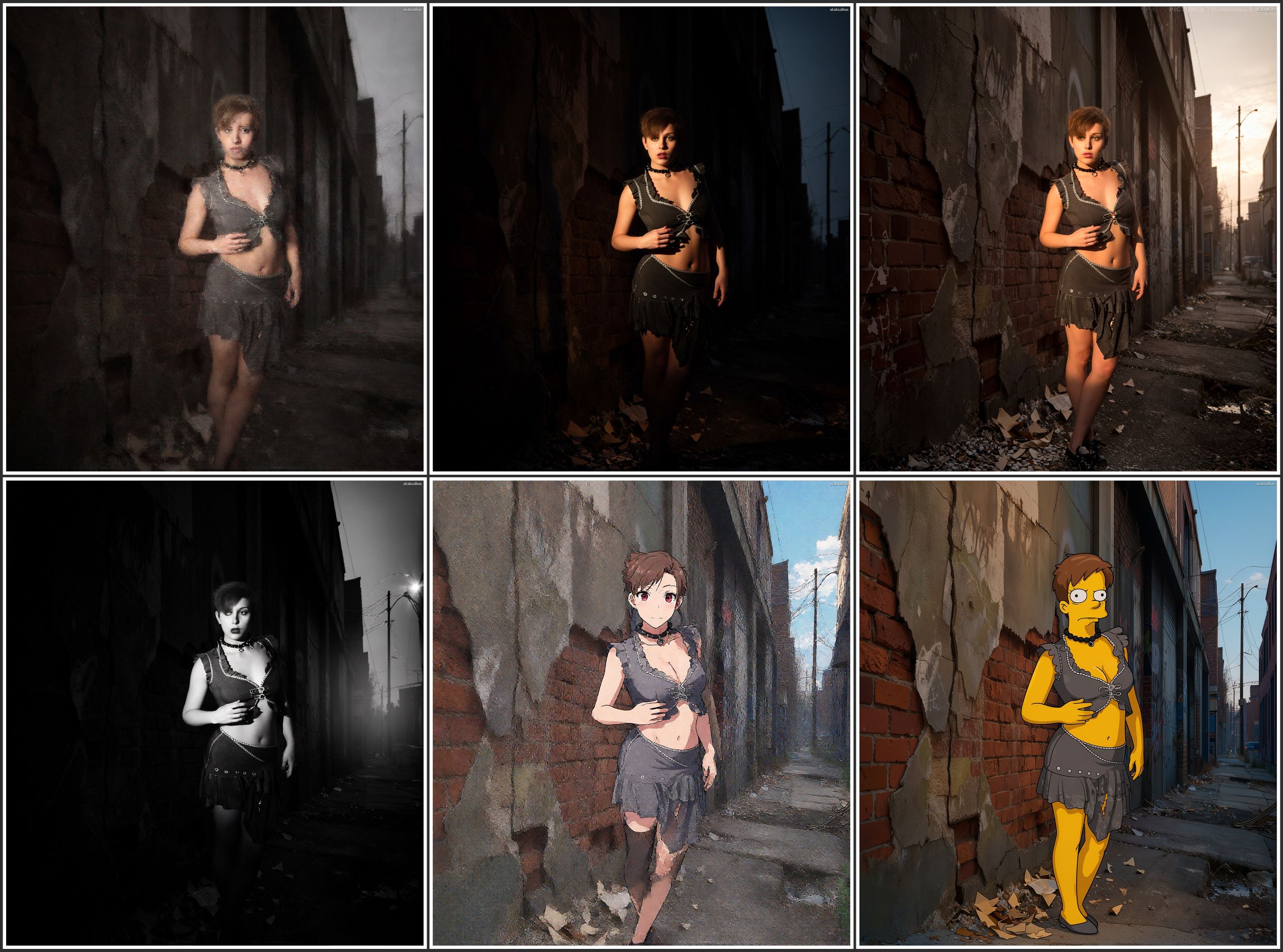
Thought people may be interested in seeing some output from AIRE v1.1 - the first 5 use the standard presets eg morning, Cinematographic, Sunset, Film Noire and Anime.
The last was generated using default but my own prompt to make the scene with a Simpsons style character
PS a very quick scene creation so artistically fairly crap!
August 25, 2026 at 10:17 AM #2185634Did you generate entirely in local, or does it require calls to an online API? I have a staunch local policy to keep everything local, should it be DS or SD.
August 25, 2026 at 10:19 AM #2185635This was entirely local - running ComfyUI in the backend with local stored models. I only have a 2060 Card so took a while even with just 8 steps - need an upgrade
August 25, 2026 at 8:07 PM #2185683I run a 3090 so it should be smooth.
August 25, 2026 at 9:00 PM #2185690@koala, this would limit what can be done. Can you install your own models from say, Civitai.red?
September 1, 2026 at 5:00 PM #2186331AIRE is updating all the time , it is a great tool and you can keep your characters features without the AI photo human take over by simply using the options provided in the newest release.
September 1, 2026 at 5:58 PM #2186335In a response to a comment i posted on dreamlights youtube he acknowledged this would be a good upgrade, particularly loras. So fingers crossed that this product continually develops
-
AuthorPosts









- You must be logged in to reply to this topic.
