Home Page › Forums › General Chat › Has anyone been able to successfully install `Ella Two-Piece Denim Outfit`?
- This topic has 7 replies, 2 voices, and was last updated 3 years, 6 months ago by
 Richard Y..
-
AuthorPosts
-
April 22, 2023 at 4:11 PM #1960243
I've installed dozens or hundreds of product before using DIM. But
Ella Two-Piece Denim Outfit For Genesis 8, 8.1, And 9doesn't seem to work right, it installs properly via dim, but I cannot find it inside dazstudio, I've looked under smart products smart files content library products content library daz studio format files...I've browsed in dazstudio directly to the folder it's literally in, and it still won't appear.
It's supposedly installed to
my library/people/genesis 8 female/clothing/beautyworksBut it's actually not there! Not at all.Inside the zip file it's installed from, instead it's files are in
my library/People/Genesis 8 Female/Clothing/Daz Originalsbut I think since the instructions file for the installation doesn't match the zip files contents the install can't process properly and neither location is used and all the people folder contents are missing? Searching the people folder finds none of the needed files, despite them definitely existing in the original zip file.I guess maybe this just means the uploader somehow broke the upload? But this is such a strange mistake it almost can't be an error? Maybe it's an error in the copy from daz3d's store to begin with?
EDIT: I copied all the files that weren't installed from the wrong location in the zip folder, to the location DIM told me they were missing from, and now it works. This makes it work/appear properly in the content library, but doesn't make it work in the smart content location. So, in essence the IM-number.zip zip format for DIM is not useful with this release and does not work, and the only way to get this product working is to install it like you would something via renderosity. Unless someone else knows a better fix than the one I used.
EDIT2: Okay so I unzipped the zip file, renamed the folders with the wrong names to match what DIM thought it should be, re-zipped it, and gave it back to DIM, it now installs functional, BUT, not with smart content support, which is the entire point of having a manifest file and IM-number.zip and feeding the zip to DIM.
As such I have no idea how to install https://zonegfx.com/ella-two-piece-denim-outfit-for-genesis-8-8-1-and-9/ properly but I also don't think it is possible, unless someone with more knowledge of DIM fixes it and reuploads it.
April 22, 2023 at 4:22 PM #1960247You're right~ just because the folders structure of G9 in the IM package is totally wrong ~~ I may fix it, hang on for a while~
PS: in fact, it's the problem that the manifest file is not in line with those folders...April 22, 2023 at 4:28 PM #1960250I fixed the folder structure, and while it works, it doesn't work in smart content, but my fix might have been more inept than yours would be. (Also I was editing the OP, because I was spending so long editing the OP, you hadn't replied yet.)
April 22, 2023 at 4:36 PM #1960256Oh oh~ you've edited more, I just saw that lol~
We either fix the folders + metadata file or just fix the manifest file. The latter is much quicker~Unzip IM - open Manifest.dsx with an editor, replace 'Clothing/Beautyworks' with 'Clothing/Daz Originals', then zip it and install the package. Everyting will be fine~
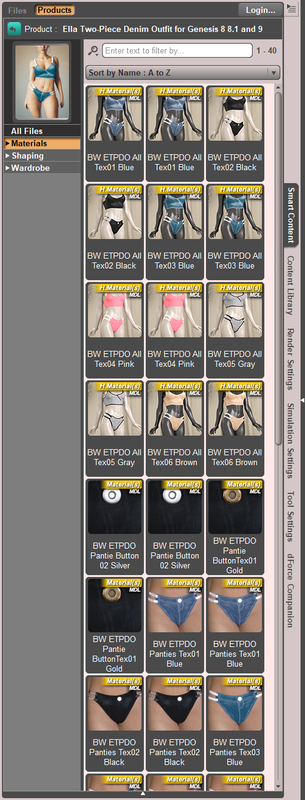 April 22, 2023 at 4:51 PM #1960257
Ah, my solution was to try the exact opposite, I had assumed the folders were wrong not the manifest. Either way you've resolved it. Someone will have to update the official link though presumably to avoid future confused people turning up.
April 22, 2023 at 4:59 PM #1960260It happens sometime ~ If you had not posted this issue, I wouldn't notice this one was not in Smart Content since I didn't always check them after installation...
April 22, 2023 at 6:45 PM #1960281I wouldn't've posted if it just wasn't in smart content, but it wasn't in content library either, it wasn't installed at all. Swapping around the folders I got it installed to the content library, but swapping one line in the manifest would've been easier and fixed both at once apparently 🙂 So thanks again.
April 22, 2023 at 10:42 PM #1960340You're welcome ~ I'd like to THANK you! 😀
-
AuthorPosts




- You must be logged in to reply to this topic.
