Home Page › Forums › General Chat › Help needed with Geometry Editor
- This topic has 7 replies, 3 voices, and was last updated 4 years, 2 months ago by
 Frank21.
-
AuthorPosts
-
July 4, 2022 at 1:12 AM #1827755
There's parts if this tent that I don't want visible. I've created some new material zones and there are others that I can turn off visibility on. When I re-open the scene they're visible again and I need to turn them off all again.
What I want to do is delete the geometry so it's gone forever.
Can someone please run me through the process of deleting geometry using the geometry editor. July 4, 2022 at 1:28 AM #1827758
Thanks LP. Off to try that. I've been using DS for so long I should have learnt that by now.
July 4, 2022 at 5:51 AM #1827772OK so I select the geometry that I want deleted with the surface selection tool, and then in the viewport I right-click it, but no such Geometry Editing option is offered. Don't know what I'm doing wrong.
 July 4, 2022 at 5:59 AM #1827773
Once you have selected with the surface selection tool, turn to the geometry editor tool. Your surface selection will remain and you can delete the polygons that you want.
You can also select the polygons directly in the geometry editor. The number of selection methods is more limited, but generally sufficient.July 4, 2022 at 7:07 AM #1827787Is "remove selected group(s)" within the geometry editor the "delete" option? I don't see any delete option?, and after choosing to "remove selected group(s), all it does is make the selected group(s) unselectable but still visible in the render.
Thank you all but I've spent enough of your and my time this for today.
This video gives a more detailed description of the steps I need to follow. I'll see what I can do tomorrow.July 4, 2022 at 11:57 AM #1827871Is “remove selected group(s)” within the geometry editor the “delete” option? I don’t see any delete option?, and after choosing to “remove selected group(s), all it does is make the selected group(s) unselectable but still visible in the render.
No RClick>Geometry Editing>Delete Selected Polygons
July 4, 2022 at 12:19 PM #1827874Select the Surface Selection tool from the Tool menu (Alt+Shift+M) and select the part you want to remove..
Select the Geometry Editor tool from the Tool menu (Alt+Shift+G)
Right click on the selected area and you should get this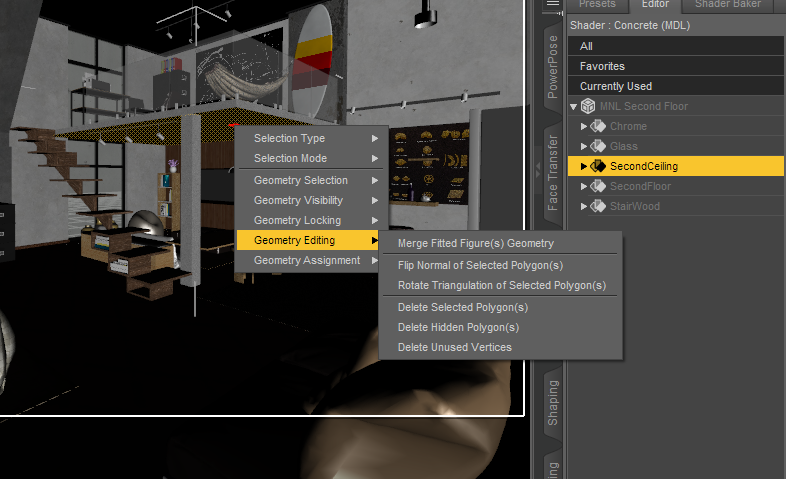 July 4, 2022 at 10:10 PM #1828018
Thanks, I got it working. Seems I need to select the surfaces with the GT, and then delete the geometry. If I just use the surface selection tool first it doesn't create a selection, so nothing gets deleted.
-
AuthorPosts






- You must be logged in to reply to this topic.
