Home Page › Forums › General Chat › Please help me figure out my content library issues
- This topic has 10 replies, 7 voices, and was last updated 4 years, 6 months ago by
Anonymous.
-
AuthorPosts
-
March 5, 2022 at 7:03 PM #1782200
So long story short I migrated all my content from my laptop to my new computer. I figured the easiest way was just to copy all the files in my directories, everything under the user folder, everything under the public folder, and everything under app data (relating to DS I mean). I thought everything was okay. But my directory is getting so freaking big, as I'm sure many of yours are.
First I should say everything is installed by DIM, for obvious reasons. It doesn't care where you downloaded the files.
I was confused for a bit, because I have nested content directories in DS so it seemed like everything was doubled. Basically I have a "runtimes" folder where I had sometimes I think installed generic stuff directly there years ago and used as the poser content directory which is what made it confusing, and then all the separate categories under it like g8f for example (which have been reinstalled through DIM within the last couple years). So I have directories /runtimes/ and /runtimes/g8f, props, etc. Maybe that was a mistake, because I have in the content tabs basically a big folder with all the other directories nested, plus those directories separate and some double.
I would just get rid of using the top directory and reinstall anything there, because I'm not sure what is even there, but it seems like there is a lot of stuff that is missing in the separated categories that is in the nested section which is weird.
I thought I would try getting rid of the separate content directories within DS preferences but all that did was broke everything so I'm left with tons of it. I can collapse the folder; it's not the end of the world.
So here is my questions and problems - first, is, is there a way in DIM to sort or search to see which products were installed under that top folder so I can uninstall and reinstall?
Now the issue - I have so much crap it's hard to find things (2582 currently installed; it seems like a lot to me anyway; it's almost 600gb - it seems like half the time the search doesn't work, and if I finally find something under content library, most won't open in smart content if I right click show in, it says "the chosen products could not be found with the current filtering option" (which from what I can tell it's not filtered; I do not have filter by context selected, and the search box is blank), or it gives me the error that the product does not provide categories for smart content pane. Sometimes with the search I will find the one piece in that product but then can't get it to show me the folder to find the rest of the stuff connected to it. I know it could not have smart content, but I would think it would still show in the product folder, but many won't.
Now I'm not sure if a lot of the products just don't have smart content, or if it's a problem, but I can't exactly go ask the creators because I got them here. A lot of these are fairly newer ones and ones that I have since manually installed with DIM since transferring everything. For example, the Rosa Maria bundle.
I'm not sure if what I've asked even will make sense. Maybe I need a tutorial on understanding the content system better. If I could at least filter by where they are installed in DIM I could move things. I've in the past set up an extra category to install things just so I could find them and figure out where in heck in the content library it actually is then moved it. I feel like the search should find it without doing this. I even look at what it's called in the DIM "show installed files"
Any suggestions also for how you separate content? Do you separate beyond figures? I have like sets and props, environment, animals, food, etc but each figure separate, but when I started they were changing to new Daz figures left and right and I assumed they would be moved on to Genesis 9 before now. TBH most of what I have installed is only G8 stuff and I think some G3 because when I started to install with DIM from scratch I didn't reinstall most of the old stuff (yet).
Sorry, that's a lot. LOL
March 5, 2022 at 8:02 PM #1782212We sort of covered that in the 'Manual Install' sticky.
TBH it sounds so broken, I think it would save you time & sanity to start afresh.
🙂
March 5, 2022 at 9:31 PM #1782234I thought of that @eelgoo but then I realized, if that's the case then shouldn't the new stuff installed work correctly? it's not just the transferred files. Is there a way to see what items should have smart content?
March 5, 2022 at 9:39 PM #1782236You see I don't use smart content myself, so folk that do use it might be able to give more helpful advice on that.
As I said in the sticky, everyone really should tailor the system in a way that makes sense to them.
I navigate solely from a well organised Content Library.
🙂
March 6, 2022 at 3:05 AM #1782285I've done a few complete Daz reinstalls
I randomly change how I set my folder structure also. Sometimes all clothes in a folder. Sometimes split it between Characters. Your best bet is to find out how you want your file structure divided so content is easy to locate. Then start from ground zero and manually install everything. Start fresh it will probably be faster than trying to sort out what you have. As a side note, if you come across a file you had installed but never used then don't reinstall it.March 6, 2022 at 4:57 AM #1782299Maybe a little off topic.
Also for a long time the folder has reached a huge size.
There was no particular desire to deal with this.
And I came up with a simple rule for myself.
Before I install something new, I remove something old and unnecessary. It does not take much time, and the folder slowly began to decrease.March 6, 2022 at 8:17 AM #1782314If you change the "c: My DAZ 3D Library" directory to an external drive, it's best to rename the dsx path to "C:\Users\Public\Documents\Install Manager\ManifestFiles".
Make a backup first...
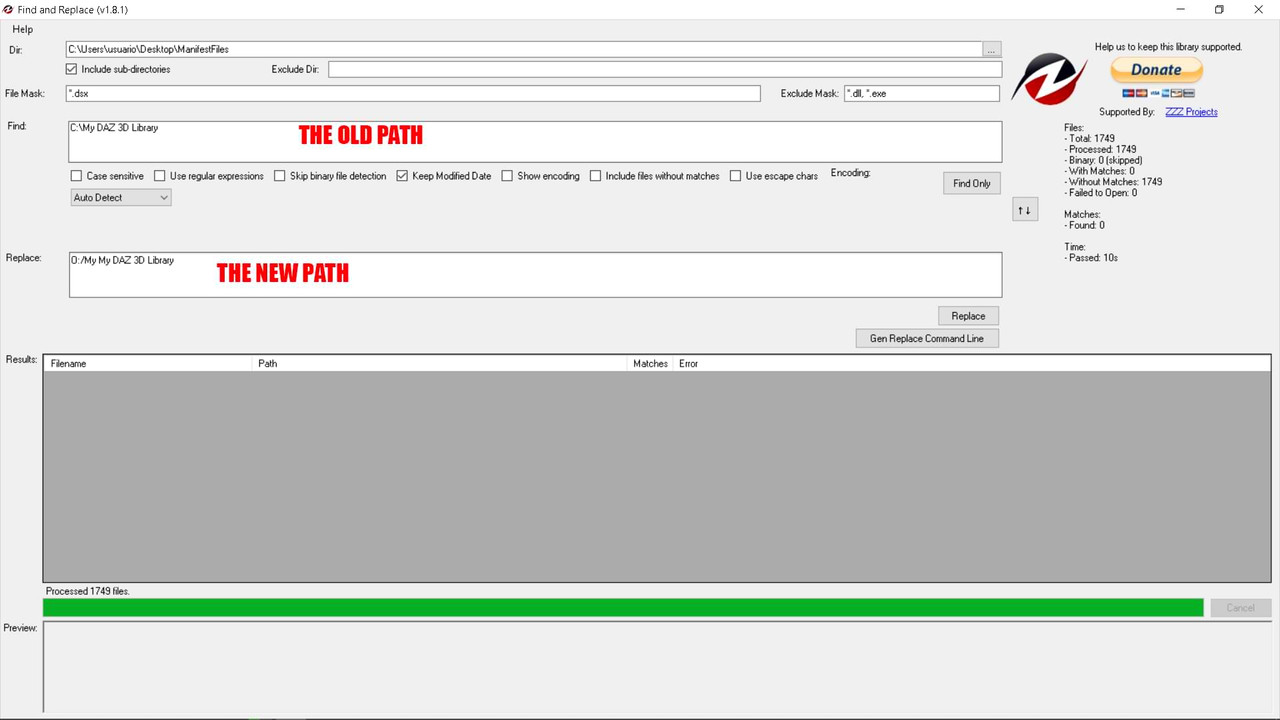
This app is very usefull... http://findandreplace.io/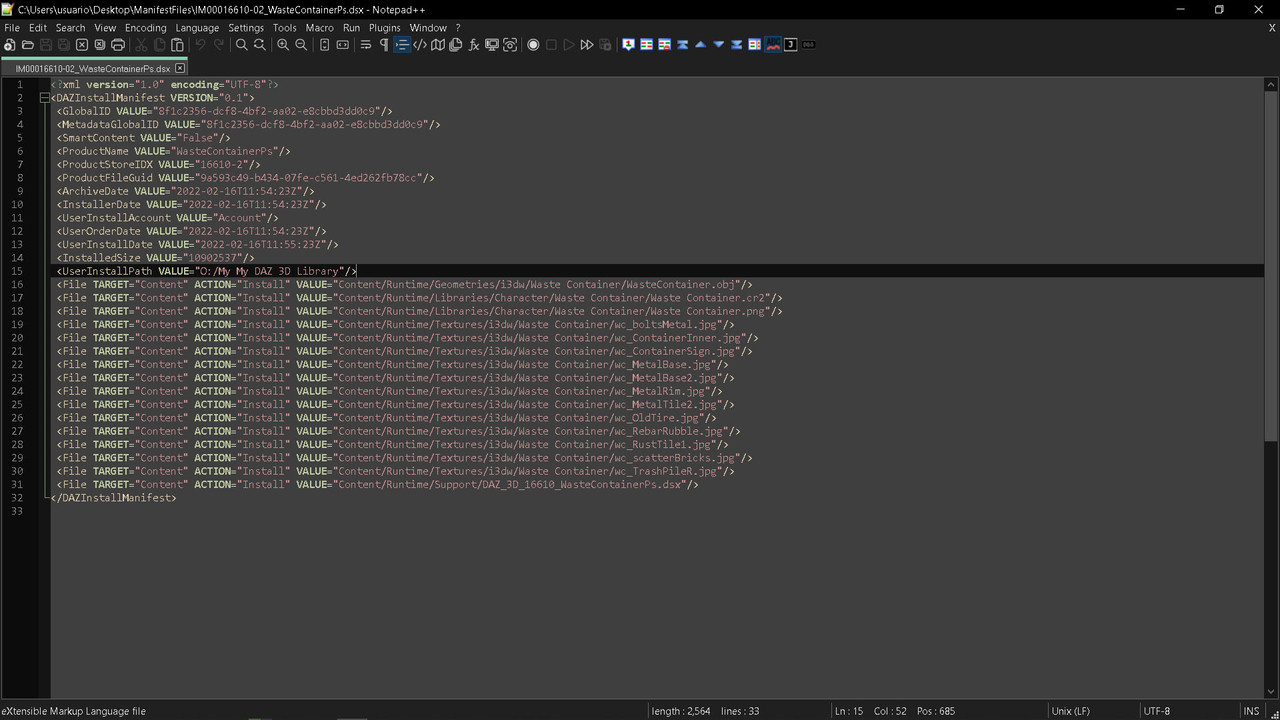 March 6, 2022 at 7:39 PM #1782494
There's a lot to cover here...
"is there a way to see what is installed with smart content?"
Yes, in DIM. There's a check mark on each item for which DIM installed a /Runtime/Support/<product>.dsx file.Also, Studio generates a boilerplate metadata file when "dumb" content is installed. When you edit a product's metadata, this is updated in the export function.
This is handy when you're building your own installer packages, these can be put in the archive (way beyond the scope of this topic) and when installed make it smart content.An important thing to know about DIM, is that it keeps a manifest library, a master collection of every product it has installed. The default location is
C:\Users\Public\Documents\DAZ 3D\InstallManager\ManifestFiles
There you will find a DSX file for every product. These are just XML files with info DIM and DAZ use.
You *can* relocate your Content Library. Dim *does* have a rebuild function for the installed content database. HOWEVER: moving the content library, even using the manager in DAZ, and rebuilding the database in DIM, will not fix the registered content "installed to" path in the manifest files. This can break DIM's understanding of what is installed and where.
If you look in one of the manifest files, you will find a tag <UserInstallPath ... />.
You will notice it has the path of where DIM installed the content, and that it doesn't point to your new library location.
This is simple to fix though, using Notepad++ you can use the "Find In Files" search on the manifest folder, and do a bulk replace.
So for example,
<UserInstallPath VALUE="C:/Users/Public/Documents/My DAZ 3D Library"/>
gets replaced with
<UserInstallPath VALUE="G:/Studio/My DAZ 3D Library"/>
in every DSX file in the manifest folder.
Now DIM can show you what's installed like before, and knows exactly where it is when you want to uninstall or update it.Also make sure you have the paths in DIM set up properly as well so you don't install content to a wrong location, and that it's using the same db as Studio.
For all your "dumb" content, you should find the vast majority of it in LOCAL_USER (in All Products), since it has no DSX metadata file on install, it has no explicit authorship data. SKU, product name are derived from the installer name. There is no Author or Store meta, so it will go to LOCAL_USER as the author and default to DAZ_3D for the store. Also, any file that has no categorization goes to Lost And Found. A near-perfect Product with metadata can show up in Loast And Found, because of one single file that wasn't categorized. Easy fix, just right click, and Categorize... metadata edited!
If you get “the chosen products could not be found with the current filtering option”, then there is something in one of the search slots! Make sure you don't have search terms in any of the filter boxes, there's one on each of Products and Files tabs, and one for files in the Product exploration view. It's laid out like ass, I know...
March 12, 2022 at 1:35 AM #1784006I installed everything in exactly the same place so I didn't have to worry about the manifest locations etc mattering. I just used the same exact structure as was on my laptop on my new computer.
What is the "rebuild function" maybe that's my issue.
I will try looking through lost and found. It may just be worth it when I need something to install to a blank directory so I can find the structure then I can figure out where it is (and hopefully fix the metadata), because if the search doesn't find it, it's not able to be used.
March 12, 2022 at 8:04 AM #1784074On Install Manager, open Settings (the gear icon up top right)
choose Advanced Settings...
open the Installation tab
right-click on the path of your library (in the bottom list view) and choose Fix Installed File Registry...
and it supposedly fixes the installed files registry or something :^)Also, it occurs to me after reading again, you did not copy over your CMS database? That's where Daz stores all the Smart Content metadata. Assuming you didn't completely wreck your library folders, you also have every product's meta and user-defined meta in the /Runtime/Support folder. There's a tool to re-install these data:
In DAZ, open your Content Browser pane. Click the hamburger menu button ( THIS one ) and select Content DB Maintenance...
in the little popup window, check off Re-Import Metadata... and click Accept
in the new window that pops up, there should be a list of all the metadata files for all your products (these are the .dsx files in /Runtime/Support), and they should all be checked. If there's also a User Data that's checked, leave that too. Ensuring everything is checked, click Accept and wait for it to finish. Be patient, it could take several minutes (my 2500 products will take about 8-9 minutes to re-import).When it's done, you should be able to see everything in Smart Content. If not, double-check your environment paths.
March 12, 2022 at 9:06 AM #1784087Anonymous
InactiveRank:
@Amber
thanks! Lots of good info here -
AuthorPosts










- You must be logged in to reply to this topic.
