Home Page › Forums › General Chat › Render time comparisons with 3080ti
- This topic has 11 replies, 6 voices, and was last updated 5 years, 3 months ago by
 Cage.
Cage.
-
AuthorPosts
-
June 16, 2021 at 7:09 AM #1703070
For those interested in the numbers. Here is a direct comparison between my old video card and my new video card.
Video Card: RTX 2080 8GB -> RTX 3080ti 12GB
Available VRAM for rendering in Windows 10: 6.5GB -> 9.8GB (increase of 3.3GB of VRAM)Experiment: Scene with two heavily clothed G8F figures and one heavily clothed G8M figure, complex lighting and complex environment. IRAY rendering in DAZ 4.15 at 2880x1620 resolution.
I rebooted before each render, to ensure I had a clean slate with the video card memory and DAZ. I removed my 2080 and installed my 3080ti in between the first and second render.Render Times: 38 minutes 32.33 seconds -> 13 minutes 12.47 seconds
So, at the end of the day it is about 1/3(ish) the time to complete the render. It isn't life changing, but considering my normal renders take around an hour, getting that down to around 20 minutes a pop is a lifesaver. Especially because I setup all of my scenes and kick off the renders in a batch (often 20-30 renders each time). My animations normally take about 15 hours to render, so hopefully I'll see closer to 5-6 hours.
Was it worth it? For me yes it was. Cutting my render times to 1/3 and gaining an additional 3.3GB of VRAM breathing room for my complex scenes is a huge benefit. I hope something in this mess of a post is interesting or helpful for your decision making process.
June 16, 2021 at 9:11 AM #1703095Well I've got an RTX 2080 and the thing is none of my renders take longer than 15 minutes with two (or more) clothed figures and a complex scene environment. I put that down to setting up your scene to work efficiently with regard to lighting. As far as I'm concerned no scene needs anything more than a HDRI working the ambient and a Ghost Light giving character light directionality. Maybe a plane to block light where you don't want it coming from, a back light if must. Common sense stuff.
While a 3000 series seems attractive, I wish I had one, I think if people learnt to set up there scenes correctly in the first place they'd not be experiencing inordinately long render times. Much of it comes down to long learnt experience and trial and error which there is no substitute for.June 16, 2021 at 1:20 PM #1703116As far as I’m concerned no scene needs anything more than a HDRI working the ambient and a Ghost Light giving character light directionality.
This. 1000x this. The crazier the lighting, the longer it takes (each light adds just that much more to the calculation load for each iteration). It also helps to carefully evaluate the render settings. Usually most folks leave them as DAZ originally set them, and never optimize them (nor do they ever optimize textures, come to think of it.)
I usually get fussy when render times on my GTX 2070-equipped laptop go past 20 minutes (7-10 for toon renders, because the textures are not all crazy with displacements, SSS, etc. and the lighting is even simpler.)
June 16, 2021 at 6:28 PM #1703165Not sure how to respond to the two of you. I appreciate that you have experience. I also have a decent amount of experience. I've probably rendered 7000+ images by now (a lot for some, not a lot for others). While there are times simple lighting works. There are times for me where it most definitely does not work. I don't do simple portrait style, one off images. I do complex scenes in elaborate backgrounds where I will be moving the characters and changing camera angles a dozen times in one series for a scene in my game.
I need to setup the lighting to make every camera angle look good, every time. Sometimes the background is the central focus, and sometimes it is one of the various people in the scene. Simple lighting just doesn't work. I also need to keep the textures high as I might have a couple images in a scene from far away and immediately after there will be an extreme close up. I need to be able to batch render these, so having to change the lighting or the textures for every still I'm doing in a scene that has 50+ stills would be a time killer for me. Especially because I need to put that scene to rest to start working on the next one. So for me, getting everything looking perfect once and then just walking the camera around, changing poses & expressions, changing focus and moving models around are all I have to do which only take a couple minutes per still. Then I kick off the batch render and that scene is put to bed.
June 18, 2021 at 4:28 AM #1703434Can I suggest you reinstall your 2080 and use it for your system card. Leave the 3080 unconnected to any monitor and Daz will use that card's entire memory for your renders, nothing being used for screen purposes.
Also, as long as your scene fits into the 6.5Gb you have free on your 2080, *both* cards will be used for the render which will seriously cut down the render time. If the scene is too large, DS will drop to just using the 3080. Nothing lost...
I'm guessing you're rendering VNs/comics/something like that so use them both. I use a 1660 Super as my system card and a 3080 for my rendering. On the rare occasion a scene fits into the 5Gb or so of free space on the 1660 it flies.
When you've got a scene lit entirely by multiple candles, or figures with separate fill, rim, back and main lights the idea of simple lighting goes out of the window. Fine for an outdoor scene but complex, indoor scenes? Nope... make it look good and use the power you now have. Don't sell that 2080!
June 18, 2021 at 9:19 PM #1703686I appreciate the technical description but some of it is semantics...
GPU-Z shows 100 MB in use on my 2nd card which, to all intents and purposes, is nothing. Essentially the entire VRAM of that 3080 is available for rendering. I do know about dynamic VRAM allocation but Studio does something undocumented (or if it is documented I can't find it!) and funky with compression as it approaches the VRAM limit and therefore never actually reserves the maximum, allowing Windows to retain usage of the actual VRAM and not offload it to system RAM. If what you say actually happens, I've never seen it.
Anyway, the underlying point was that the OP should get that 2080 back into their PC for an easier life!
Your point about HDRIs is well made but they don't work for me and, by the sounds of it, would not for the OP either. You can get away with it for simple scenes but where characters would interact with objects in the scene, exist behind them or cast/receive shadows, those objects have to be pulled out of the HDRI and rendered as normal. Complex, interior scenes can't really be done like this. My other gripe with them is you need one HDRI per camera position; a single camera fixed in space that can only rotate and zoom isn't what I want but it may suit a lot of others.
Honestly, if I could get my hands on a 3090 I'd just buy one and solve the inherent optimisation hassles of DS/Iray with brute force.
As we discussed before, though, real-time rendering is the future and we can bring our DAZ models along for the ride.
June 19, 2021 at 2:37 AM #1703774So Cheviot, funny you should mention my 2080. I actually have that in a second system and am trying to get my hands on a couple of 3070 or 3070ti cards. It will probably take months. However, I do use it now so I can run two batch renders at the same time. One batch on my primary (with the 3080ti) and one on the secondary computer (with the 2080 and hopefully soon with more).
Nice writeup Linvingpixels. I've not tried baking all of the lighting into an HDRI before. That's a brand new concept for me (always learning, always learning). I'll definitely look into that. I invariably bump the textures down to something reasonable whenever I can. I am currently doing scenes that can have 7+ G8 and/or G3 characters in a scene and it gets ridiculous if you don't.
June 19, 2021 at 4:07 AM #1703781For those that care. There was a forum created for cards and how well they do.
Here is a link to the post. I found it very informative and thought I'd share. It's a compilation of a bunch of people who used the same render and their times.June 19, 2021 at 4:24 AM #1703782There's a quick but comprehensive 10 minute tutorial here - https://www.youtube.com/watch?v=JeLdxBQzDdw - for rendering the entire scene as an HDRI and then using it for multiple renders.
Once made, they do speed up the rendering process enormously and allow far more geometry and materials to be used on characters/props/etc. The rendering time also dramatically drops but there is a tradeoff; your camera is free to swivel and zoom but it is anchored to one point in space and any additional characters or objects will always render in front of the background. If you need a character to sit at a table on a chair, you have to remove those from your HDRI creation and render separately, likewise if you need a character to be partially obscured by some of the set.
Some time ago I was creating a series of scenes inside the ROG Inn set and spent a day trying to get HDRIs to work but it was too problematic. For simple scenes with an open space it may well be worth doing and LP's other tips on scene optimisation will help enormously.
I'd just like to find a 3090 and be done with it!
(Quick Edit - that video shows you how to render the scene multiple times and combine the 3 or 5 images in Photoshop, but you can render it out just once using the canvas. That will also create an HDRI but the lighting is not quite as predictable as using the technique shown. If you want a high level of detail in the background you'll be looking at an 8k+ render so scenes where you are going to use DoF are more suited to this technique as well.)
June 19, 2021 at 6:15 AM #1703787DirkDiggler, that Daz thread is the only reliable comparison between render times and GPUs with DS. The times can pretty much be taken as "real" with the base test scene. Apart from some other system specs that introduce some variability, they're a very reliable as a guide to GPU performance on a per GPU basis.
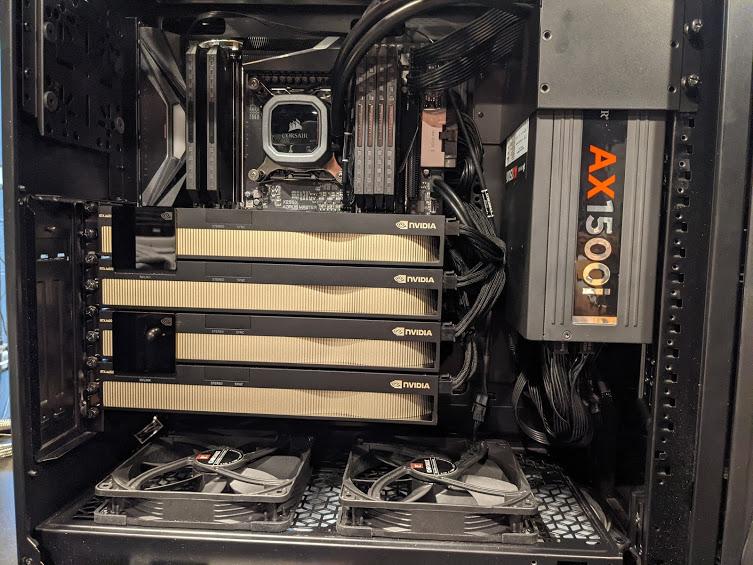
One guy has 4 RTX A6000s and apparently $34,000 to spend on 4 GPUs alone left over from a dead filthy wealthy maiden aunt is seems, twice the new price of my car (Fiat 500). Can't compete against that sort of rig LOL. He has no images in the Daz gallery....?
 June 19, 2021 at 6:15 AM #1703788
Cheviot, I appreciate the link. I'll definitely be watching that tomorrow.
June 19, 2021 at 4:59 PM #1703919Some of the challenges in using hdris can be overcome:
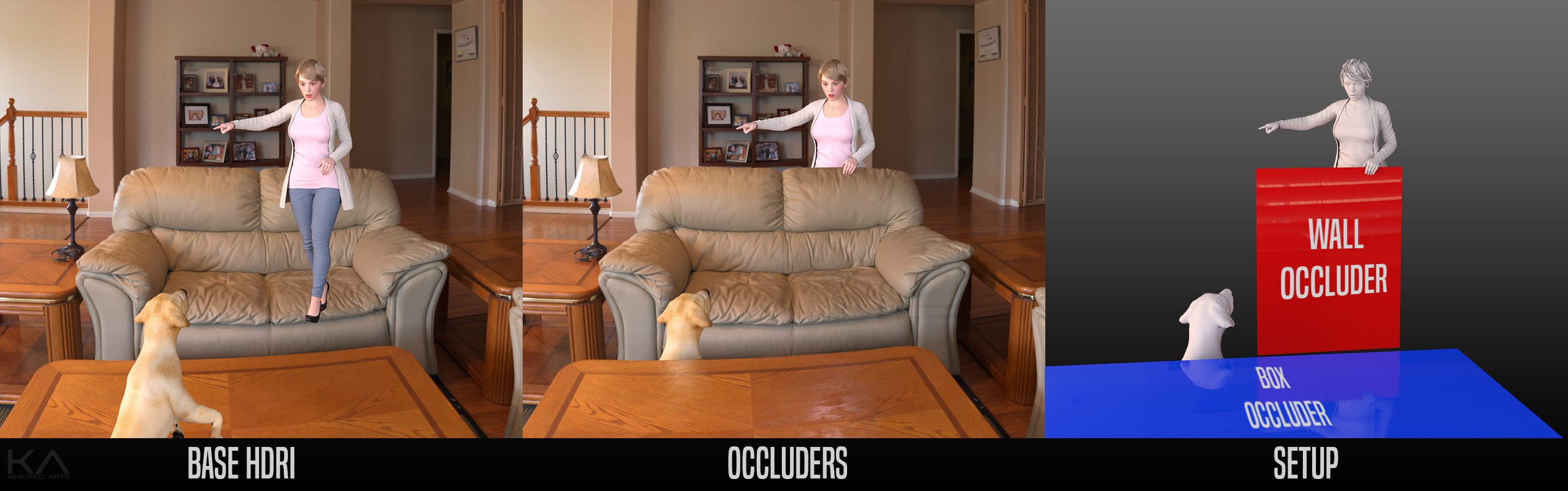
https://zonegfx.com/iray-hdri-tookit/
When I give animation a go, it's gonna be with an hdri created from the scene.
-
AuthorPosts









- You must be logged in to reply to this topic.
