Home Page › Forums › General Chat › (HELP) MAJOR jaw issue with G8M
- This topic has 14 replies, 8 voices, and was last updated 5 years, 5 months ago by
 MariCorsair.
-
AuthorPosts
-
April 9, 2021 at 12:07 AM #1682356
This has been this way for a while now and I can't for the life of me figure out how to fix it. I cannot do hardly any expression with it like this. The log file shows no error, so I don't even know where to start. It's only happening with G8 Males. I've tried redownloading and copying over G8 essentials, but it doesn't do anything to solve the problem. Any time the mouth opens, the jaw juts out. It's nightmare fuel and ruining a lot of my pictures and my beautiful G8 men. -_-
Any advice is appreciated. I've tried troubleshooting online and have gotten nothing.April 9, 2021 at 12:24 AM #1682358I think from the parameters tab you can select “view hidden morphs” or something like that and see if there is a morph that is dialed there.
April 9, 2021 at 1:09 AM #1682372I've found through doing that, that it's, unfortunately, a character I created originally in G3 that I had used the Character Converter on. My main character actually. Now I'm trying to figure out a way to keep the shape and make it into a brand new morph that hopefully won't carry over the problem. I'd hate to have to remake him completely.
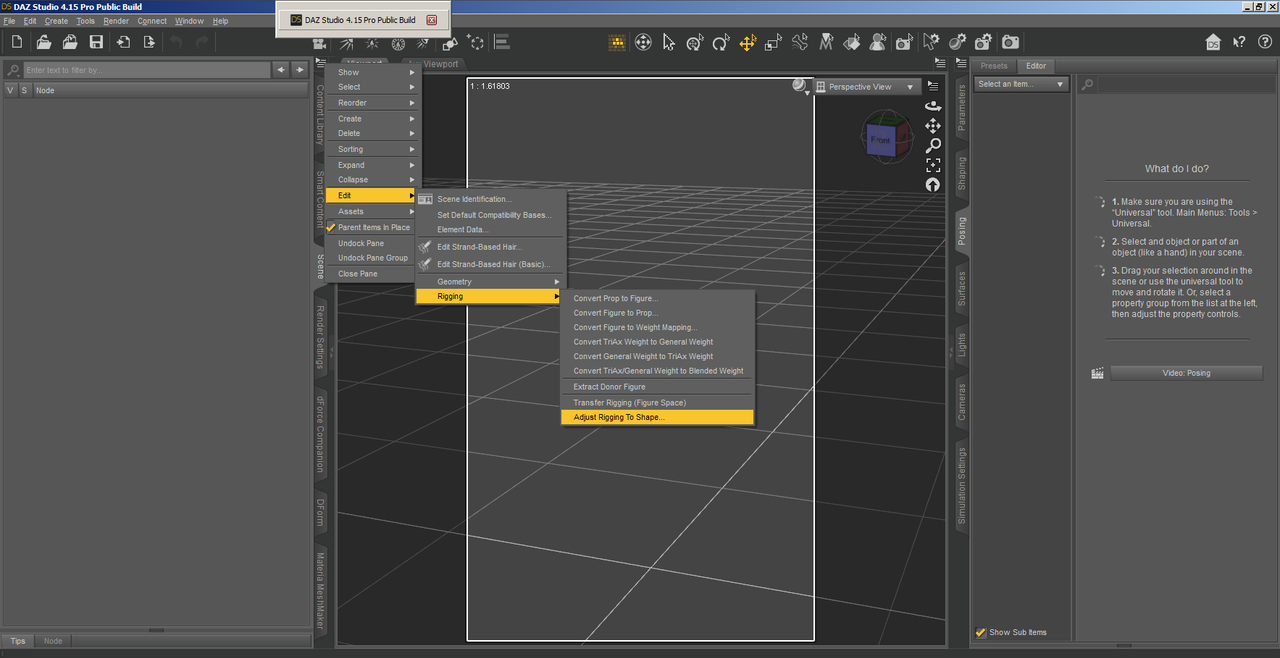
April 9, 2021 at 4:15 AM #1682381I had similar eye issues with a couple of G3 females I converted to G8 where the joints for their faces weren't where they were supposed to be causing their eyes to "rotate" right out of their heads. What fixed it for them was using the Adjust Rigging To Shape tool. Here's a picture of where you can find it (Note you need the Scene tab selected for the right options to show): Screenshot
Hopefully this will help. I know how frustrating stuff like this can be.
April 9, 2021 at 4:33 AM #1682382You could also try using
Helped me with a G3 custom figure that I'd made and getting it over to G8.1 - was a lot easier than I thought it was going to be 😀
April 9, 2021 at 6:42 AM #1682386Maybe Maybe this helps.
The easy way
Start Daz.
Load the Genesis 8 Base Figure.
Go to your Parameters Tab (may want to check the Shaping Tab later as well) and select “Currently Used”. This should display the offending morphs.
For those unwanted morphs click the “Gear Cog” on the upper right of the “Morph Dial” and select “Parameter Settings”
In the lower half of the next menu box theres a “Default” setting. Change it to ” 0 ” (zero) and click “Accept”.
To save this, you’ll need to go to the Menu, File, Save As, Support Asset, “Save Modified Assets”
You should get a message box saying G8 and those morphs will be permently modified, Click “Accept”.
Next time you load G8 it should be all good zero’d out.
April 9, 2021 at 3:32 PM #1682535Okay, this is a very dumb question, but have you tried selecting the Lower Jaw and making sure it's zeroed?
In the Scene Tab, select the dude's head, then expand downward... you'll find the lower jaw. Sometimes a pose will move that lower jaw out, up, down, etc, causing stuff like this.
It is likely that some product maker put in some morph data/dial that is pre-set to 100% or similar (it happens.)
Finally, you can try grabbing the Ultimate Zero product and using it to zero out every dial on the body, in order to see if that works: https://zonegfx.com/ultimate-zero/
April 9, 2021 at 7:03 PM #1682571Thank you so much to everyone for their different advice and sorry for the late reply!
I'll definitely go through all these options and see if one of them can help me fix this without having to remake him after so long!@Grouchy Old Fart, the lower jaw is zeroed the whole time. I believe it's most definitely a rigging issue that happened with me converting from G3M to G8M.
Hoping either adjusting rigging to figure or Dial Fusion will help fix the problem! If those don't work, I'll give Jozef and Zemlon's advice a go and see if that (hopefully) ends this frustration lol. Surely one of these options will be the solution!
Thanks again guys 🙂April 9, 2021 at 7:21 PM #1682573The 'adjust rigging to figure' through the scene tab worked! I feel dumb for even having this issue so long! Thank you @StopUsingGoogle!!!
And thanks to everyone else too- I learn more about the program, in general, every time I have to seek help from forums and will be keeping this alternate solutions in mind when/if anything else gives me trouble.Consider this problem solved 🙂
April 9, 2021 at 7:23 PM #1682574I'd say it's definitely rigging problem as @StopusingGoogle said. But using the Adjust Rigging To Shape tool isn't enough on it's own, you have to finish it off by using the ERC Freeze tool when you are in Edit Mode.
If you don't know what that is or how to use it then please let me know and I'll do my best to explain where and what it is.April 9, 2021 at 7:32 PM #1682575I'm unfamiliar with ERC Freeze and would very grateful for any explanation you can give to make it a more permanent solution 🙂
April 9, 2021 at 7:57 PM #1682579Is it a custom character?
April 9, 2021 at 8:55 PM #1682587I hope this explains what and how to use ERC Freeze.

1 - Load your character using your characters morph slider.
2 - Activate the Joint Editor Tool
3 - Right click on your character and bring up the Adjust Rigging To Shape tool (As in image) and click on it.

4 - Click Accept and wait a few secs for it to do it's thing.

5 - Right click on your characters morph slider then click on Edit Mode.

6 - Once in Edit Mode right click the slider again then click on ERC Freeze.

7 - Click on Accept and wait until it's done it's thing. (Will take quite a few seconds depending on how pwerful your PC is.)

8 - Come out of Edit Mode and the Joint Editing Tool, then click on Save Modified Assets. (As shown in image)

9 - Click on Accept and your character should be good to go.
I hope this sorts out your problem.
Cheers.April 10, 2021 at 1:48 AM #1682653@MariCorsair - I had all but decided that it wasn't worth using my converted characters after a couple days fighting my issue when I finally stumbled on the solution. I'm glad it helped.
@amberleaf - Thank you for the ERC freeze info. I'd heard to use it before, but now I know how to do it. Fortunately I've only had one recurrence with my main convert but now I can finish the job.April 10, 2021 at 4:22 PM #1682886Thank you for the visual guide, Amberleaf. It definitely helps 😀 And you're a lifesaver, stopusinggoogle.
I'll make sure to follow all the steps, but for a temporary solution, just saving the file as a new scene after adjusting rigging did keep fixed when reloading.
@duckface, it's a custom character I created out of a few different models (I don't know how to sculpt), so he has several morph tabs instead of just one for his own character and I save it as a scene file. I'm not sure how to convert things like that into a brand new morph, but it would make things a lot simpler if it's possible. All my original characters are like that. -
AuthorPosts










- You must be logged in to reply to this topic.