Home Page › Forums › General Chat › Gender Render
- This topic has 9 replies, 5 voices, and was last updated 6 years, 11 months ago by
 Dragon.
-
AuthorPosts
-
October 4, 2019 at 10:54 AM #1272236
Ok so this is just a first render test.
I loaded a Victoria 8 and added the XXY male genitalia for G8F (yes, it's a penis for females) since I'm creating crossdressing/transgender characters.
I applied the object, copied material and applied the shell as it says in the can.
https://gyazo.com/53477869652fb4c486be4a31b3d6614f
The render test shows this:
https://gyazo.com/ee825ac2fa69872d9b61b402122a5eed
https://gyazo.com/00d9be23629b5ec1629f70f9ae570c36Ok, this looks like shit lol
I can see the alphas on the shell and the cock looks yellower than the character skin.
How do I fix that?October 4, 2019 at 11:03 AM #1272240It's texture shaded not rendered. render by Nvidia Iray:
 October 4, 2019 at 11:47 AM #1272276
https://gyazo.com/08e5840c80edd45352bdea1d5be74562
Is it still rendering?
Has it stopped rendering?
Has it even started rendering?I'm totally lost!
October 4, 2019 at 11:50 AM #1272281Here's a couple tips:
Join F95 (google it) - this is a webpage / discord
Join 3DX (google it) - this is a discordThe first is... well, both for rendering and assets / games
the latter is for basically rendering / working with 3DOctober 4, 2019 at 11:54 AM #1272290Oh thanks Errilhl
I will join thoseOctober 4, 2019 at 12:18 PM #1272323Yes it's rendering. You have to wait until all the noise is gone. Then the rendering is complete. There is another way ,if you have installes GPU-Z software , see the GPU Load (in Sensor) when it is rendering The GPU Load shows a high number and when the GPU Load is zero or a lower number it means the render is finished.
October 4, 2019 at 12:23 PM #1272327You can render also in this smaller windows on the right side of viewport:

and also by this Camera Icon if you want to export your render:
 October 5, 2019 at 3:06 AM #1273218
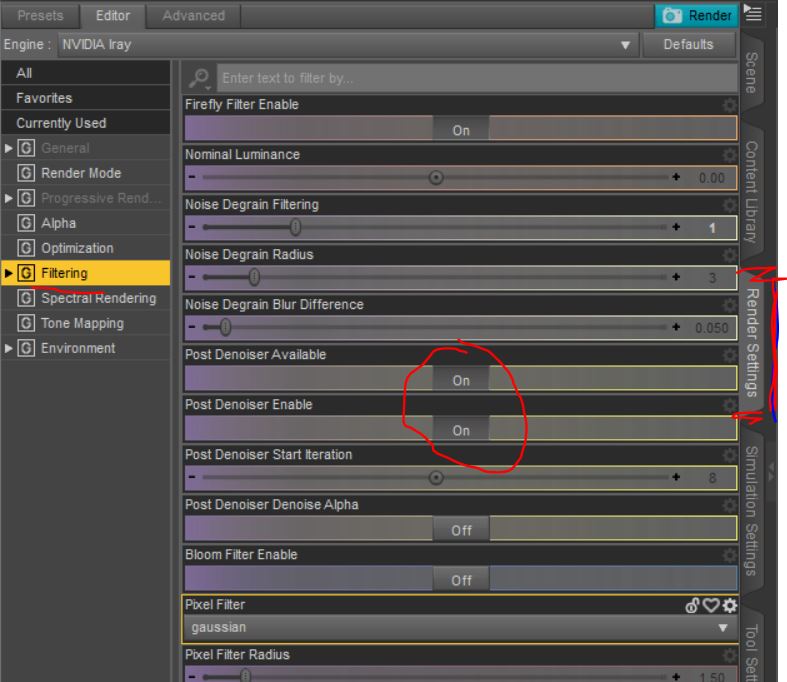
Don't forget to turn on the Denoiser, saves you tons of time.
 October 5, 2019 at 10:10 PM #1274367
Oh thank you!
Actually I need more info about Lighting and Render Settings.
I have got a bunch of Light Presets and Shader Presets
but I have no idea how to use them.
Should I select my character(s) before I merge Lights into the Scene or not?October 5, 2019 at 10:31 PM #1274383You don't need to select anything to add lights.
Just a word of advice. I know everyone is eager to just jump right in and start creating masterpieces, but you should really learn the basics of DAZ Studio and then build on those. There are tons of free video tutorials to help you do that.
Here's a few on youtube.
{https://www.youtube.com/watch?v=5_9fj60zjBw}
Here's DAZ 3D videos link
[https://www.youtube.com/user/WWWDAZ3DCOM/featured] -
AuthorPosts








- You must be logged in to reply to this topic.
