Home Page › Forums › Art Showcase › Through the portal.
- This topic has 18 replies, 8 voices, and was last updated 7 years ago by
Perlin.

-
AuthorPosts
-
September 14, 2019 at 6:50 PM #1245911
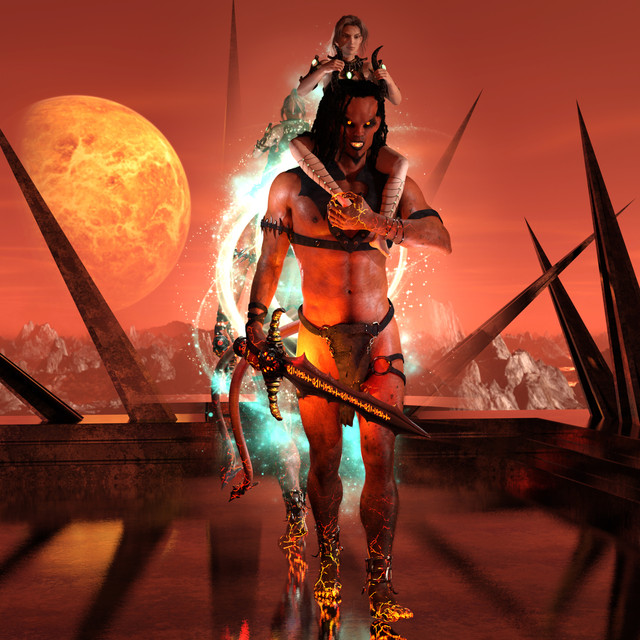
Also decided to share my demon riding art :).
Any tips on how to better remove noise in the Iray render?
I tried the new Post Denoiser, but it cuts the quality very much
Full size image.
 <br />upload photos<br />September 14, 2019 at 8:21 PM #1246010
Only tip ive found that work for me is to render as large as possible then shrink the image.
September 14, 2019 at 8:39 PM #1246027There also the othre side of extreme, if you are on Potato,rendering as large as possible is a hurdle because sometimes your Potato can't handle it, so then this trick exist: Rendering a small part as many as possible with Spot rendering then at final step combine them all with Photoshop, this will need a bit photoshop and post-processing knowledge tho
September 14, 2019 at 9:29 PM #1246063I haven't figured out how, but I read somewhere you could extend the render time. Maybe since I've thrown that out there, someone here may know.
I had that before and my solution , apparently, was upgrading my GPU.
I've also read, more lighting. That, of course, is experimentation.September 15, 2019 at 3:29 AM #1246502yeah ive heard tons of light then photoshop exposure. Havent tried it yet though. I didnt like the denoiser either. Ive had some luck rendering in layers if the scene is to heavy on the card. That makes it easier to render large.
In some cases ive kept the same amount of light I just changed what was lighting it. Some HDRIs suck it seems.
September 18, 2019 at 2:28 PM #1251204ISO and shutter speed may make a bit of difference - not sure though, since I use it to tone down brighter images. Haven't really done a lot of experimenting with the render options yet other than those listed above
September 19, 2019 at 2:11 AM #1251792Well, if nothing else, I'm learning a lil about tone mapping. Never played with it previously. Thanks LP.
September 19, 2019 at 2:44 AM #1251815I set render time to 0 minutes, max samples to 50,000, min samples to 50, and convergence ratio to 99%. It would render for a week if I let it, but I usually stop the render between 4000 and 6000 iterations.
September 19, 2019 at 4:55 AM #1251904how can it render at 0 minutes? I've never messed with those settings. So much I don't know.
September 19, 2019 at 12:36 PM #1252289Setting the render time to zero is basically setting it to infinity.
Rendering is an “either or” scenario. Either you reach max samples, or you reach the end of the render time, or you reach the percentage of convergence. Setting the render time to zero (infinity) takes it out of the equation. Setting max samples to a ridiculously high number takes the number of iterations out as well. So basically when I render, it won’t be completely done until it is 99% converged.
Everything I know about render settings I learned from @ladyburger. She’s the real expert.
September 19, 2019 at 3:04 PM #1252428Anonymous
InactiveRank:
@drgnmztr - @robf4g210 is correct, if you set the time to 0, it turns off the time aspect. Your render settings in that tab are either/or criteria for the most part. So if you're using default settings and have your rendering quality toggled on, it will stop when it reaches the default criteria, either 5000 iterations (samples), 7200 seconds (2 hours) or 95 percent conversion. Timer at 0 eliminates the time basis. After that, i tend to bump the conversion ratio to 100 percent and 7000 samples. This is typically enough for most scenes. I personally hate the iteration timeout (unless I'm rendering a draft) because i like 100 percent conversion ratios. However bumping your samples up uses more VRAM. I would suggest not tweaking the Rendering Quality slider as it is an overall multiplier and will exponentially increase render times A WHOLE LOT. if you're still getting grainy renders, and have a good knowledge of photo editing software such as photoshop, you can try bumping the lighting up a bit and bringing it back down in post. This is actually my standard practice as I render with canvasses setup that allows me to tweak lighting a lot in photoshop. I hope this helps.
September 19, 2019 at 9:28 PM #1252794I rarely have issues with noise/grain with my 1070. (Frak I love my card.LOL).. I was just commenting on the settings LP mentioned after I mentioned I'd read Iray loves light and it helps with noise reduction. LP expanded on that as I was hoping someone would , for Isilfor.
That being said, I can still use this knowledge for other reasons. Its funny because I seem to have this pattern of rendering darker (not on purpose) and then spot bumping up light in PS. Which works quite well for me actually.
But you guys explaining these settings is very helpful, even if I still don't quite understand .. Gives me something to play with when I'm blank on ideas.
September 19, 2019 at 9:30 PM #1252796BTW, I get that 0 turns the time aspect off now. I was talking about not really understanding the setting s for the iterations and conversion ratios and stuff.
September 19, 2019 at 9:57 PM #1252814Ive maxed out all settings and gotten a 1 hour render and an 8 hour render. Ive had a scene with tons of noise and changed one light or an angle and gotten almost no noise.
Same with textures and shaders. I now set everything to max and just stop the render when im ok with it. Ive stopped renders at 1% and 60%. Every so often Ill let one run to 98%.The canvas option looks interesting. Will have to try that.
September 19, 2019 at 11:51 PM #1252896How about rendering a short movie in DAZ? Is it possible to render that like a photo realistic scene?
-
AuthorPosts










- You must be logged in to reply to this topic.

