Home Page › Forums › General Chat › Around "Look my boobs!" script...
- This topic has 4 replies, 3 voices, and was last updated 2 years, 6 months ago by
 ADAM.
ADAM.
-
AuthorPosts
-
March 24, 2024 at 7:52 PM #2066040
I am asked to explain more about this script.
As you can see, the interface is simple.
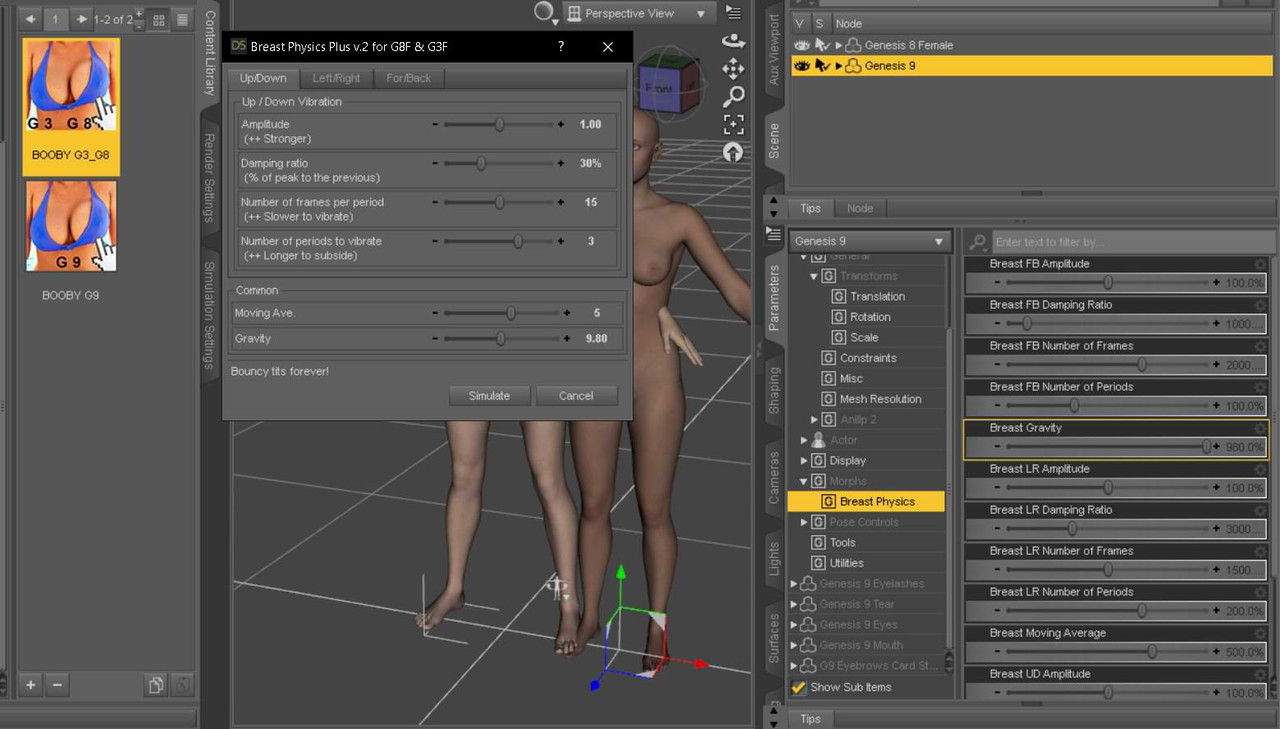
The three tabs correspond to the coordinates Y, X, Z. (Up/down, Left/Right and Forward/Backward..)
Amplitude is the "applicable force" of the parameter, etc...
Moving Averange is the general value of application on the breasts.
Gravity, better to leave it at 9.8. (although there are areas of the Earth where, to a greater or lesser extent, it will barely be noticed. But if you want to be on the Moon, well..., I don't think any girl will show off her things outside the planet...)
In Parameters/Actor a Morph is created, but it is easier from the script.
And, here, a comparative video.
March 24, 2024 at 8:43 PM #2066047Anonymous
InactiveRank:
hubba hubba!
March 25, 2024 at 2:36 PM #2066196I have to say that the script is not mine, although I have decrypted and modified it. Originally, it lasted 14 days... Also, it only worked in version 4.10 of DS, since it did not generate the morphs in another version. I don't know why... So I separated the .dsf morphs and adjusted for an optimal value. Upon passing, the author "masakot0606" disappeared without a trace, useless links, etc...
I don't remember why I downloaded it, but I've kept it for years...
Originally, it was intended for g3/g8, using Zev0 morphs. For Genesis 9 I had to adapt the names of the bones and figure out the replacement.
The story - from 2018 - can be read here:
https://www.daz3d.com/forums/discussion/20208/breast-bounce-script-for-daz-studio-4-5/p6March 25, 2024 at 11:18 PM #2066343I found the original text! (I still had the original rar, inexplicably, since I deleted this type of rar, which takes up space, and after 6 years...)
--------------------
Breasts Physics Plus for G8F and G3F v.1.0 by [email protected]This script is freeware.
0. Requirements
================
- DAZ Studio 4.10.0.123 or higher
- Genesis 8 or 3 Female figure
(You don't need any commercial morphs)1. Introduction
================
This script analyzes the force applied to the breasts in each frame of the animation, and then calculates and assigns morph values to simulate realistic breasts movement. It allows you to change parameters to simulate breasts with infinite variety of different characteristics.The technique used to simulate the vibration is called seismic response analysis, which architects use when they design buildings to withstand earthquakes or strong wind, thus producing a realistic looking breast movement.
2. How to use it
=================
- Install the script (It is a DAZ encrypted script)
- Execute the script with the animated G8F or G3F figure selected.
(either the entire figure or any of its node)
- Tweak the parameters to your liking or leave them as they are.
- Press the "Simulate" button.
- A dialog box will come up when the process is complete.
- The simulation result is ready for you to enjoy.3. Parameters
==============
3.0 - Background theory
------------------------
The force applied to an object will cause displacement of its shape in the subsequent time period, following a vibration pattern inherent to the object, called characteristic vibration. The displacement at a given point in time is a cumulative total of displacement resulting from the forces applied in the preceding moments.When the body moves, the breasts receive forces in xyz direction and move in quite a complex fashion. But the movement is largely defined by the characteristic vibration pattern, and there are 4 parameters you can set.
3.1 - Amplitude
---------------
If you want larger (smaller) displacement of the shape, increase (decrease) this value.3.2 - Damping ratio
--------------------
The ratio of the 1st peak of the vibration and the 2nd (and any subsequent) peak. If the Damping ratio is set to 30%, the 2nd peak is 30% of the 1st peak, the 3rd peak is 30% of the 2nd (30% x 30% = 9% of the 1st) and so on. Lower the value, the vibration subsides more quickly.3.3 - Number of frames per period
---------------------------------
The number of frames necessary to complete one period of the characteristic vibration. The larger the number, the longer it takes to complete one period, which means slower to vibrate. If the body moves up/down at the frequency of 15 frames, and if the up/down number of frames per period for the breasts is set at the same value, it will cause a phenomenon called resonance and the vibration will gradually become more intense.3.4 - Number of periods to vibrate
----------------------------------
The number of periods the vibration will continue after the force stops being applied. For example, if the damping ratio is 60%, the second peak is 60% of the first, and the third peak is 36% of the first (60% of 60%). If the "Number of periods" is set to 2, however, there will no longer be a third peak because the vibration stops after 2 periods.4. Other parameters
====================
4.1 - Gravitational acceleration
---------------------------------
The software calculate the impact of the gravity in the same way as the force generated by the body movement. Changing the value of the gravity has a noticeable (and sometimes favorable) difference to the simulation results. The default value of the gravitational acceleration is set to 9.8 m/s/s as in the real world on the earth.4.2 - Moving average
--------------------------
The software can set the number of frames to average out the force applied in order to suppress jerky movement.5. Other
========
5.1 Embedding parameters
-------------------------
Once the simulation is performed by hitting the button in the dialog box, the simulation parameters are saved to the figure as morph values. If the script finds these values when it is first executed before the dialog box is displayed, it will use them as default values to display in the dialog box.The stored parameters can be found in the top layer of the Parameters Pane $B!H(BMorphs$B!I(B. Even if you change them in the Parameters pane, it won't do anything until you run the script again. If you always want to start the script with your own default parameters, execute the simulation with the tweaked parameters to save them to the figure, and then use that figure as a template.
6. Donation
============
This script is freeware. However, I would welcome your generous donation of USD5.0 if you like my script and continue to use it. You can donate the money via the following PayPal link.https://www.paypal.me/MasatoK0606/USD5
Just copy and paste this URL into your browser.
Appendix (Revision history)
===========================
v 1.0 First releaseBy [email protected]
All rights reserved
-------------------------March 25, 2024 at 11:33 PM #2066344Thanks
-
AuthorPosts



- You must be logged in to reply to this topic.
