Home Page › Forums › General Chat › (Not Yet*) Open Render Queue v0.1 WIP for Daz Studio 6.26.2026.28722 Latest
- This topic has 3 replies, 2 voices, and was last updated 1 hour, 10 minutes ago by
 secretnetguy.
-
AuthorPosts
-
October 26, 2026 at 3:01 PM #2193111
As you're all aware, the clowns behind Daz and their hype man Richard Intestine or whatever have smugly stepped all over the community, by gating plugins we before owned outright behind a monthly subscription.
Most importantly, the two plugins I actually paid for, Mesh Grabber and Render Queue. I was very miffed about this but didn't have time to challenge them on it before. Recently, I decided to reimplement Open Mesh Grabber and Open Render Queue.
Obviously, Open Mesh Grabber is a massive undertaking on my part, especially as I have a day job, so it'll take a few months until I open source both, since I am not an expert on Daz plugins, I used the Render Queue as "target practice". And the source I am writing is shared between the two.
I can't afford a Claude subscription (not willing to pay those massive sums for a few million tokens) and apparently the reverse engineering abilities were nerfed last week anyways due to corporations crying, so I had limited help from local clanker at reverse engineering it, so it's taking me a lot longer than I'd like. But I think I've managed to make most of the important stuff to work for my reimplementation of Render Queue. I've also fixed some glaring bugs their implementation has.
THIS IS A REIMPLEMENTATION, NOT A CRACK (so not necessarily all the features work). SO ONLY THE STUFF I GUARANTEE BELOW WORKS WORKS. AND MAYBE NOT EVEN THAT. BUT IT'S FREE, SO YEAH.

Please wait for a member of the community to validate what I am sharing is safe to use. For the DLL itself:
SHA-256 70917FAB3A6252E5C503C1D82D538A1C4F24EB54D818FC406E694C49AB3C5755
MD5 9BD732A6952CFA6CDDDE2E1DA07595DEDownload here: https://www.mediafire.com/file/oz0u1k8g6n7u84p/OpenRenderQueueALPHA.7z/file
Workflow that I can attest works is each render is a separate scene (theoretically, animations work, but I haven't tested any of it):
1. SET THE OUTPUT DIRECTORY.
2. + button to add scenes that you want rendered Make sure to add a time limit to the render or it will never end. Make sure you have a dedicated camera set before you save the scene, as usual. I don't guarantee other things works or multicams just yet.
3. Save the queue to a new file wherever you want it, important.
Press Start Queue.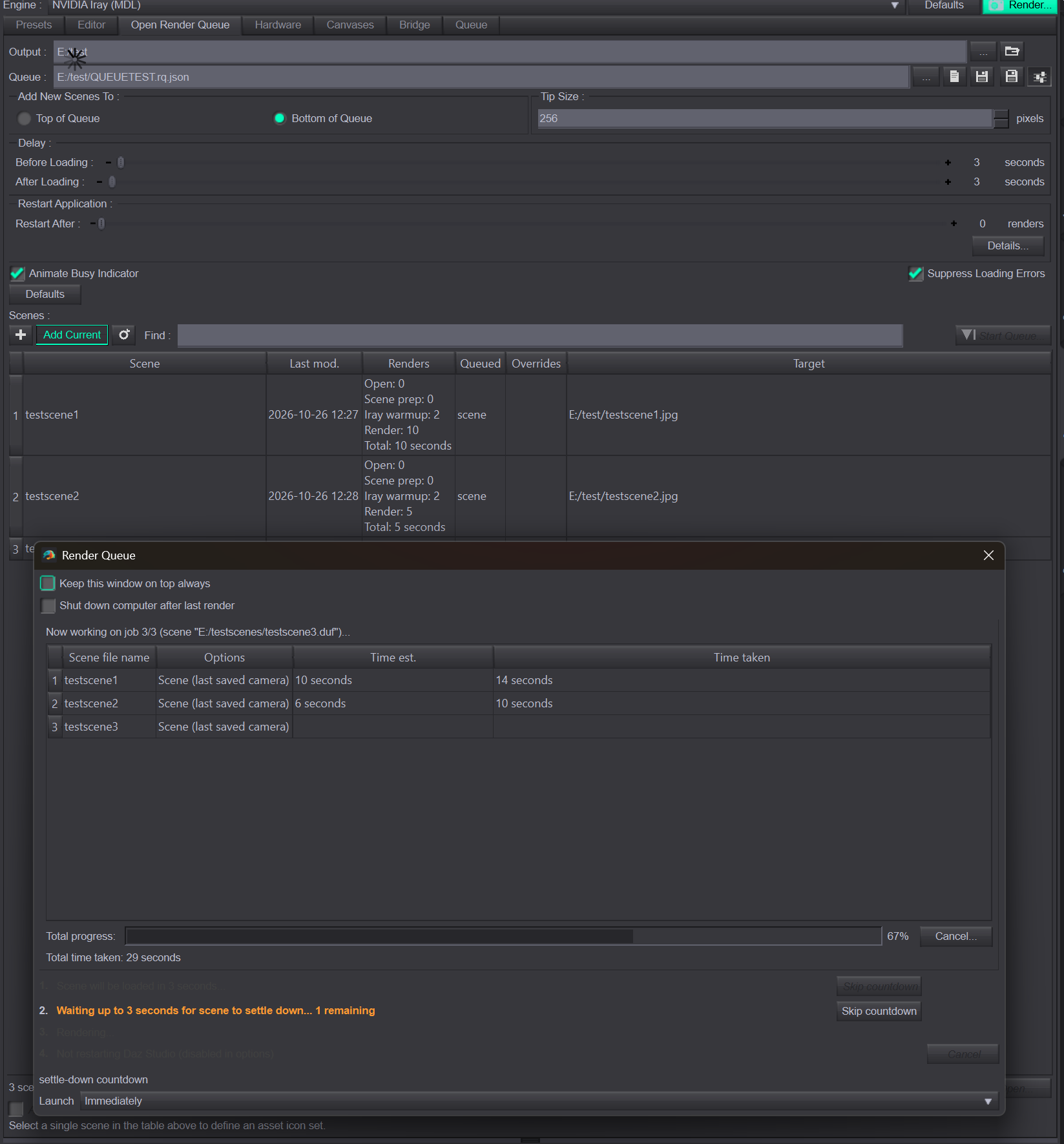
KNOWN ISSUES:
- The render windows don't close on their own in this version. If you have 98 scenes batched, it'll open 98 windows. That's a bit of a yikes, but not something that will bite anyone in the ass at this junction, unless you render at 8K or 16K throughout.
October 26, 2026 at 3:06 PM #2193113My goals for the future build are introducing features that don't exist in Render Queue as gated by Daz clowns. Namely, implementing a fullblown per render queue override of render settings, especially changing settings on the fly (Richard Intestine on Daz forums suggested that we should reopen each one one by one, edit and resave, that's unacceptable).
Daz6 latest public build is the target (because the SDK is still in limbo, of course it is, it's only been out a year /s), and this can target both 50 series and 40 series cards.
My Open Mesh Grabber target will be Daz 4.24, since that's the primary editor I use for editing, because Daz 6 is garbage for anything other than Nvidia's work (iRay 2025).
Workflow for using this is: Build scenes with 4.24, then batch them overnight in Daz6 with ORQ.
October 26, 2026 at 3:22 PM #2193116Nice!
I don't use either tool, but I 100% wish you luck.
By the way, perhaps you can use GrokBot or similar (it's a $40 USD/mo subscription, and last I heard it still does RE?)
October 26, 2026 at 3:58 PM #2193119Thank you for the suggestion, I'll keep looking! Also, for anyone using this, this is an exterior thing to the Daz subsystems, just like their original plugin they bought off a member of the community. I have no control over the way the scene loads.
So, for the users, please use those Before/After loading delays to avoid having black screens etc. Minimum of 3 seconds ( I provided defaults). If you're willing, 5-10 seconds would work best for the scene to settle.
So far I've battle tested it on 130 4K renders and 18 8K ones, for my work.
-
AuthorPosts




- You must be logged in to reply to this topic.
