Home Page › Forums › General Chat › Damn Ears!!!!
- This topic has 12 replies, 4 voices, and was last updated 3 years, 6 months ago by
 Richard Y..
-
AuthorPosts
-
March 21, 2023 at 4:27 PM #1944383
Need some more advice please!
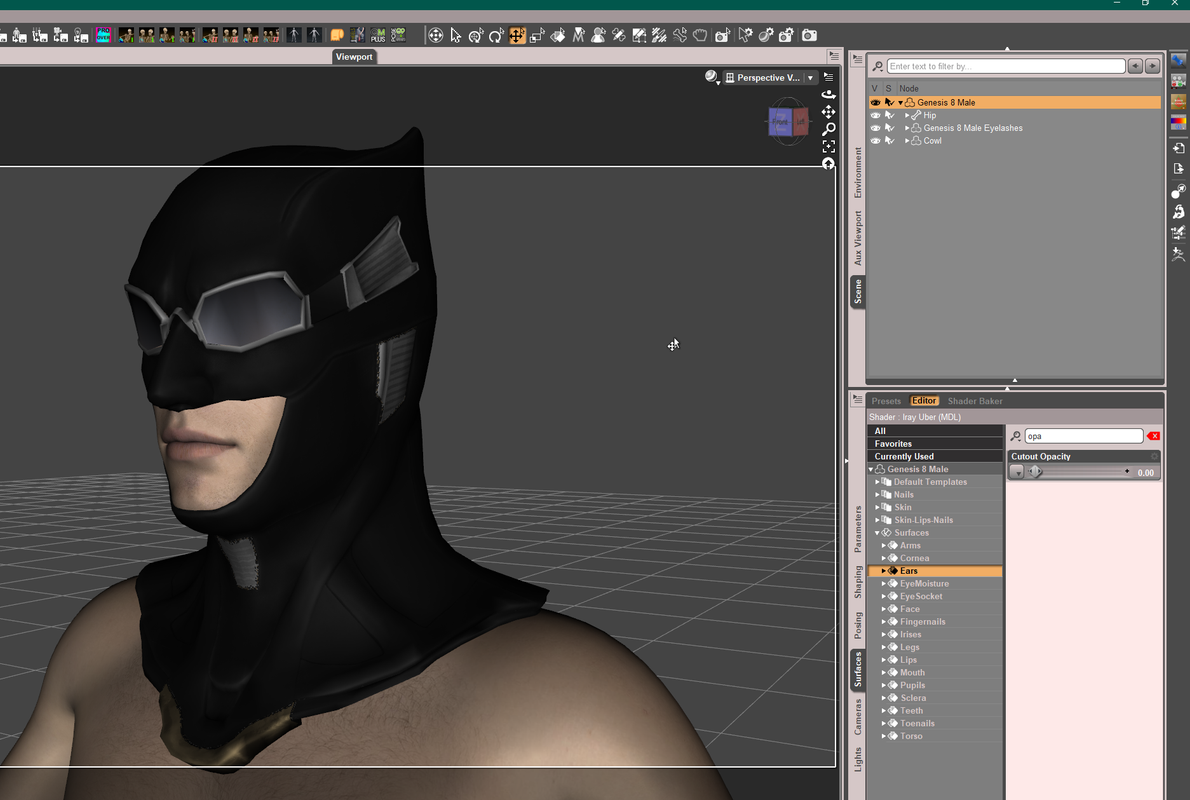
How can I hide G8 ears? I don't want to delete them as I will need them when characters like batman and Flash take off their cowls/masks!
Thanks in advance!
March 21, 2023 at 5:16 PM #1944391Why not just make them not visible by selecting the node and clicking the visibility symbol to toggle them off?
March 21, 2023 at 6:09 PM #1944417Did that but they stayed visible. It may be cause I loaded the custom character on the G8 base who knows why that didn't work right for me though. Sometime I hit the nail on the head and sometimes I hit the nail on the thumb either way it hurts where it counts in my case!
March 21, 2023 at 9:47 PM #1944461Some screenshots would help. I'm assuming you have a cowl or helmet of some sort that the ears are clipping through. You could just apply a morph that hides the ears. If the morph applies to your helmet/cowl you could find the same morph (usually hidden but you can enable hidden parameters) under 'currently used' and set it to zero on the helmet.
Here are some options
March 21, 2023 at 10:18 PM #1944465Guess I'll have to wait for my points to rebuild and get something that removes them. I saw something this morning.
Will just reload character when removing the cowl. No biggie I guess.March 22, 2023 at 12:08 AM #1944526If the cowl you use is a conforming item, you may also Auto-Hide Faces function.
Switch to Geometry Editor, select G8, RMB menu in Viewport, Geometry Selection - Select by Surfaces - Ears, then Geometry Assignment - Set Auto-Hide Faces for Attachment... - Select the Cowl.
Then unfit the cowl and fit it again~March 22, 2023 at 12:14 AM #1944529It is the Injustice 2 Batman (Justice League) product, says its by Tractor Tech.
I don't think it has all the normal morphs like the regular clothing or dforce clothing.
The product is on this site.March 22, 2023 at 12:23 AM #1944532Oh, this cowl is simple, just hide the surface of ears will be fine.
 March 22, 2023 at 12:25 AM #1944533
Dang it! I need to take more DAZ tutorials! You just did that instantly!
March 22, 2023 at 12:29 AM #1944534Yep, I don't know how
March 22, 2023 at 12:30 AM #1944535NM, just figured it out. Now I feel really dumb!
March 22, 2023 at 12:30 AM #1944536Thank you
March 22, 2023 at 1:06 AM #1944542NP~ The author should've given it an auto-hide face setup~~
-
AuthorPosts







- You must be logged in to reply to this topic.
