Home Page › Forums › General Chat › DAZ smart content question
- This topic has 9 replies, 5 voices, and was last updated 4 years, 3 months ago by
 gts6.
gts6.
-
AuthorPosts
-
May 21, 2022 at 12:31 AM #1810383
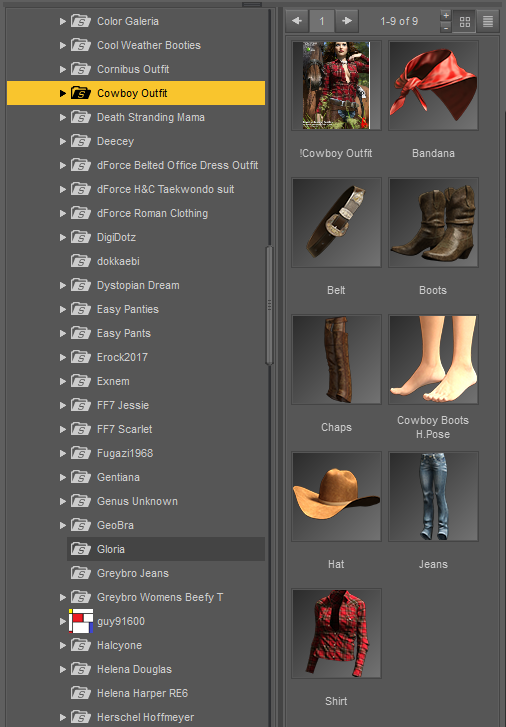
An annoying problem I have with DAZ is the thumbnails for smartcontent. For instance, if I click on "Footwear" under the Wardrobe section, it shows the thumbnails, some that are products specifically for Shoes only, they show the thumbnails fine correctly. But if the footwear is part of a complete outfit, it usually shows a thumbnail of a model in the full outfit and you can barely see the shoes to know what they look like. Then I must explore each one of those one at atime just to see what those shoes look like.
So the question is, is there a known way or workaround to change the thumbnail to show just the shoes if I click footwear, but then if I click say "Underwear" Just show the thumb of the underwear of that outfit set. And then of course, still show the default thumbnail when im searching for an entire outfit.
May 21, 2022 at 1:02 AM #1810395The thumbnails that you see for the content are just png images which have the same name as the content that they represent.. afaik, they are not automatically generated.
If you want a different image for the content then you can change them manually.. you could either load just the content you want in Daz and then take a screenshot and save it there in the correct folders.. or you could crop the original image to show only the parts you want..
The main thing is that the name should be the same as the content that they represent
 May 21, 2022 at 1:31 AM #1810397
Yes, I understand that. The problem is that there are multiple items that make up an outfit. If I am looking specifically for shoes, for instance.. shoes are part of almost all of the outfits. So when looking under the set of "Footwear" it also shows default image (named as the outfit) instead of the secondary image named for the Shoes within that outfit. So im looking for a way to have each of the pieces of the outfit to have its own thumbnail displayed based upon which part of an outfit im looking for (could be shoes, pants, etc..) Id want each to show its own thumbnail based on which branch im in, if that makes sense
May 21, 2022 at 2:23 AM #1810401I've always been a manual install person myself. Never have and never will let content install all over the place in nested vanity folders where you'll never find it. If you set up your runtime structure properly you'll pretty much know where to find things.
As for shoes, I have a folder made just for that for each character. During (manual) install, as well as installing the whole clothing pack, I split off the shoes into a separate folder. All the shoes for G8F/M eg, are easily findable. And I do the same for swimwear, bedrooms, bathrooms etc. If I come across a good skin shader I particularly like I also save it into a folder as a material preset for later.
Smart Content is not smart, it just has tags (metadata) that defines where it be can found and what it is compatible with. If content has no DS metadata it will not be visible in Smart Content, and if you search for "shoes" it will not reveal any item not named "shoes", such as sandals, sneakers, saddle oxfords, etc.... dumb content finder.
Setting up a customised My Library doesn't require memorising all the locations, just organising, and often renaming, the user facing files logically.May 21, 2022 at 2:35 AM #1810403Didn't realize the OP was asking about smart content.. 🙁
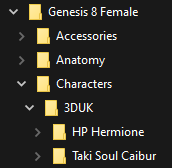
I'm trying to reorganize the content in my library.. mostly just moving the actual content from the vendor folders.. lots of vendors put their content inside their specific folders and it is a bit difficult to find when you remember the name of the content, but don't remember the vendor..
mostly content like this..
still working on it
May 21, 2022 at 3:02 AM #1810405Well the thread title says "DAZ Smart Content Question" @Gladson1976
"...vendors put their content inside their specific folders" That's what makes finding stuff so hard when you use the Content Library to find it, and why Smart Content was invented to "solve" the problem that Daz created.
If a logical naming file structure for PAs was required and implemented by Daz there would be no need for Smart Content at all.
Thus creating an convoluted solution to an self-created unnecessary problem, well done Daz... May 21, 2022 at 3:55 AM #1810414
Smart Content has two tabs, "Files" and "Products". It looks like you're looking at the items in "Products", for this reason you're looking at the entire outfit, to see a specific item, switch to the "Files" tab.
May 21, 2022 at 4:18 AM #1810417thanks Twister174 (and everyone else also). But that was the solution, the Files and Products tabs, they display the content differently, I never realized it.
This makes it SO much easier to find stuff.May 21, 2022 at 8:42 AM #1810492May 21, 2022 at 5:52 PM #1810693ive actually considered just writing an exe software to handle Daz content, but unless I would want to enter all the details about each product manually, id still be at the mercy of the file structure and data from the artists (which seems to be the actual problem, although *most* of the stuff is correct)
I may still write a content handler exe someday, but it's very low on my priority of things to do now, especially since viewing the "Files" instead of "products" tab seems to solve my current issue. (im still new to Daz, only been using it a couple of months)
-
AuthorPosts









- You must be logged in to reply to this topic.
