Home Page › Forums › General Chat › Back-up weirdness
- This topic has 7 replies, 5 voices, and was last updated 4 years, 5 months ago by
 Frank21.
-
AuthorPosts
-
March 29, 2022 at 5:28 AM #1789734
Fearing a drive crash I try to back-up my Daz library onto a 1TB SSD (named DS Runtime)
My Library is 683 GB so it should easily fit onto a 1TB drive.
But windows says I need an extra 430 GB to copy the files over.
This makes no sense to me. What's going on here?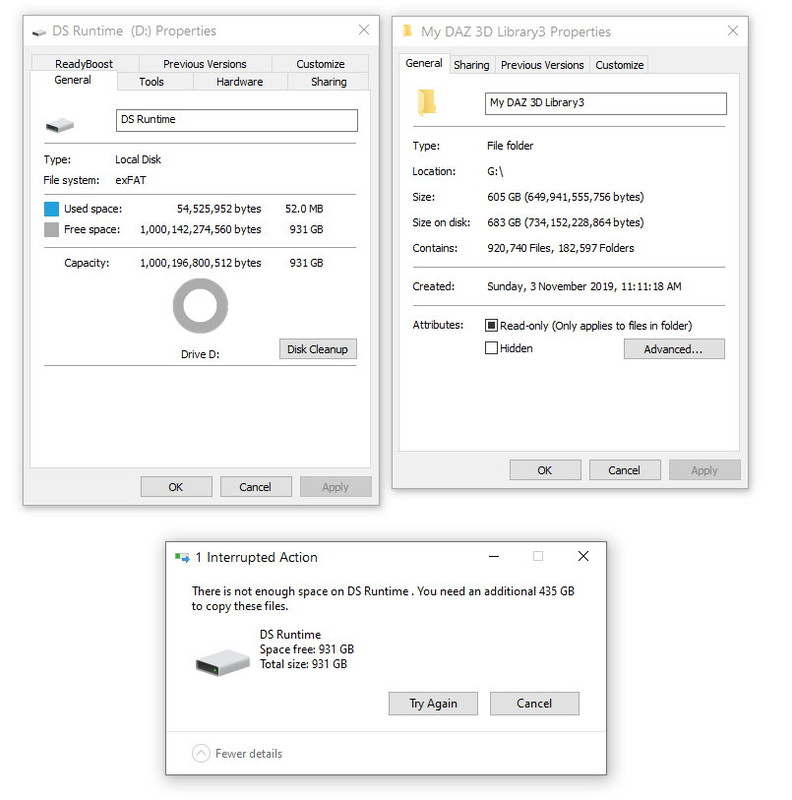 March 29, 2022 at 5:59 AM #1789737
I'm no expert, but I've had issues when going from NTFS to exFAT file systems. I'd try formatting the SSD to NTFS and trying again.
Furthermore, I've found that cloning drives, rather than simply copying the files over, tends to be more consistent. There are a number of free cloning/imaging software options, such as Macrium Reflect.
March 29, 2022 at 6:01 AM #1789738If the source folder is on an NTFS system and I can see the target is exFat.. that would explain the weirdness as NTFS uses a 4KB sector size and exFat uses a 128KB sector size for drives above 32GB..
Technically, this means that a 2KB file will occupy only 4KB on an NTFS system, but will occupy 128KB on an exFAT system.. more wastage of space..
Formatting the target drive as NTFS should solve this 🙂
@enjoyify.. you beat me to it 🙂March 29, 2022 at 6:03 AM #1789741@Gladson1976 jinx 😉
March 29, 2022 at 6:42 AM #1789754Ok guys, format SSD to NTFS. I'll give it a go and let you know what happens.
Edit - well it seems to be working now, and telling me 1 hour 20 mins at about 100 MB/s.
Thanks for your help.March 29, 2022 at 8:43 AM #1789774exFAT man, you can't do that! Sector and journal sizes are all wrong.
March 29, 2022 at 1:41 PM #1789895What everyone else said. exFAT is an ugly acne-scarred fat-chick of a compromise for disk sizes larger than 4GB; they use it so that they can claim Windows and MacOS compatibility.
I wish Windows natively supported r/w ext4, or at least HFS+ 🙁
If you only have Windows, just format your external disk for NTFS. It'll let you use all of the disk, and save you a lot of headaches later on (and if you do switch to a Mac, there are perfectly usable 3rd-party NTFS drivers that work just fine on that Mac.)
March 29, 2022 at 7:52 PM #1790030Thank you Amber and GOF. I just woke up, I'm going to try adding the new SSD library to DS and running it to see if there's any problems. There shouldn't be.
-
AuthorPosts








- You must be logged in to reply to this topic.
