Home Page › Forums › General Chat › Does anybody know how to fix this?
- This topic has 5 replies, 2 voices, and was last updated 4 years, 8 months ago by
 Ewlo.
Ewlo.
-
AuthorPosts
-
January 23, 2022 at 4:30 PM #1769765
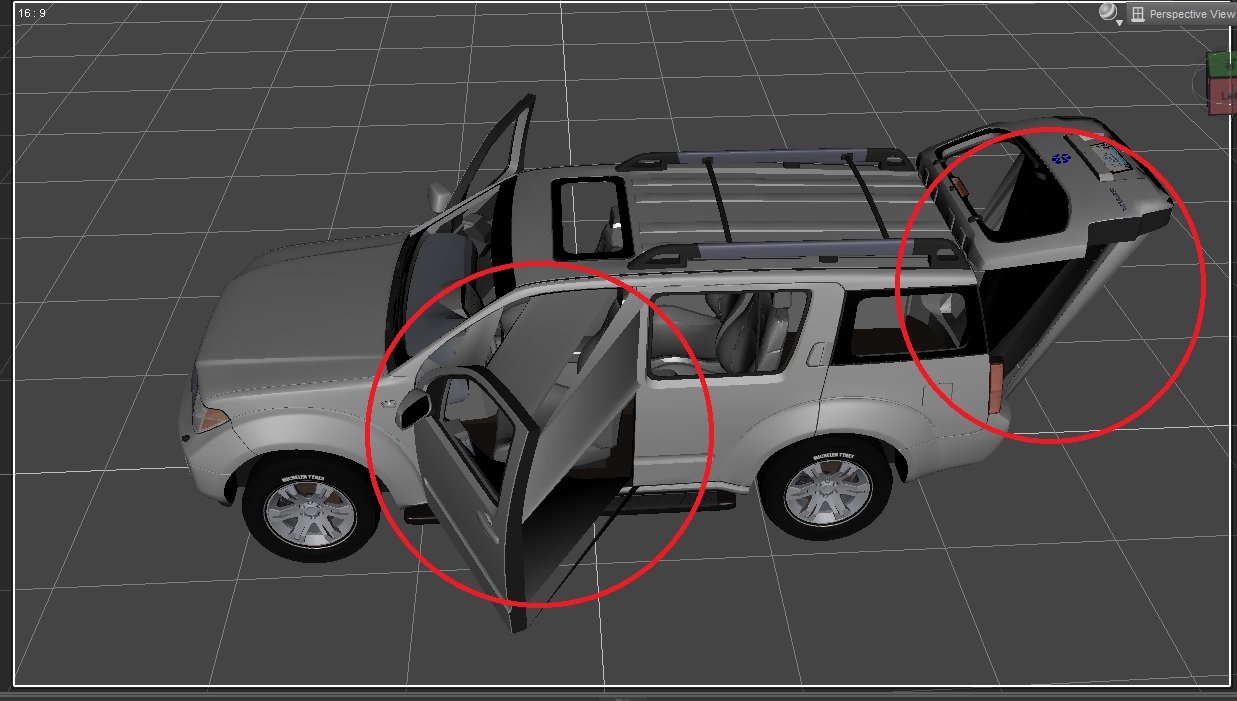
Hey, I've been looking for some tutorials on internet about it, I know you can use poser content by default in Daz 3d but with the poser content loaded there are some issues with textures materials and posing parameters and I'd like to fix that, however I couldn't find anything helpful, If somebody could share some information, links, videos or something, I'll be really grateful. Check the direct link to see the issue what I'm talking about.
January 23, 2022 at 7:46 PM #1769807I found something, check the link, just change the letter F to D and add the missing dots.
www Faz3d com/forums/discussion/19117/problem-with-strange-bending-on-poser-car-models-in-daz-studio
In any case, according to the discussion on daz forum, my issue is related to this:
"DS4 uses what's called a "single skin mesh", and it's set to auto weld any Poser content on load, so what you are seeing is the vertices along your group edges after they have been welded together, as they were too close to the vertices in the other groups."
But, I have no idea what I have to tweak on daz studio to make it work.
January 23, 2022 at 9:52 PM #1769833I've seen this when I use cross-generational clothing but not with Poser props before. All my Poser cars work fine in DS.
Which model is it?.... I may have it.
Are you using an open/close dial or rotating the door?January 23, 2022 at 10:08 PM #1769834The model I'm using is the Pathblazer, it's here on gfx.
zonegfx.com/pathblazer-suv-for-poser/
I tried both options to open the door (dials from parameters and rotation tool) and I get the same issue. I load the car model from the Content Library (Poser Content) inside daz studio.
January 23, 2022 at 11:00 PM #1769842Downloaded...the model is <5 MB so I didn't expect much. And I confirm it certainly had a big problem in DS. I tried a few things with no success.
Do you have Poser installed? I would probably try opening it in Poser and exporting it as FBX (uncheck weld body part seams), try opening the FBX in DS. If that doesn't import then open the FBX in Blender and export as a new FBX or DAE. No guarantee that it will work.
Personally I think the model is so low quality you'd be better off getting a better quality 4x4.
Maybe this.January 24, 2022 at 3:17 PM #1770036Thanks for the suggestions Frank21, and I don't have Poser yet but I start to download it right now, Let's see what I can do with the car model and I'll be updating later. btw, I got all the cars available here on gfx (Road ranger included) 'cause I really like them.
-
AuthorPosts




- You must be logged in to reply to this topic.