Home Page › Forums › General Chat › Please, please, please, don't modify DIM files
- This topic has 11 replies, 6 voices, and was last updated 5 years, 6 months ago by
 Paul (Fuzzy3000).
-
AuthorPosts
-
March 3, 2021 at 9:13 PM #1671477
People please post DIM (original zip files from DAZ) files only if possible and don't change the name formatting in them or remove files or add files. It messes things up for those of us that use the install manager. Also if you're going to post non DIM files please say it on the post like some people do by informing when they are sharing EXE files. It helps a lot in not wasting points in something that we can't use to stay organized via Install Manager.
Thanks in advance...
March 3, 2021 at 9:25 PM #1671479Keeping the name the same makes them easier to find for people who shouldn't be finding them. Especially considering they are on our accounts for sharing purposes. I always change the name of my posts. I keep the guts identical though. I can't oblige on this one. However, if you ask for the original name via PM, I will happily give that information.
March 4, 2021 at 12:14 AM #1671499Changing the files or the names on the im files actually makes them not work correctly. If you have to change something for your own peace of mind zip or rar the original files as they come and name that something else for your upload so inside the actual files are original. That is the easiest solution to keep all parties happy.
March 4, 2021 at 2:13 AM #1671517Exactly like Fairylady1 said, thank you. Changing the name or injecting other files into them prevent us from installing it and sometimes it's very time consuming to correct this manually and a waste of points as well when we can't figure out the right format. They can be installed manually but that messes with keeping everything organized with metadata, etc, etc.
Thank you for the response Bacon Smoke.
March 4, 2021 at 2:53 AM #1671531I'd be willing to put the original download into a zip file to hide it. Someone else was complaining about not wanting people to put zips inside of zips, because that creates more work. Can't please everyone I guess. If it makes it easier I'll do what Fairlady1 has requested.
March 4, 2021 at 4:01 AM #1671540Yes, thank you. That works and it's what a good portion of the participants here do but lately I've been finding more and more files that were renamed or modified.
March 4, 2021 at 4:15 AM #1671541Not everyone will be happy at all times or with that but an extra folder to unzip is preferable to messed up or not working ones. No one wants to spend so much time trying to fix something when it only takes moments to unzip one extra folder. And it is the easiest solution.
March 4, 2021 at 3:55 PM #1671621Same issue - stressed over and over to implore people not to do it, yet it goes on and on.
Not a problem having to unzip to get to the original file structure [and names].
Biggest pain is when someone alters the originals - and put additional folders inside that, having already extracted the files - meaning having to search for product / find sku to reconstruct dim file name/ rebuild zip etc.
They are the real pains.
Please, Post Everything in its Original Daz DIM Structure [even if inside an otherwise named folder].
This also keeps it easy [relatively] for those that get confused by all the alterations and feel they have wasted points, and are unable to use their download [they will soon get fed up are unlikely to stay and share in future].
🙂March 4, 2021 at 5:24 PM #1671641@baconsmoke
If you want "people who shouldn’t be finding" your items from finding them you might want to consider using a hoster that doesn't put the name of your folder/file into the URL (e.g. Mega or Google Drive).
@muldersfiles
Items that are not sold at the Daz store are mostly not usable with DIM as getting your content compatible is an extra step of work. 😐
So seeing that the blog post points to Rendo, Rotica, etc. means in most cases you'll end up with a manual install.
DIM looks for zip archives with a certain naming convention (IM12345678-01_awesomeItemName.zip) and then sticks to the content of the dsx files inside the archive (Supplement.dsx and Manifest.dsx). As long as these files are around (and the files are in the places the Manifest.dsx points to) you can choose a random SKU (has to be eight digits) and a random name for your zip.
See this example:
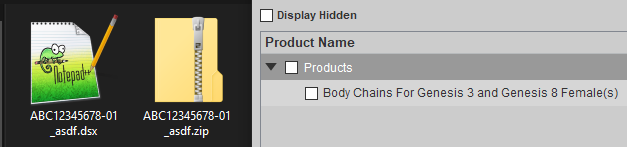
TL;DR:
You don't need to have the original archive name as long as you make it look "close enough" for DIM to recognize it as something it can work with.March 5, 2021 at 1:14 AM #1671868Hottehue: That's some good info there on formatting the files to be able to use the Install Manager. However it is completely unnecessary for files purchased from Daz3d directly or possibly sourced from other sharing sites that are already in the DIM format. I realize that non Daz3d products are not gonna be DIM formatted.
My aim is to make people (that likely don't use the Daz Install Manager and that have access to DIM files) aware of how changing naming conventions creates extra work and frustration (like Paul-Fuzzy3000 also confirms) for those of us that do use it which I suspect is a majority.
It's also a request to mention in the post description when sharing something from Daz3d that isn't DIM formatted.
March 5, 2021 at 4:28 AM #1671877You can make non Daz items easily DIM-compatible with the content package assist, same for renamed DIM files, they can also easily be repaired with it. It's just that extra step of work mentioned before.
But yes, the renaming of files is frustrating and unnecessary
March 5, 2021 at 8:28 AM #1671893Content Package Assist is excellent [and available on the site] for structuring non-DIM products to that style - allowing easy install and uninstall for those that do not like manual options.
however, it is a nonsense process to have to use to restore a DIM setup to an original Daz product that has been 'bastardised' by someone - for whatever their reason.
Nothing justifies it.
If you purchased an original Daz product play with it all you like for your own amusement.
Just do not upload your little Frankenstein creations - keep and upload the original that you downloaded.
Anything else is lazy or plain vindictive, intending to annoy people.🙂
-
AuthorPosts










- You must be logged in to reply to this topic.
