Home Page › Forums › General Chat › Hole in shirt from recent download
- This topic has 7 replies, 3 voices, and was last updated 3 years, 10 months ago by
 InverseKinematics.
-
AuthorPosts
-
November 5, 2022 at 3:33 PM #1886332
Hey,
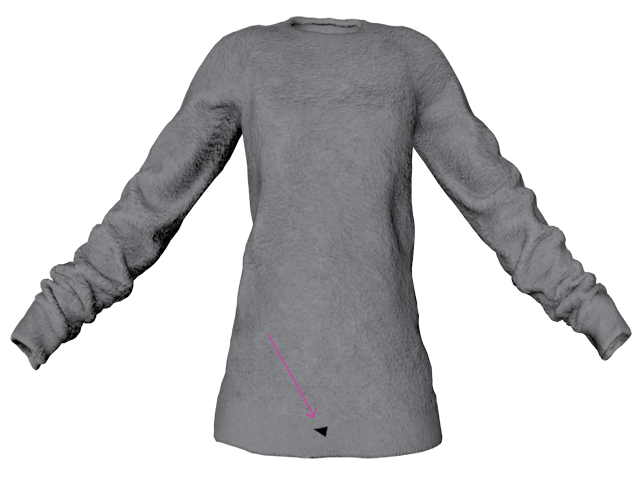
I downloaded this shirt from the new link here on the Zone:
Home Outfit For Genesis 8 Female (Patreon)
Home OutfitBut the shirt has a hole in it. Two of them actually as there is another one below the first near the shirt's edge. Inn models ignored my message regarding it.
Can this be fixed? Never came across anything like this before. Thanks!
 November 5, 2022 at 3:55 PM #1886340
Umm, contacting the vendor when you didn't buy the item (unless it's a freebie) probably isn't a good idea. They tend to dislike pirates.
November 5, 2022 at 4:09 PM #1886346It was a freebie
November 5, 2022 at 9:18 PM #1886449This can be repaired in Blender or any modeling app but is it worth it.
I changed the texture to black and the tear was unnoticeable, make it white and it can clearly be seen. It's a game rip and many items are just rigged and packaged for release without being cleaned up.November 6, 2022 at 2:22 PM #1886706If it was a single render than I could easily correct it in photoshop. But I do animations in 30 to 120+ range.
Just seems odd to me that it gets posted for download and not corrected. In addition, 2 additional texture sets were made for it.
From a business standpoint it's pathetic. They sell products as well. I sure wouldn't be buying anything from them with they are posting crap like this. Free or not.
November 6, 2022 at 3:20 PM #1886723If you'd given INN money on Patreon you'd probably get a reply. Since you haven't I can only say it's best to ask others how to fix the issue, try the Blender forums for a start. All these little learning curves will help you save a lot of time if you come across issues like this again.
FYI - Game ripping isn't a business, i'm surprised they've gotten this far with selling stuff they don't own, but long may it last.
November 6, 2022 at 3:52 PM #1886739Agreed.
The problem itself is a reversed normal. I bet if you made a normals map for it that triangle would go away.
November 6, 2022 at 4:15 PM #1886754It does have a normals map. It's a tear in the mesh which probably happened during the conversion.
hxxps://www.versluis.com/2016/05/how-to-weld-points-in-blender/
Just checked it in Blender and it is indeed broken.
-
AuthorPosts




- You must be logged in to reply to this topic.
